
HelpLook vs GitBook vs Docmost: Which Knowledge Base Fits Your Team?
Three tools, three very different ideas about where knowledge should live. GitBook treats documentation as a polished publishing product. Docmost treats it as infrastructure you own. HelpLook treats it as a self-service experience that should answer questions before anyone files a ticket.
This comparison walks through what each platform actually does well, where the trade-offs sit, and which one matches your team's constraints — whether that's a public help center, developer docs, or a locked-down internal wiki.
Quick comparison at a glance

GitBook product interface.
| Criterion | HelpLook | GitBook | Docmost |
|---|---|---|---|
| Primary focus | AI knowledge base + help desk | AI-powered documentation platform | Self-hosted enterprise wiki |
| Deployment | Cloud SaaS | Cloud SaaS | Self-hosted / on-premises |
| No-code editing | Yes | Yes (Markdown-first) | Yes (block-based) |
| AI search & chatbot | Built-in, multi-model | AI Assistant + AI search | AI assistant, self-hosted LLM support |
| SEO & branding controls | Custom domains, SEO settings | Custom publishing themes | Public sharing, less SEO-focused |
| Git sync | Not a core feature | Yes | Not a core feature |
| Open source | No | No | Yes |
| Best fit | Customer self-service, e-commerce manuals, internal KB | Product & API documentation | Regulated internal knowledge |
GitBook: strong for developer-facing documentation

GitBook product interface.
GitBook has spent years earning its reputation with technical writers and product teams. Its editor handles Markdown cleanly, Git sync keeps docs aligned with code releases, and the publishing layer produces documentation sites that look deliberate rather than assembled.
Its AI direction is the more interesting part. GitBook positions itself as a knowledge layer for AI, with an AI Assistant that answers questions from your content, AI-powered content insights, and support for MCP so AI agents can pull from your docs. For teams whose documentation is a product surface — API references, SDK guides, versioned release notes — that combination is genuinely hard to beat.
Where GitBook asks for patience is flexibility. It is cloud-only, so data residency and air-gapped requirements are off the table. Its strengths assume a docs-as-code workflow, which is excellent for engineers and less natural for support teams who just want to publish a help article before lunch.
Docmost: control-first wiki for regulated teams
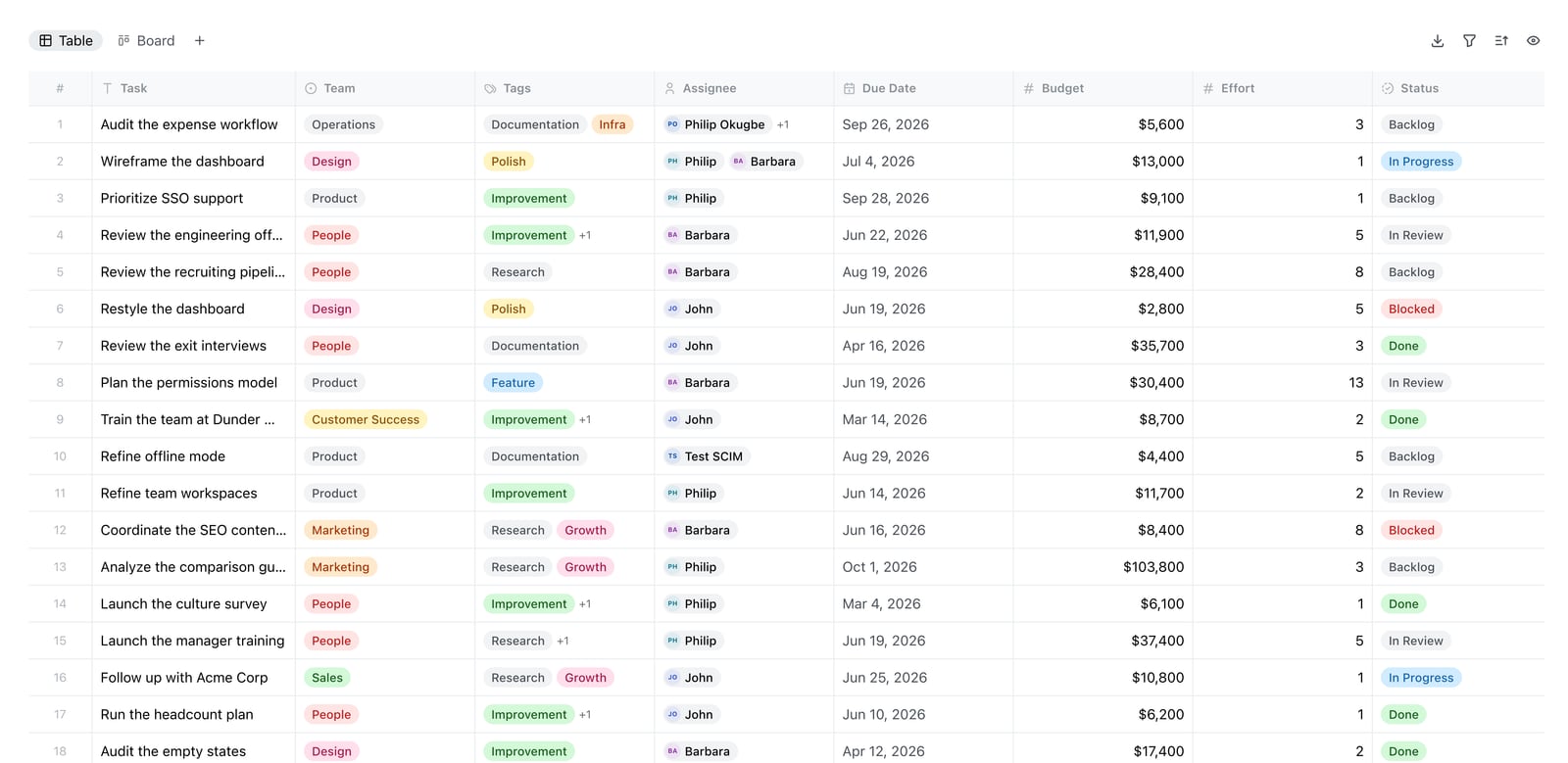
Docmost Bases table view.
Docmost approaches the same problem from the opposite direction. It is open source, self-hosted, and built for organizations that cannot send internal knowledge to someone else's cloud. You deploy it on your own servers or private cloud, and the data stays inside your compliance boundary.
The feature list reflects that audience: real-time collaborative editing, spaces and page hierarchies, page-level permissions, RBAC, SSO/SAML/OIDC/LDAP, SCIM provisioning, MFA, audit logs, and air-gapped deployment. Docmost also supports self-hosted LLMs through Ollama, vLLM, and OpenAI-compatible endpoints, which means AI assistance without shipping content to a third party. Its comparison page against GitBook highlights full data sovereignty and enterprise security on your own infrastructure as the core differentiators.
Docmost is also broader than pure documentation — Bases for databases, Kanban views, page verification workflows, and built-in diagrams make it a working team wiki, not just a docs publisher. The trade-off is operational: self-hosting means someone owns upgrades, backups, and uptime. Teams without that capacity will feel the weight.
HelpLook: no-code self-service with AI search built in
HelpLook sits in a different lane: it is an AI knowledge base and help desk platform aimed at teams who want a customer-facing self-service portal without engineering involvement.
The pitch is speed and reach. You build content in a no-code editor, brand the site, and publish to a custom domain with SEO controls in place. AI-driven search and a chatbot answer questions directly from your documentation, drawing on models such as OpenAI, ERNIE Bot, and Azure. Analytics track how content performs, so you can see which articles reduce tickets and which ones get ignored.
Supporting details matter here too: QR code access for physical products, PDF downloads, third-party integrations, and use cases that stretch from customer support centers to e-commerce product manuals, enterprise blogs, and internal knowledge bases. HelpLook reports over 10,000 global brands using the platform, with subscription plans running from a free tier to enterprise pricing with AI credits and scalable resources.
If your bottleneck is that customers keep asking questions your docs should already answer, HelpLook is built for exactly that problem.
Where each tool genuinely wins
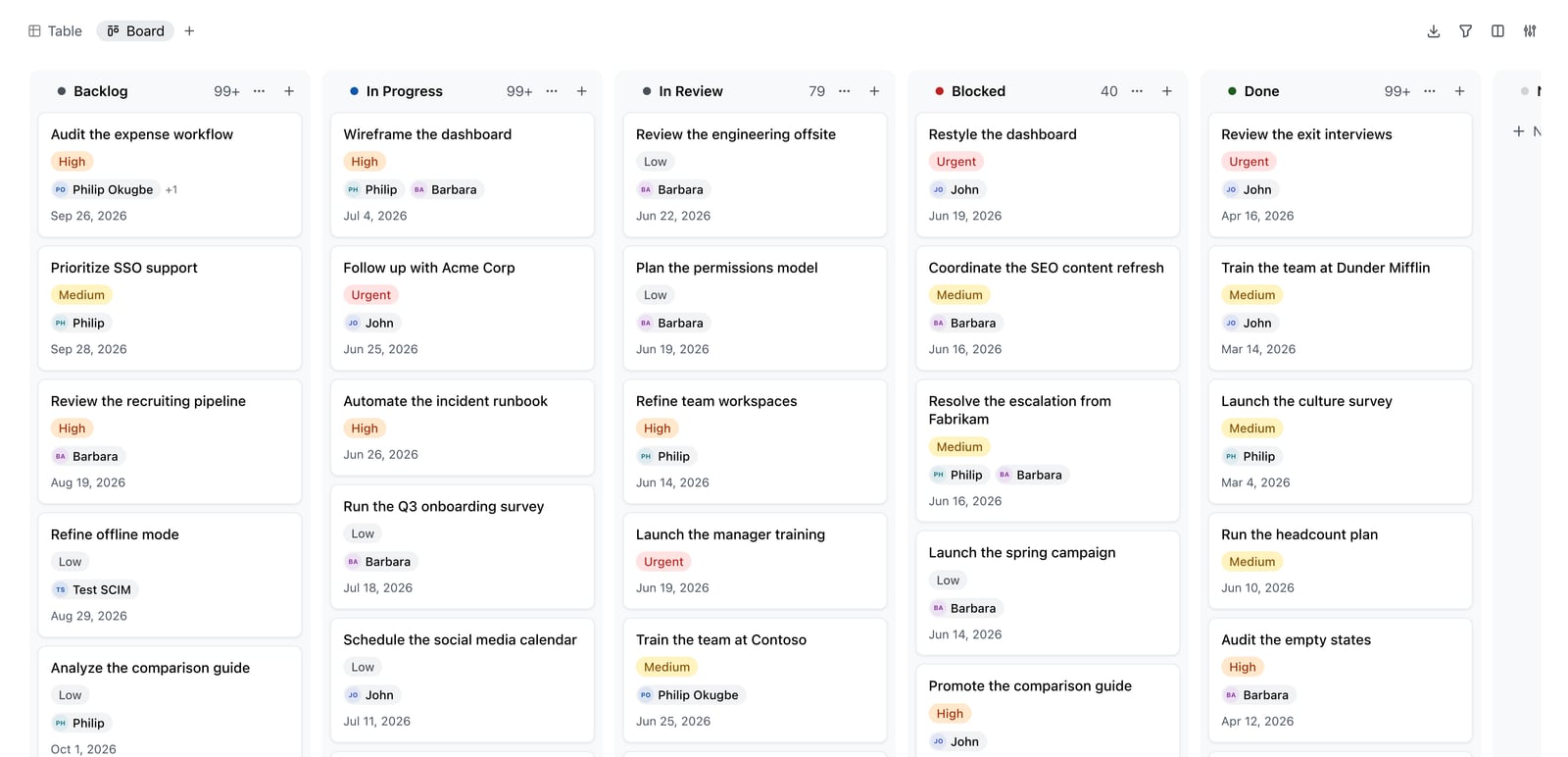
Docmost Kanban board.
Choosing between these three is less about feature counts and more about which constraint dominates your decision.
Pick GitBook if your documentation is developer-facing, versioned alongside code, and benefits from Git sync, Markdown workflows, and AI-readiness for agent consumption. It rewards teams with technical writers and release cycles.
Pick Docmost if data sovereignty is non-negotiable. Compliance frameworks, air-gapped environments, and self-hosted LLM requirements point directly at Docmost. You get enterprise auth, audit logs, and full infrastructure control in exchange for running the stack yourself.
Pick HelpLook if you need a branded, searchable self-service portal that non-technical teams can maintain. The combination of no-code editing, AI search and chatbot, SEO-friendly publishing, and usage analytics fits customer support and product documentation better than a docs-as-code tool would.
Many organizations end up running two of these side by side — for example, GitBook for public API reference and HelpLook for the customer help center. That is a legitimate architecture, not a failure to standardize.
Decision checklist
Before you commit, answer these five questions:
- Who writes the content? Engineers favor Markdown and Git. Support and marketing teams favor visual editors.
- Who reads it? External customers need SEO, branding, and AI answers. Internal staff need permissions and search.
- Where must the data live? If the answer is "our own servers," only one of these three qualifies.
- How will people find answers? AI search and chatbots reduce repeat questions; traditional full-text search does not.
- What is the real cost? Subscription pricing is visible. Self-hosting trades license fees for engineering time.
If you want to see how HelpLook stacks up against other platforms in the same category, the comparisons of HelpLook vs Document360 vs Docsie and HelpLook vs Mintlify vs DocsBot cover AI search, editing, and pricing in more depth. For a broader set of options, HelpLook vs Archbee vs Docsie breaks down branding and content creation differences.
Related reading
- HelpLook vs Docsie vs DocsBot: Which AI Knowledge Base Wins? - Compare HelpLook, Docsie, and DocsBot on AI search, content creation, chatbots, integrations, and pricing to pick the right knowledge platform.
Sources and further reading
- Enterprise-ready Wiki for Teams | Docmost - Secure on-premises wiki for enterprises. Meet ITAR, FedRAMP, and GDPR compliance with ease.
- HelpLook VS GitBook:A Side-by-Side Comparison - In this article, we will take a closer look at both Gitbook and HelpLook and examine their strengths and weaknesses to help you make the right decision for your company.
- Who are the Best Gitbook Alternatives? My View: - In today's fast-paced development environment, high-quality documentation is no longer optional—it's...
FAQ
Is Docmost a good GitBook alternative?
Yes, for a specific audience. Docmost replaces GitBook well when self-hosting, open source licensing, and compliance requirements matter more than Git-based publishing workflows. If your team depends on Git sync and polished public documentation sites, GitBook remains the stronger fit.
Does HelpLook support self-hosting?
HelpLook is delivered as a cloud subscription service with plans from a free tier to enterprise pricing. Teams with strict on-premises or air-gapped requirements should evaluate Docmost instead, since that is Docmost's core strength.
Which tool has the best AI search?
All three offer AI-assisted search and answering. HelpLook bundles AI search and a chatbot into a no-code self-service portal with multi-model support. GitBook focuses its AI on documentation accuracy and agent-readiness, including MCP support. Docmost lets you run AI against self-hosted models so content never leaves your infrastructure.
Can I use GitBook and HelpLook together?
Yes, and many teams do. GitBook handles developer documentation and versioned API references, while HelpLook runs the customer-facing help center with AI search, branding, and analytics. The two serve different readers and rarely conflict.
Which platform is best for internal knowledge bases?
Docmost is purpose-built for internal wikis with page-level permissions, SSO, audit logs, and verification workflows. HelpLook also supports internal knowledge base use cases with a no-code editor and AI search, which suits teams that want faster setup without managing servers.
How should I evaluate pricing?
Compare total cost, not sticker price. GitBook and HelpLook charge subscription fees that scale with seats or usage. Docmost is open source, but self-hosting adds infrastructure, maintenance, and upgrade work. Factor in who maintains the system before comparing numbers.
Conclusion
There is no single winner here, because the three tools optimize for different problems. GitBook is the strongest choice for developer-facing documentation that lives close to code. Docmost is the right answer when data sovereignty and compliance decide the purchase. HelpLook is built for teams that want a branded, AI-powered self-service portal their non-technical staff can run without engineering support.
Start with your hardest constraint — deployment model, content ownership, or audience — and the decision usually makes itself. For more head-to-head breakdowns across the knowledge base market, see the related HelpLook comparisons covering AI search, customization, and pricing.