
Docmost Review: Self-Hosted Wiki & Notion Alternative (2026)
In this HelpLook review, we put Docmost through its paces—an open-source, self-hosted collaborative wiki that’s earning attention as a privacy-first alternative to Confluence and Notion. Is Docmost the right fit for your team’s knowledge base, or does it fall short where Notion-like flexibility is expected? We dive into features, setup, AI capabilities, bases, compliance, and real-world limitations to help you decide.
What Is Docmost?
Docmost Review: Self-Hosted Wiki & Notion Alternative (2026) product interface and feature overview.
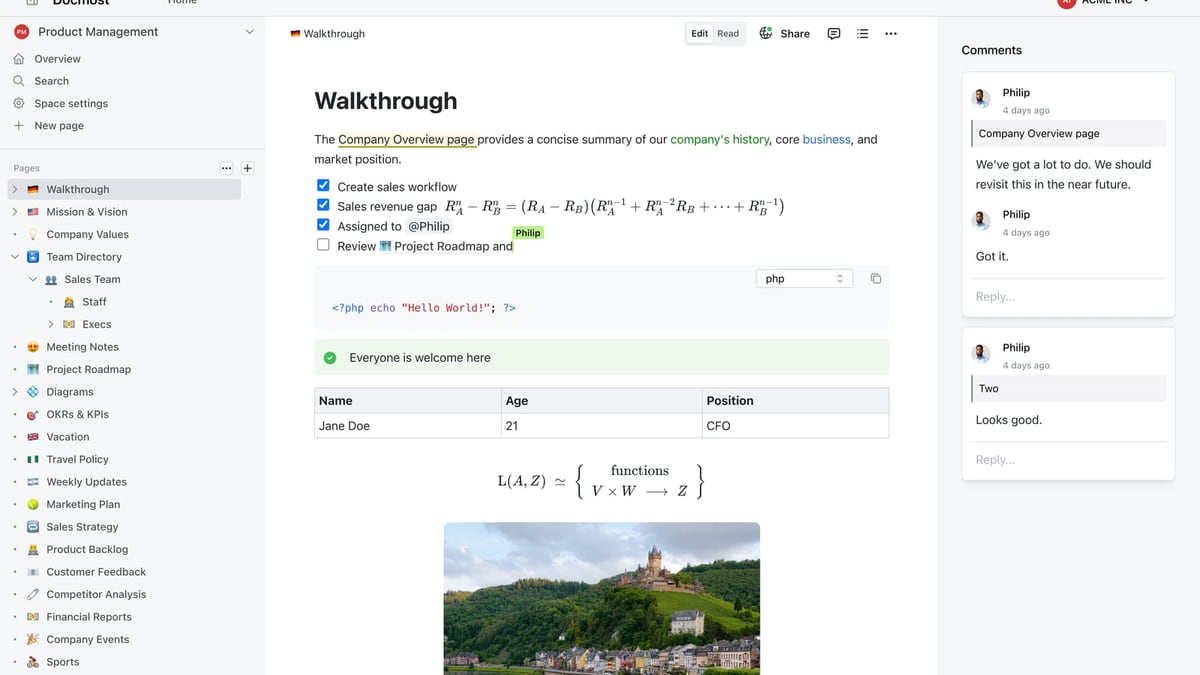
Docmost is a free, open-source enterprise wiki and documentation platform you deploy on your own infrastructure. It’s built for teams that need full data control—whether for internal wikis, compliance-heavy documentation, or a private knowledge base that replaces cloud tools. The project has already crossed 3 million downloads and is rapidly maturing into a credible alternative for organizations that can’t risk vendor lock-in or data exposure.
At its core, Docmost offers real-time collaborative rich-text editing, granular role-based access control (RBAC), team spaces, page versioning, inline comments, and powerful search. What’s new and noteworthy is the addition of Bases (Kanban and database views) and an AI assistant that supports self-hosted large language models (Ollama, vLLM) as well as OpenAI, letting you keep AI-generated content fully on-premises.
Key Features of Docmost
Docmost Review: Self-Hosted Wiki & Notion Alternative (2026) product interface and feature overview.
Real-Time Collaboration and Rich Editing
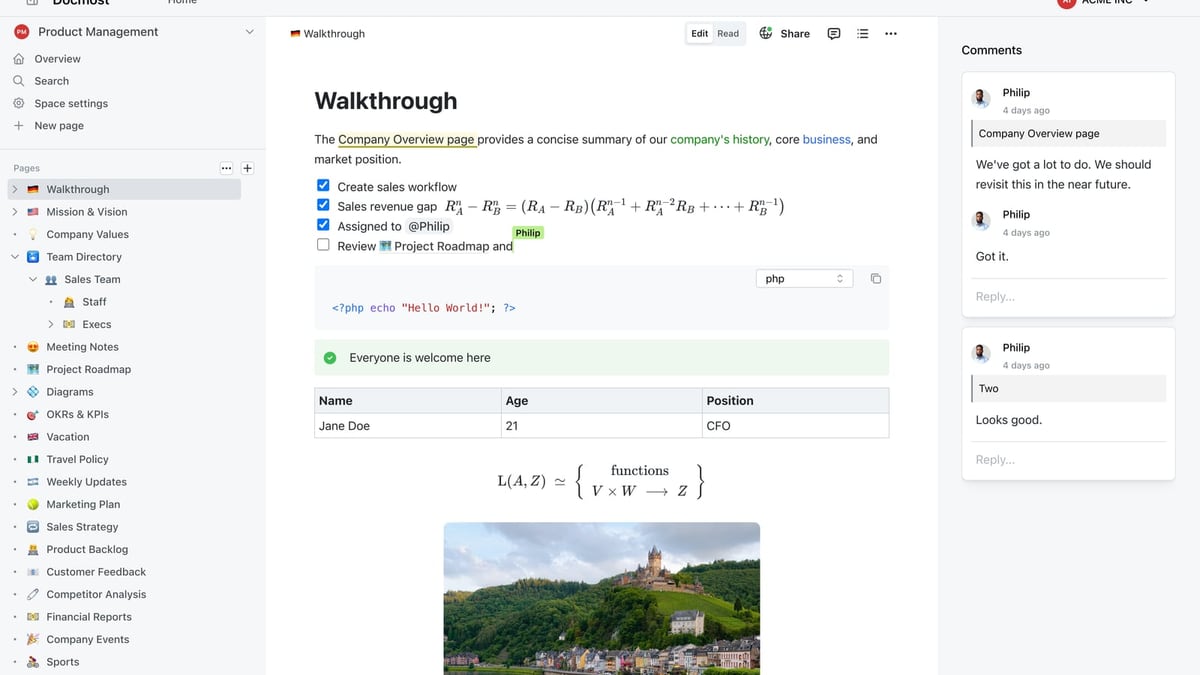
Multiple people can edit a page simultaneously with a clean WYSIWYG editor that supports tables, LaTeX math, callouts, and code blocks. There’s no distraction-free “editing mode” toggle yet, which some users on Noted mention can feel cluttered when you just want to read a document. Still, for teams actively building a wiki together, the live editing experience is a strong foundation.
Spaces and Permissions
Content is organized into Spaces—dedicated areas for teams, projects, or departments. Administrators can set view, edit, and manage permissions at the space or page level, and you can create groups for easier role assignment. This mirrors the structured approach of Confluence, but without the per-user licensing costs.
Page History and Workflows
Every change is versioned, so you can browse complete page histories and roll back to any previous state. This is essential for compliance-heavy environments. On top of that, Docmost supports page verification workflows, where designated reviewers can approve or reject changes—exactly what regulated industries need.
AI Assistant with Self-Hosted LLMs
One of Docmost's standout differentiators is its AI integration. You can connect a local model through Ollama or vLLM (or use OpenAI) to summarize pages, generate drafts, and answer questions from your wiki. Because the LLM runs on your own hardware, no data ever leaves your network. This is a rare feature in open-source wiki tools and a major draw for security-conscious organizations.
Bases: Kanban and Database Views
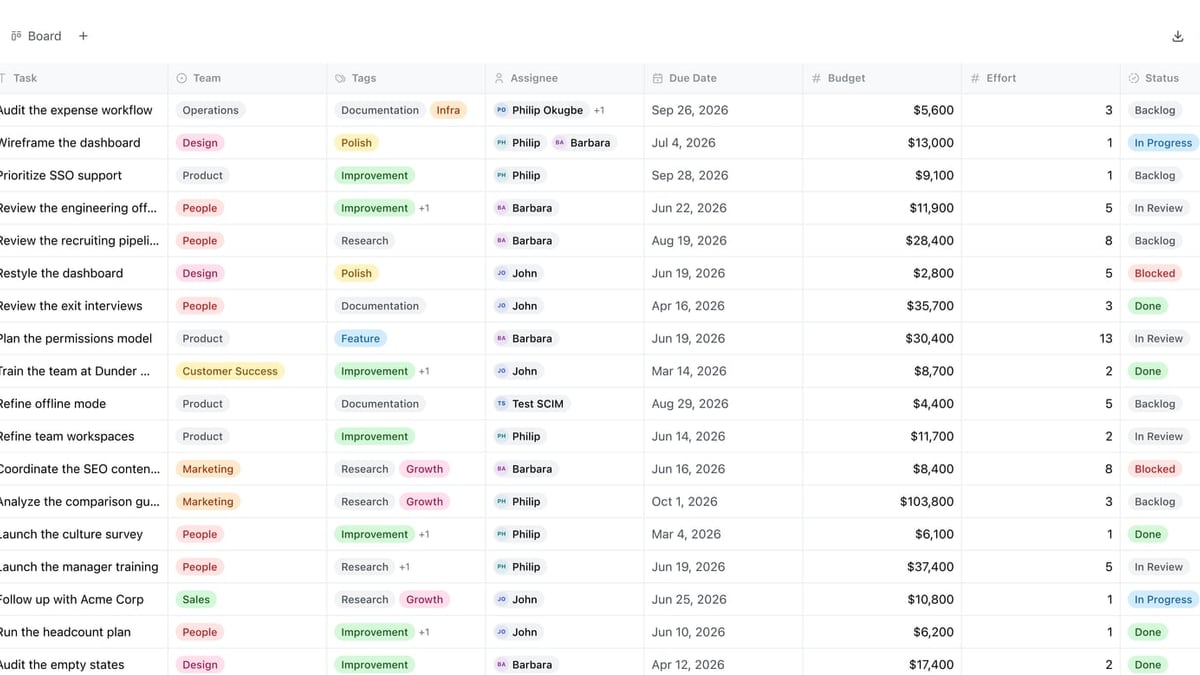
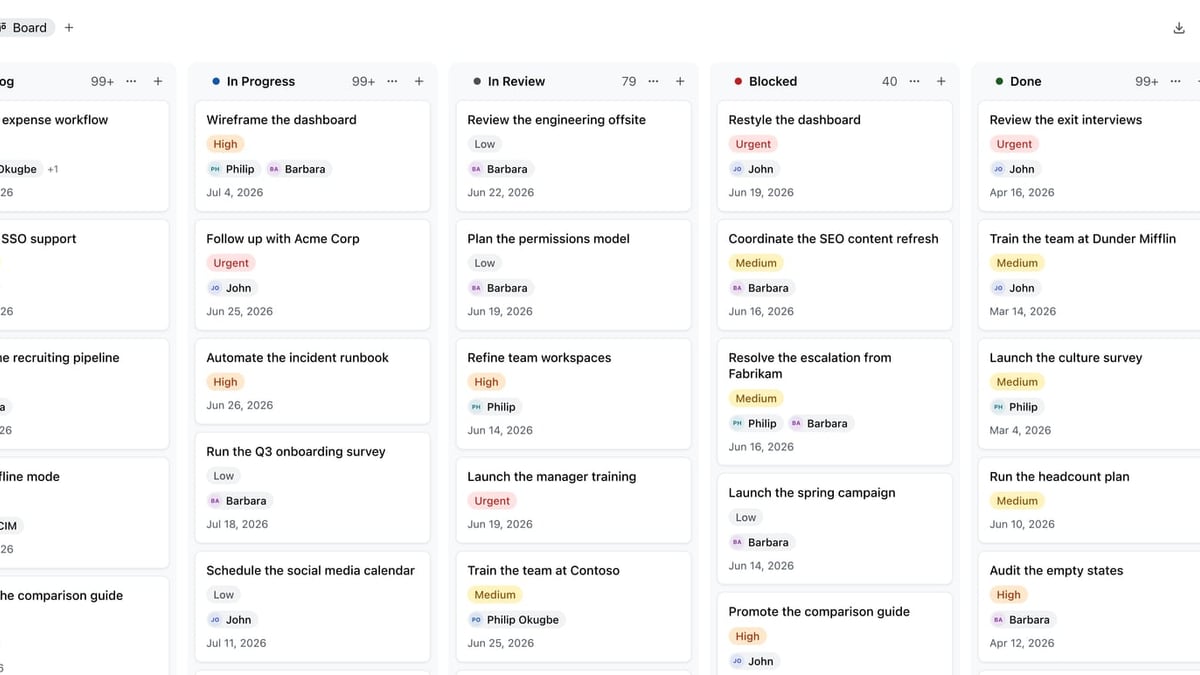
Docmost now includes Bases, which bring lightweight database and Kanban board functionality. This directly addresses the “no databases” criticism from early Reddit discussions. While not as feature-rich as Notion’s relational databases, you can create custom data tables, switch to Kanban for task tracking, and embed them within documentation. For many internal wikis, this is enough to replace basic project management views inside the same tool.
Enterprise SSO, Audit Logs, and Compliance
Docmost supports SAML, OIDC, and LDAP out of the box, covering mainstream identity providers. Multi-factor authentication (MFA), detailed audit logs, and SCIM provisioning are all built in. The platform is designed for air-gapped deployment and meets the compliance needs of ITAR, FedRAMP, GDPR, SOC 2, and ISO 27001. If your documentation has to survive an auditor’s scrutiny, Docmost checks the right boxes.
Public Sharing and Embedded Content
While earlier versions required authentication for everything, Docmost now supports public sharing with configurable access levels. You can expose certain spaces or pages to external readers without giving them full system access. This is critical for customer-facing knowledge bases or open documentation portals.
Docmost Pricing: Is It Really Free?
Docmost Review: Self-Hosted Wiki & Notion Alternative (2026) product interface and feature overview.
Yes—Docmost is entirely open source under the MIT license. There are no recurring fees, no premium tiers, and no artificial feature gates. You download the software, host it yourself, and own your data. The only expenses you’ll incur are your own server resources and any optional cloud infrastructure (like a VPS or a managed Postgres instance). For organizations migrating from per-seat Confluence or Notion Business plans, this can translate into thousands of dollars in annual savings.
How to Set Up Docmost
Docmost Review: Self-Hosted Wiki & Notion Alternative (2026) product interface and feature overview.
Docker Compose Quick Start
Docmost runs best with Docker, and the official Compose file brings up the application, a Postgres 16 database, and Redis. Here’s a simplified version:
services:
  docmost:
    image: docmost/docmost:latest
    depends_on:
      - db
      - redis
    environment:
      APP_URL: "http://localhost:3000"
      APP_SECRET: "your-secure-random-string"
      DATABASE_URL: "postgresql://user:pass@db:5432/docmost?schema=public"
      REDIS_URL: "redis://redis:6379"
    ports:
      - "3000:3000"
    volumes:
      - ./docmost-storage:/app/data/storage

  db:
    image: postgres:16-alpine
    environment:
      POSTGRES_DB: docmost
      POSTGRES_USER: docmost
      POSTGRES_PASSWORD: a-strong-password
    volumes:
      - pgdata:/var/lib/postgresql/data

  redis:
    image: redis:7.2-alpine
    volumes:
      - redisdata:/data

volumes:
  pgdata:
  redisdata:
After docker compose up -d, visit http://your-server-ip:3000, create your admin account, and start building your first workspace.
Hardware Requirements
Docmost is lightweight for small teams. A modern dual-core VPS with 2 GB of RAM is enough for a handful of users. As your document base grows or you enable the AI assistant with a self-hosted LLM, you’ll need a more powerful server, especially if you want to run models like Llama 3 locally.
Ideal Use Cases for Docmost
- Compliance-Heavy Enterprises: Air-gapped deployment, SSO, audit logs, and page verification workflows make it a strong fit for government, defense, and healthcare.
- Internal Company Wikis: Replace Confluence with a free, self-hosted alternative that doesn’t charge per user.
- Project Documentation: Combine long-form docs with Kanban boards in the same space, keeping everything under one authentication layer.
- Homelabbers and Self-Hosting Enthusiasts: The Docker setup is straightforward, and you get a polished wiki for personal knowledge management without ongoing fees.
- AI-Augmented Knowledge Bases: Connect a local LLM and let the assistant answer questions from your documentation—without any data leaving your network.
Strengths and Limitations
| Strengths | Limitations |
|---|---|
| Free and open source – no license fees | Bases are less advanced than Notion’s relational databases |
| Full data sovereignty – runs on your own servers | No mobile app yet (web-based access only) |
| Powerful AI assistant with self-hosted LLM support | Real-time editing can feel cluttered; no toggle for read-only view |
| Enterprise SSO, MFA, audit logs, SCIM | Code blocks lack a one-click copy button |
| Public sharing now available | Smaller community compared to Outline or BookStack |
| Active development with frequent releases | Initial setup requires Docker and basic server know-how |
Docmost vs. Alternatives: A Quick Comparison
Docmost vs. Notion: Notion excels at flexible databases and a polished user experience, but it’s cloud-first and can’t be fully self-hosted. Docmost’s Bases are evolving, but if your workflow depends on complex relational data, Notion still leads. For teams that prioritize data privacy and zero subscription costs, Docmost wins decisively.
Docmost vs. Confluence: Both share a page-tree architecture, spaces, and permissions. Confluence offers deeper integrations with Atlassian’s ecosystem, but you pay per user. Docmost covers the wiki fundamentals plus AI and compliance features without the sticker shock.
Docmost vs. Outline: Outline is another strong open-source wiki with real-time collaboration and a more opinionated, clean interface. It uses a MongoDB/Redis/Node stack and supports SSO natively. Some users who tested both on Reddit ultimately switched to Outline for its UX polish and built-in public sharing. However, Docmost now closes that gap and adds built-in AI and Kanban views.
For teams weighing a self-hosted wiki against a managed AI knowledge base, we’ve also compared HelpLook and Docmost in detail. Cloud platforms like Document360 offer structured help-center features that Docmost doesn’t natively provide, but they come with monthly subscriptions.
Related reading
- Mintlify Review 2026: AI Docs Platform Pros, Cons & Pricing - Is Mintlify's $300/mo AI documentation platform worth it? We test Autopilot agent, API playground, user sentiment, and pricing. See if it fits your team.
- HelpLook vs KnowledgeBase vs Mintlify: The 2026 AI KB Showdown - Compare HelpLook, KnowledgeBase, and Mintlify AI knowledge bases on features, pricing, and use cases. Find the best platform for customer support, developer docs, and agent-native knowledge.
Sources and further reading
- Docmost - Self -Hosted Collaborative Wiki and Documentation Portal - Simplify your documentation using the self-hosted Docmost wiki app
- What Is Docmost? The Open-Source Confluence Alternative Explained - What Is Docmost? The Open-Source Confluence Alternative ExplainedContabohttps://contabo.com › blog › what-is-docmostContabohttps://contabo.com › blog › what-is-docmost
FAQ
Is Docmost really a Notion or Confluence alternative? It covers the core wiki and documentation needs of both, and now includes databases/Kanban. It’s a viable replacement for teams that don’t need Notion’s full relational power or Confluence’s endless add-ons. For many internal documentation use cases, it’s already competitive.
Can I use Docmost for a public knowledge base? Yes. Public sharing lets you expose selected spaces or pages without authentication, though you’re responsible for securing the underlying server.
Does the AI assistant send data to third parties? Not if you use a self-hosted LLM. You can run models via Ollama or vLLM on your own hardware, keeping all prompts and generated text private. If you connect OpenAI, data will be processed through OpenAI’s API.
What about offline access and mobile support? Docmost is currently web-only. You can access it from a mobile browser, but there’s no dedicated app or offline editing capability.
Can I migrate data out of Docmost if needed? Because it’s open source and uses a Postgres database, you can export pages and data via direct database access or future official export tools. The absence of vendor lock-in is a core principle.
How does set-up complexity compare to other self-hosted wikis? If you’re comfortable with Docker, the deployment is a few minutes. Non-technical teams may need someone to manage the server, SSL certificates, and backups.
Final Verdict: Should You Choose Docmost?
Docmost is carving out a distinct niche: an enterprise-ready, open-source wiki that doesn’t compromise on compliance or AI. Its AI assistant with self-hosted LLM support is practically unique at this price point—free. If your top priorities are data sovereignty, zero licensing costs, and a credible Notion/Confluence replacement for internal documentation, Docmost deserves a serious trial.
That said, it’s still maturing. Teams that live in Notion’s linked databases or require a mobile-first experience may find the feature set too raw. But for organizations that already run their own servers and need an auditable, AI-enhanced knowledge base, Docmost is one of the most compelling open-source options in 2026.
Our HelpLook testing shows that Docmost’s trajectory is positive, and we’ll continue to track how it evolves against both cloud and self-hosted rivals.