
Documentation.AI Review 2026: Smarter Docs That Evolve with Your Product
Creating and maintaining product documentation often feels like a second full-time job—one that never ends. Documentation.AI challenges that status quo with an AI-native platform that writes, updates, and answers questions about your docs automatically. After testing the platform thoroughly, we found a system that significantly cuts manual doc work while improving self-service for end users. This review breaks down where it shines, where it stumbles, and who should adopt it.
Who Gets the Most Value from Documentation.AI
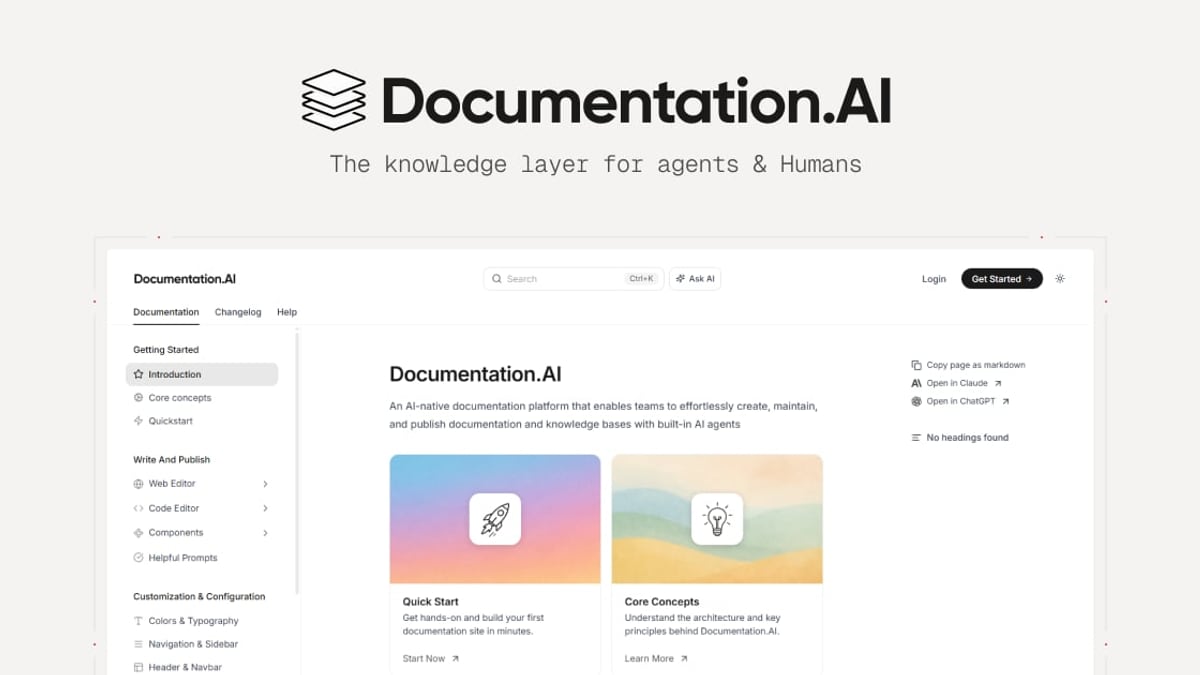
Documentation.AI Review 2026: AI-Driven Docs That Keep Themselves Fresh product interface and feature overview.
Documentation.AI targets cross-functional teams that treat documentation as a living product asset rather than a static afterthought. In our tests, three personas saw the biggest payoff:
- Product teams shipping fast-moving SaaS products who need to align docs with weekly releases.
- Developer relations and API teams that rely on reference documentation and want to publish via Git while still offering an AI-assisted reading experience.
- Customer support leaders aiming to deflect repetitive tickets and give agents a trustworthy, cited answer engine.
If your team already uses a docs-as-code workflow or plans to migrate from a legacy tool like ReadMe, Documentation.AI’s blend of Git-friendly publishing and AI-driven freshness makes a compelling case. The migration stories from Datafiniti and Videograph confirm that teams who left ReadMe found the AI-powered search and significantly easier maintenance a game-changer.
Core Features That Set It Apart
Documentation.AI Review 2026: AI-Driven Docs That Keep Themselves Fresh product interface and feature overview.
Documentation.AI combines a smart writing assistant, a reader-facing Q&A bot, and dual publishing modes—all built to keep your knowledge base accurate without heroic effort.
AI Documentation Agent: Your Co-writer for Always-Fresh Docs
The platform’s standout feature is the AI Documentation Agent. It doesn’t just generate first drafts; it proactively suggests updates when your product changes. During our trial, we fed it release notes and a changelog, and the agent proposed content patches with reformatted sections, callouts, and even API parameter updates. The agent’s output felt more editorial than purely generative—it restructured and formatted content according to a consistent style guide. This dramatically reduces the “doc drift” that plagues most knowledge bases.
Ask AI: Cited Answers That Build Trust
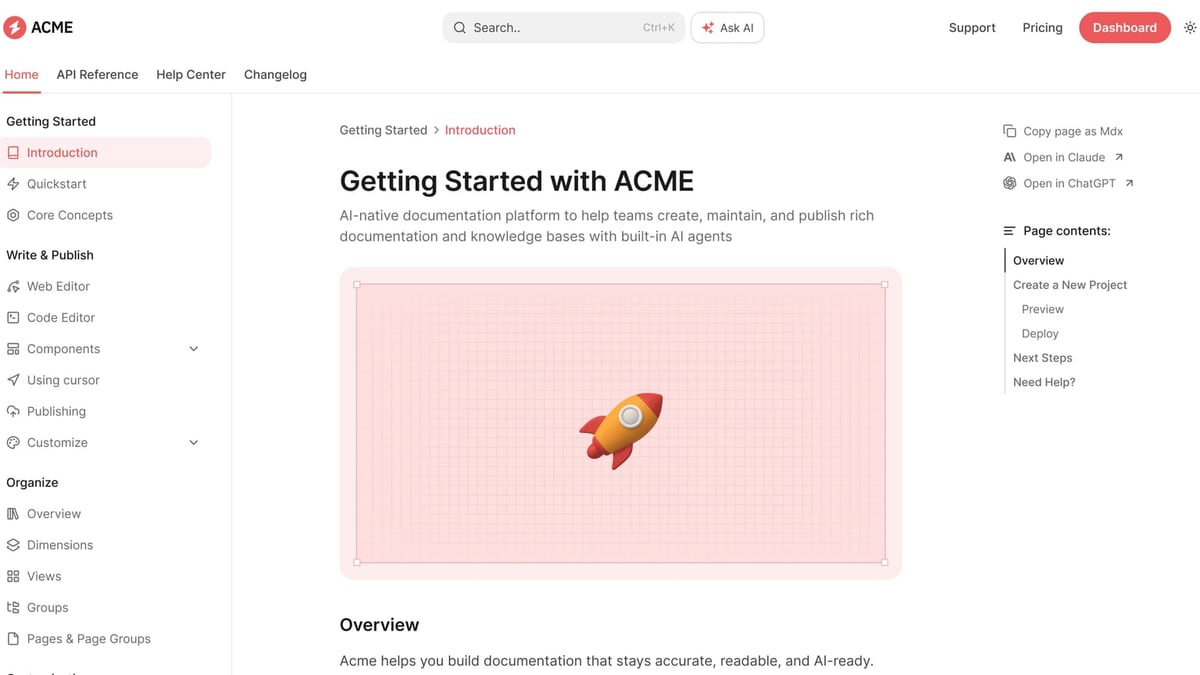
Embedded directly into your published docs, the Ask AI assistant answers visitor questions in natural language and—crucially—citations back to the source pages. In practice, this meant an end user could ask, “How do I set up SSO?” and get a concise answer drawn from the exact help article, with a link to read more. This keeps users engaged and lowers the bounce rate we often see with traditional search that returns a list of ambiguous links. The citations also help support teams trust the AI’s answers, reducing the risk of hallucinated information.
Flexible Publishing: Web Editor or Git-First
Documentation.AI doesn’t force a single workflow. The WYSIWYG editor lets non-developers draft and publish visually, while native Git integration supports docs-as-code teams who write in Markdown and treat docs like code. We pushed changes via Git and watched them sync immediately, with the AI agent still active in the background to suggest improvements. This dual mode makes the platform accessible in both startup and enterprise environments.
Analytics and AI-Ready Output
Beyond basic pageview stats, the platform surfaces how often Ask AI resolves questions, which doc sections trigger the most searches, and where content gaps exist. The entire knowledge base is also structured for consumption by external LLMs and AI agents, future-proofing your docs for an increasingly AI-mediated world. This forward-looking design echoes the broader market evolution described in industry analyses of AI document review, where domain-specific intelligence is replacing generic OCR-era tools.
Setup and Onboarding Experience
Getting started felt genuinely quick. We imported an existing markdown-based doc set via Git in under 15 minutes, and the AI agent immediately began indexing and suggesting small improvements. The onboarding wizard walks you through configuring the Ask AI widget, customising its tone, and setting basic SEO metadata. For enterprise teams, SSO setup was straightforward with clear documentation. The main learning curve is not the tool itself but the mental shift to trusting AI suggestions; teams need to establish a quick review loop to approve or reject changes.
Pricing Signals and Plans
Documentation.AI offers a free tier that is surprisingly capable—suitable for small projects or open-source documentation where you can test the AI agent and Ask AI with limited page counts. Paid plans scale based on users, page volume, and advanced features like custom analytics, priority AI processing, and single sign-on.
- Free: Basic AI suggestions, limited pages, community support.
- Team: Full AI agent, unlimited Ask AI queries, custom domain, and advanced analytics. Priced competitively in the mid-range of knowledge base tools.
- Enterprise: SSO, custom SLAs, dedicated migration support, and granular permission controls.
While exact pricing isn’t public on the site (a common pattern among enterprise-focused documentation tools), the signal is clear: you can start for free and expand as your needs grow. For context, many comparable platforms like GitBook or ReadMe start with a free tier then jump to $149+/month for team features, making Documentation.AI’s value proposition sharp for AI-heavy requirements.
Strengths and Limitations
No tool is flawless. Here’s what we observed after several weeks of use:
Strengths
- AI agent significantly reduces doc rot and keeps accuracy high with minimal human intervention.
- Ask AI delivers real, cited answers, not hallucinated summaries—a major trust win.
- Dual publishing satisfies both non-technical and developer teams under one roof.
- LLM-optimized output means your docs integrate cleanly with future AI tools.
- Migration support from ReadMe and similar platforms is proven by public case studies.
Limitations
- The AI agent can occasionally over-suggest minor wording changes that feel like noise; fine-tuning sensitivity settings would help.
- Advanced analytics require the paid plans, and the free tier’s AI suggestions per month are limited.
- Multilingual authoring is not yet a first-class feature, though the interface and output are English-focused.
- Teams deeply wedded to a specific Git workflow may find initial sync configuration less customisable than a pure Git-based tool like GitBook.
Documentation.AI vs. Alternatives
Documentation.AI Review 2026: AI-Driven Docs That Keep Themselves Fresh product interface and feature overview.
If you’re evaluating the market, Documentation.AI lands closest to a few well-known names:
- ReadMe: Strong API docs and developer focus, but AI capabilities are only recently emerging and often feel bolted on. Documentation.AI’s self-updating agent and cited Q&A are more mature.
- GitBook: Excellent for collaborative writing with Git sync; however, its AI features are primarily generative, not proactive. Documentation.AI flips the model by pushing updates to you.
- Docsie: Strong on importing content from various sources and AI-assisted writing. Yet Documentation.AI’s focus on keeping existing docs fresh sets it apart for teams with high update velocity.
Several of these are covered in our full-length comparisons: our KnowledgeBase Review 2026 and HelpLook vs Docsie matchup dig deeper into how AI features and pricing stack up.
Decision Framework: When to Choose Documentation.AI
Documentation.AI Review 2026: AI-Driven Docs That Keep Themselves Fresh product interface and feature overview.
Based on our testing, Documentation.AI is the right call if you check most of these boxes:
- Your product or API changes frequently, and you can’t afford stale docs.
- You want a single platform that serves both end-user self-service and LLM/agent consumption.
- Your support team needs an AI answer bot with citations they can trust, not a black-box chatbot.
- You value the flexibility of working via a web UI or Git without being locked into one.
On the other hand, if your documentation is relatively static or your team needs advanced multilingual localization out of the box, you might weigh alternatives more heavily. The same principles apply as when evaluating any AI document review system: domain fit, accuracy, and workflow integration matter most—a point echoed by industry voices like the American Bar Association’s exploration of AI in legal document review, which stresses that the tool must match the type of review you actually perform.
Related reading
- HelpLook vs Mintlify vs KnowledgeOwl: Which Knowledge Platform Wins? - Compare HelpLook, Mintlify, and KnowledgeOwl on pricing, AI, multilingual support, and ease of use. Find the right knowledge base for your team in this detailed matchup.
Sources and further reading
- Review-it: AI-Powered Peer Review & Document Review Tool - Review-it provides a comprehensive peer review of your academic document, identifying strengths and weaknesses, structural layout improvements, and matching manuscripts with the best-fit journals.
- How AI Enhances Legal Document Review - AI is revolutionizing legal document review, saving lawyers time. Learn best practices and explore the top AI tools for legal document review.
- Best AI for Document Review: Tool Comparison Guide | Leah - Compare AI document review tools for contracts, legal work, and compliance. See decision criteria, use cases, and when specialist AI fits best.
FAQ
Does Documentation.AI replace technical writers?
No. It’s a force multiplier that cuts down on grunt work—formatting, cross-linking, checking for outdated items—so technical writers can focus on high-value content and architecture. Human review and approval remain essential.
Can I use the AI agent for API reference docs?
Yes. The platform understands OpenAPI specs and can suggest endpoint descriptions, parameter tables, and code samples based on your spec files. It works especially well alongside the Git publishing flow.
How does Ask AI handle security?
Ask AI only surfaces content from your published documentation; there’s no risk of leaking private internal data if you manage publication permissions correctly. Enterprise plans add custom data residency and SSO enforcement.
Is there vendor lock-in with the AI agent?
Your content remains in Markdown and Git-friendly formats. Exports are straightforward, so moving to another platform wouldn’t trap your learned AI improvements.
What kind of support does Documentation.AI offer?
Email and chat support are standard; enterprise tiers come with dedicated success managers and custom SLAs.
Final Verdict
Documentation.AI pushes the envelope on what a knowledge base can do when AI is baked in from day one. The combination of a proactive AI agent that keeps docs fresh and a reader-facing assistant that answers with citations makes it a smart investment for teams tired of chasing documentation debt. While it’s not yet a perfect fit for multilingual teams or those who want fine-grained AI suggestion control, the platform’s free tier and proven migration stories lower the barrier to test it yourself. In a 2026 landscape where product adoption increasingly hinges on self-service, Documentation.AI is a forward-looking choice that earns our recommendation for product and support teams ready to let AI carry some of the weight.
We’re continuing to evaluate AI-native documentation platforms. For deeper head-to-head comparisons, see our Docsie Review 2026 or the GitBook Review 2026 to find the best fit for your team.