
HelpLook vs Docmost: AI Knowledge Base vs Self-Hosted Wiki
Choosing between an all-in-one AI knowledge base and a self-hosted team wiki isn’t just about features—it’s about how your team works, who your audience is, and how much control you really need. HelpLook and Docmost represent two very different philosophies: one is a turnkey, AI-driven platform built for customer self‑service and internal docs; the other is an open‑source, self‑hosted wiki focused on internal collaboration and data sovereignty. This comparison breaks down the two on deployment, AI capabilities, customer‑facing tools, pricing, and more, so you can see which one fits your team.
At HelpLook, we’ve evaluated both alongside other AI knowledge base platforms. If you’re also weighing alternatives like GitBook, check out our HelpLook vs GitBook comparison for another head‑to‑head.
What is HelpLook?

HelpLook vs Docmost: AI Knowledge Base vs Self-Hosted Wiki product interface and feature overview.
HelpLook is an all-in-one, AI‑powered self‑service platform that lets you create and manage knowledge bases, help desks, and documentation—all without coding. It’s designed to serve both internal teams and external customers through four core components:
- Portal – content creation hub with a rich editor and built‑in analytics
- Site – customizable public or private knowledge base with custom domain support
- Widget – embeddable knowledge base and AI chatbot, ready to integrate into any web page or app
- HelpLook AI – AI‑powered search and conversational chatbot that delivers instant answers using models like OpenAI, ERNIE Bot, and Azure
Over 10,000 companies worldwide use HelpLook across industries such as SaaS, legal, healthcare, financial services, and education. The platform emphasizes rapid deployment, SEO optimization, multilingual support, and a free‑to‑start pricing model.
What is Docmost?
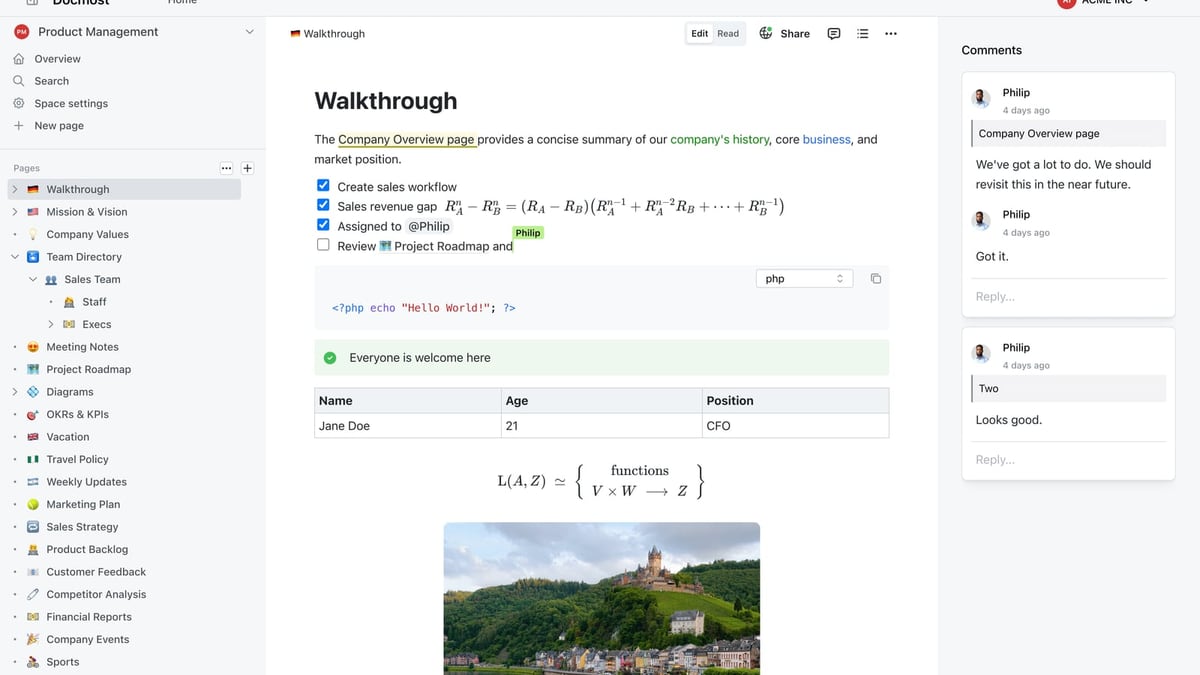
HelpLook vs Docmost: AI Knowledge Base vs Self-Hosted Wiki product interface and feature overview.
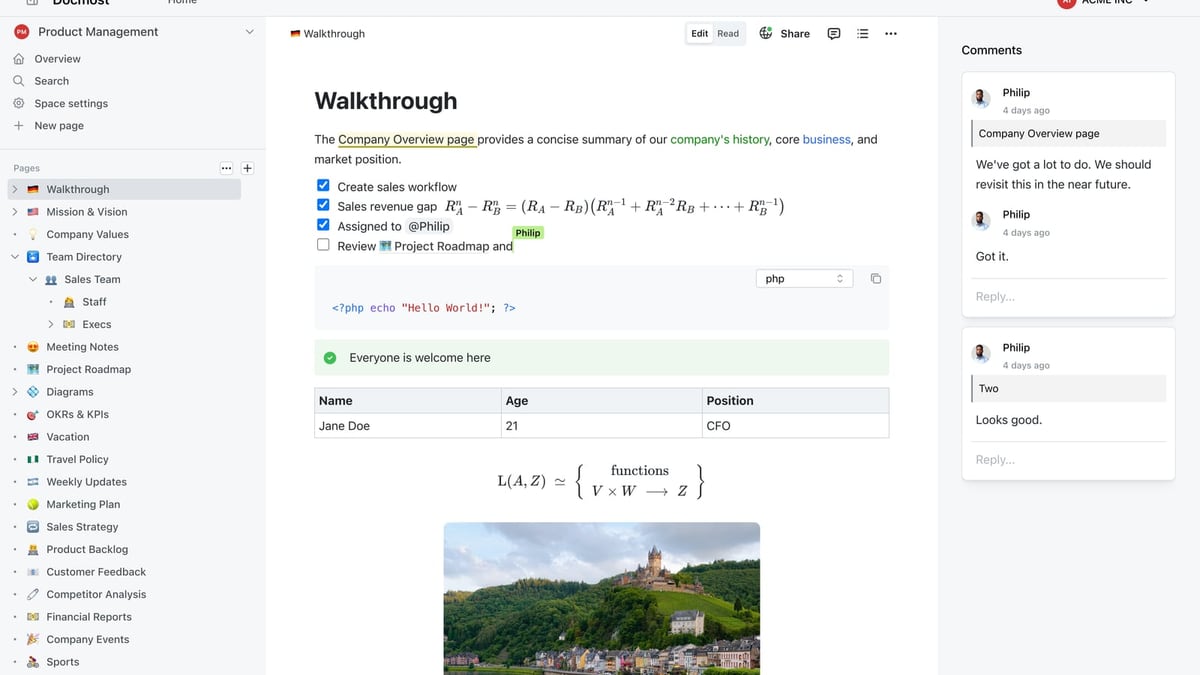
Docmost is an open‑source, self‑hosted enterprise wiki for teams that need secure, on‑premises knowledge management. It serves as a Confluence or Notion alternative, giving organizations full control over their data. Core features include real‑time collaborative editing, spaces and granular permissions, diagram support (Draw.io, Excalidraw, Mermaid), SSO/SAML/OIDC/LDAP, MFA, audit logs, and an AI assistant that works with self‑hosted LLMs or external providers.
Docmost is trusted by organizations with strict compliance requirements, including ITAR, FedRAMP, GDPR, SOC 2, and ISO 27001. Its value proposition centers on security, data ownership, and air‑gapped deployment. However, as an open‑source tool with a self‑hosted architecture, it demands technical expertise to set up and maintain.
Feature Comparison: HelpLook vs Docmost
HelpLook vs Docmost: AI Knowledge Base vs Self-Hosted Wiki product interface and feature overview.
| Feature | HelpLook | Docmost |
|---|---|---|
| Deployment | Cloud‑based SaaS, instant setup | Self‑hosted via Docker, requires server management |
| AI‑powered search & chatbot | Built‑in for end‑users, embeddable widget, multiple AI model integrations | AI assistant for internal content creation/editing only; no public‑facing chatbot |
| Customer‑facing help center | Fully customizable public site + widget to embed in apps/websites | Public sharing exists, but no dedicated help center widget or customer self‑service portal |
| Internal wiki & collaboration | Yes, with structured content design and team collaboration features | Strong real‑time co‑editing, spaces, page verification workflows, granular permissions |
| Analytics | Built‑in portal analytics for content performance | No built‑in analytics (not mentioned in feature set) |
| Multilingual support | Native multilingual capabilities for global audiences | Not highlighted; limited to single‑language wikis by default |
| SEO tools | SEO optimization for public knowledge base pages | No SEO features for public pages |
| Integrations & ecosystem | Integrates with external AI models, websites via widget, e‑commerce platforms | Integrations mainly focused on diagrams and importers (Confluence, Notion, Markdown); no third‑party AI model orchestration |
| Pricing | Free plan available; paid plans start affordably without seat minimums | Community edition free but missing SSO, AI, Kanban; Business plan $3.5/seat/month (min. 10 seats) |
| Support & Documentation | Dedicated support, extensive onboarding resources for business users | Community support on free tier; priority support only in Enterprise; limited official documentation (often cited as sparse) |
Key Differences Deep Dive
Deployment and Maintenance Overhead
HelpLook is a cloud‑based SaaS platform. You sign up and start building your knowledge base immediately—no servers, no Docker, no updates to manage. For fast‑moving teams without a dedicated IT operations unit, this is a massive time saver.
Docmost, on the other hand, demands you host it yourself. You’ll need to provision a server, install and orchestrate Docker containers, handle backups, apply security patches, and monitor uptime. While this gives you total data control, it also means your team carries the operational burden. For many businesses, that overhead outweighs the benefit, especially when compliance isn’t the primary driver.
AI Integration and Customer-Facing Capabilities
HelpLook’s AI is not an afterthought—it’s the center of the experience. The platform provides an AI chatbot and intelligent search that can be embedded directly into your website or application, turning your knowledge base into a 24/7 self‑service support channel. It supports multiple AI models out of the box, so you can pick the engine that fits your performance and data residency needs.
Docmost’s AI assistant, introduced with the Business plan, helps editors write and refine content—it’s an aid for internal authors, not an external support tool. There is no mechanism to deploy an AI chatbot on your customer‑facing site, and the AI search is limited to internal users. If your goal is to deflect support tickets with instant, AI‑generated answers, Docmost simply doesn’t offer that capability.
Analytics and SEO for Public Knowledge Bases
When you publish a public help center, you want to know how it’s performing and make sure customers can find it. HelpLook includes a built‑in analytics dashboard and SEO tools that help your articles rank in search engines. Docmost, built primarily for internal wiki use, has no analytics engine and no SEO optimization features for publicly shared pages. You can share a page, but you can’t see if anyone reads it or track its impact on support volume.
Total Cost of Ownership
While Docmost’s Community edition is free to download, the free tier omits essential features such as SSO, AI, page‑level permissions, Kanban views, and attachment search. To get a meaningful, secure collaboration setup, you need the Business plan at $3.5 per seat per month with a minimum of 10 seats—plus the cost of hosting, infrastructure, and ongoing server maintenance. HelpLook’s free plan gives you access to core AI and knowledge base features without any seat minimums, and its paid plans scale flexibly from there. This makes HelpLook more accessible for small teams and more predictable in long‑term costs for growing companies.
Maturity and Community Support
HelpLook serves over 10,000 companies globally and provides dedicated customer support. Docmost, while impressive for an open‑source project, is still relatively young. User discussions on platforms like Reddit highlight that Docmost has sparse documentation, missing keyboard shortcuts, and limited third‑party integrations. The project has advanced rapidly, but teams expecting a polished, well‑documented enterprise experience may encounter rough edges that HelpLook’s commercial support model completely avoids.
When Should You Choose HelpLook?
HelpLook is the stronger choice when you need:
- A customer‑facing knowledge base and help center that works out of the box, with custom domain, SEO, and analytics
- AI‑powered self‑service—a chatbot that answers customer questions instantly and reduces support load
- Quick deployment with zero infrastructure management
- Multilingual content for global audiences
- An all‑in‑one platform that combines internal knowledge management with a public help desk
- No minimum seat requirements and a free plan that already includes AI features
If you’re comparing multiple AI‑first platforms, we’ve also tested HelpLook against Documentation.AI and DocsBot. Read the full breakdown in our HelpLook vs Documentation.AI vs DocsBot showdown.
When Docmost Might Still Fit
HelpLook vs Docmost: AI Knowledge Base vs Self-Hosted Wiki product interface and feature overview.
Docmost excels in scenarios where absolute data sovereignty and self‑hosted infrastructure are non‑negotiable:
- Organizations that must comply with ITAR, FedRAMP, or operate in air‑gapped environments
- Teams with strong DevOps capabilities that want to own every layer of the stack
- Internal wikis where AI assistance for editors is helpful, but customer‑facing AI isn’t needed
- Environments that already use SAML, OIDC, or LDAP and prefer to self‑host their authentication pipeline
Even in these cases, you trade off the convenience of a fully managed platform and the power of an embedded AI support agent. For most businesses without extreme regulatory constraints, HelpLook provides a faster path to value.
Related reading
- Freshservice Review 2026: AI-Powered ITSM Pros, Cons & Pricing - Read our evidence-based Freshservice review: AI-driven ITSM features, real user ratings, pricing, strengths, limitations, and ideal use cases.
- Stonly Review 2026: AI Knowledge Platform Pros, Cons & Pricing - Evidence-based Stonly review: our test of features, pricing, user ratings, and ideal use cases. See if it fits your support team.
Sources and further reading
- Docmost vs outline : r/selfhosted - Outline user here (coming from Confluence Server).I like it a lot for being fast and user friendly. Also you can use almost any IDP out there for authentication.What I don't like is the handling of screenshots:
- Is Nuclino the Right Wiki for Your Team? Consider Selfhosting Instead - Nuclino has built a solid reputation as a clean, fast wiki tool for teams that want to stop losing information in scattered Google Docs and Slack threads. And honestly, that reputation is well earned. The editor feels snappy, the interface stays out of your way, and getting new team members onboard takes minutes.
But here's the thing. Nuclino works great until it doesn't. And for a growing number of teams, the cracks start showing once you move past the basics and start asking harder questions
- Enterprise-ready Wiki for Teams | Docmost - Secure on-premises wiki for enterprises. Meet ITAR, FedRAMP, and GDPR compliance with ease.
FAQ
Can I use HelpLook as an internal wiki only?
Absolutely. HelpLook’s private site option lets you build an internal knowledge base with the same AI search capabilities. You can keep all content behind a login and use it exclusively for team documentation.
Does Docmost offer a help desk or ticket management system?
No. Docmost is a wiki and collaborative documentation tool. It does not include ticketing, live chat, or a customer support workflow. For a full help desk, you would need a separate tool.
Does HelpLook support on‑premises deployment?
HelpLook is a cloud‑based SaaS solution and does not offer an on‑premises self‑hosted option. If your compliance requirements demand air‑gapped deployment, Docmost’s architecture may be more suitable.
Can Docmost’s AI chatbot answer customer questions on my website?
No. Docmost’s AI Assistant is designed for internal content creation and editing tasks. It cannot be embedded as a customer‑facing chatbot. HelpLook’s Widget, on the other hand, is purpose‑built for that.
What does Docmost’s free Community plan actually include?
It includes core wiki features—pages, spaces, real‑time collaboration, and public sharing—but excludes SSO, AI, Kanban, attachment search, page‑level permissions, and priority support. The Business plan at $3.5/seat/month (minimum 10 seats) is required for a truly enterprise‑ready setup. View Docmost’s pricing page for full details.
Final Verdict
HelpLook and Docmost address fundamentally different problems. Docmost is a solid open‑source wiki for internal documentation, particularly when on‑premises control is mandatory. But if your objective is to deliver a modern, AI‑driven self‑service experience for both customers and employees, HelpLook is the more complete solution. It bundles a public help center, an embeddable AI chatbot, analytics, SEO, and multilingual support into a platform that you can launch in hours—not weeks.
At HelpLook, we’ve seen that the teams who get the most value are those that prioritize ease of adoption, rapid time‑to‑value, and AI‑powered support. HelpLook nails all three. Unless your organization’s security posture strictly dictates self‑hosting, HelpLook offers the better balance of capability and simplicity.