
HelpLook vs HelpCenter.io vs Bloomfire: Which AI Knowledge Base Wins?
Choosing the right AI knowledge platform means matching the tool to your team’s real world—whether that’s slashing support tickets with on‑page answers, uniting enterprise knowledge scattered across departments, or launching an SEO‑friendly help center quickly with a free tier. HelpCenter.io, Bloomfire, and HelpLook each solve different problems. This comparison spotlights what each does best so you can pick the one that fits your workflow, not the other way around.
HelpCenter.io: Self‑Service That Keeps Customers in Flow
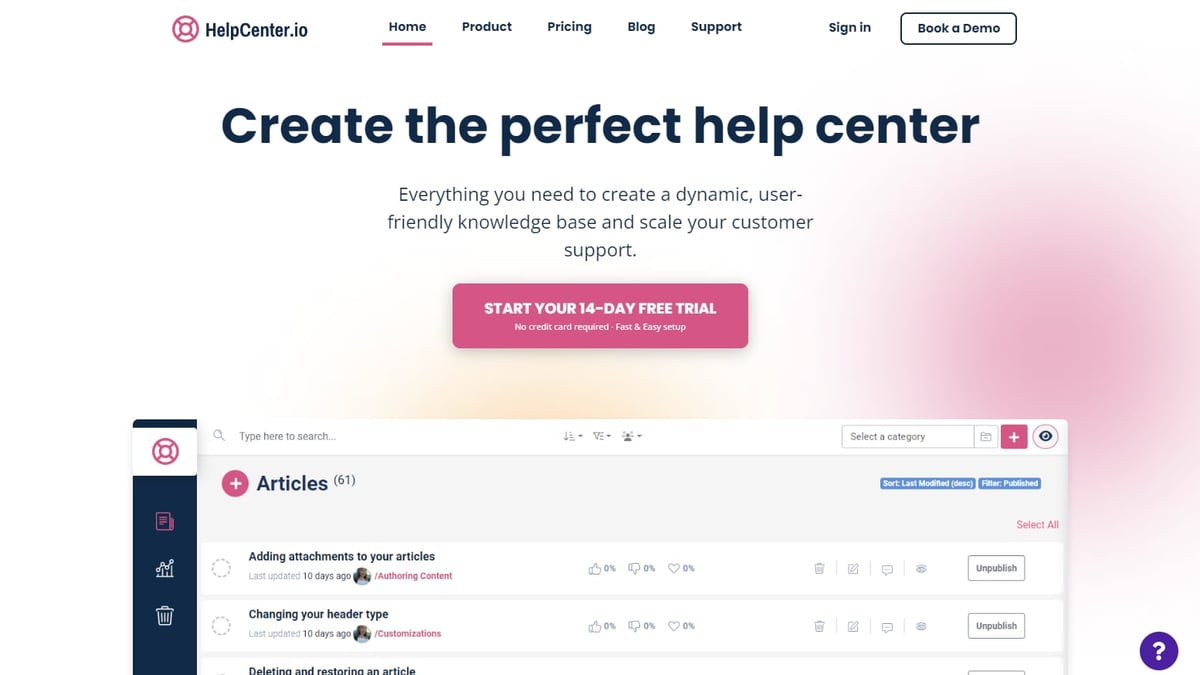
HelpLook vs HelpCenter.io vs Bloomfire: Which AI Knowledge Base Wins? product interface and feature overview.
HelpCenter.io strips complexity out of building a help center. It focuses on one job: making sure customers get the right answer without leaving the page they’re on. Its flat‑rate pricing and visual editor appeal to support and product teams that want to ship fast and stay predictable on cost.
Key Advantages of HelpCenter.io
- Flat‑rate, agent‑free pricing. Plans start at $29/month with unlimited teammates—a clear alternative to tools that charge per seat.
- No‑code visual editor. Drag‑and‑drop components, live previews, and templates let teams launch a branded help center without engineering sprints.
- Context‑aware AI Widget. The widget reads the page where it’s embedded and suggests relevant articles from your knowledge base, keeping users in flow and reducing support requests.
- Dynamic FAQ embeds. Create FAQ blocks in one central hub and embed them anywhere—pricing pages, checkout flows, onboarding—so updates stay synchronized everywhere.
- Grounded AI answers. Instant AI responses come only from your published articles, never from the open internet. Every answer gets a thumbs‑up/down that feeds analytics gaps.
- Rich analytics. See exactly where reading stops and tickets begin, track failed searches, and use that data to improve both content and product.
Importing existing content is straightforward: HelpCenter.io lets you pull in articles from Zendesk, Intercom, or Notion in one pass. For support teams that want a tidy knowledge base that actively deflects tickets without per‑agent fees, it’s a strong contender.
Bloomfire: Enterprise Knowledge Management with Deep AI

HelpLook vs HelpCenter.io vs Bloomfire: Which AI Knowledge Base Wins? product interface and feature overview.
Bloomfire is built for organizations where knowledge lives in every corner—documents, videos, spreadsheets, and subject‑matter experts’ heads. It doesn’t just store content; it uses AI to surface trusted knowledge across the enterprise and even heal the knowledge base over time.
What Makes Bloomfire Stand Out
- Enterprise‑grade AI search. Bloomfire’s search indexes video, audio, and text, so employees can find exactly the clip, paragraph, or file they need. A 72% search conversion rate is typical.
- Self‑healing knowledge base. The platform identifies stale or duplicate content and prompts updates, keeping the repository fresh without manual grooming.
- AI‑powered authoring. Built‑in tools assist in creating and formatting knowledge articles, reducing the burden on subject‑matter experts.
- Enterprise Intelligence engine. Converges knowledge management, business intelligence, and generative AI, giving companies like Novonesis and Regeneron a single source of truth.
- Compliance and security. SOC 2, GDPR, SSO, SCIM, and encryption come standard, making it viable for regulated industries.
- Proven ROI. A major credit union reported annual time savings equivalent to $469,000, and organizations routinely cut call volumes by double‑digit percentages. Bloomfire’s enterprise focus is detailed in their comparison with other KM tools.
For large enterprises that need to break down silos and move beyond a static intranet, Bloomfire’s AI‑first architecture is a powerful ally. It’s less about customer‑facing help centers and more about capturing and distributing internal know‑how at scale.
Where HelpLook Has the Upper Hand

HelpLook vs HelpCenter.io vs Bloomfire: Which AI Knowledge Base Wins? product interface and feature overview.
HelpLook brings together a complete AI‑powered self‑service toolkit—knowledge base, help desk, documentation, and chatbot—under one roof. Its strengths lie in SEO visibility, AI flexibility, and a free‑forever entry point that makes professional knowledge management accessible to any team.
HelpLook’s Strengths That Tip the Scale
- All‑in‑one platform. The Portal, Site, Widget, and HelpLook AI modules work together seamlessly. You can create content, publish a public or private knowledge base, embed it into websites, and power an AI chatbot—all without coding.
- SEO‑optimized out of the box. From custom domains and meta tags to automatic sitemaps, HelpLook is built to get your content found by search engines. Other platforms in this comparison often treat SEO as an afterthought.
- Free plan with full AI features. Unlike HelpCenter.io’s trial or Bloomfire’s enterprise‑minimum commitments, HelpLook offers a genuine free tier, making it easy to test and scale up on your terms.
- Multi‑model AI integration. The AI search and chatbot connect with OpenAI, ERNIE Bot, and Azure, giving teams the flexibility to choose the AI backbone that fits their region or compliance needs.
- Multilingual support. Publish help content in multiple languages and localize the experience for global audiences—a critical feature for SaaS and e‑commerce businesses.
- Rapid deployment. Over 10,000 companies use HelpLook across industries like legal, healthcare, and financial services, proving its combination of speed and reliability.
When compared side‑by‑side with other AI knowledge platforms, HelpLook often wins on SEO and setup speed. Our detailed breakdown of HelpLook vs Helpjuice vs GitBook shows how its AI search and multilingual features stack up.
Feature Comparison at a Glance
HelpLook vs HelpCenter.io vs Bloomfire: Which AI Knowledge Base Wins? product interface and feature overview.
| Feature | HelpCenter.io | Bloomfire | HelpLook |
|---|---|---|---|
| Pricing | Flat‑rate from $29/month, unlimited teammates | ~$25/user/month (50‑user minimum) | Free plan available, scalable tiers |
| AI Capabilities | AI Widget with grounded Q&A | Enterprise AI search, authoring, analytics | AI chatbot & search via OpenAI, ERNIE Bot, Azure |
| SEO Optimization | Not a primary focus | Not a primary focus | Built‑in meta, sitemaps, custom domain |
| Multilingual | Yes, multi‑language collections | Partial | Yes, with language switching options |
| Best For | SaaS, e‑commerce, support teams | Large enterprises, internal KM | Teams needing an all‑in‑one AI self‑service platform |
| Deployment Complexity | No‑code, visual editor | Enterprise setup with admin controls | No‑code, quick setup with onboarding support |
While the table highlights distinct strengths, your decision will hinge on whether you value pricing simplicity, enterprise‑grade AI, or a balanced AI knowledge base with strong SEO foundations.
Which One Should You Choose?
Pick HelpCenter.io if…
You’re a support or product team that wants a flat‑rate, no‑code help center that proactively answers questions right where customers are. The contextual AI Widget and dynamic FAQs are ideal for reducing ticket volume without charging per agent.
Pick Bloomfire if…
Your organization spans departments, geographies, and content types. If you need AI that indexes videos and documents, enforces compliance, and unifies enterprise knowledge, Bloomfire’s self‑healing platform is purpose‑built for the job.
Pick HelpLook if…
You need an all‑in‑one AI knowledge platform that doesn’t compromise on SEO. The free plan, multi‑model AI chatbot, and out‑of‑the‑box search optimization make it a smart choice for teams that want a public‑facing help center, internal KB, and AI assistant without juggling multiple tools. For more on how HelpLook’s AI compares in enterprise scenarios, see HelpLook vs Zendesk.
Related reading
- HelpLook vs Stonly vs KnowledgeOwl: Which AI KB Is Right for You? - Compare HelpLook, Stonly, and KnowledgeOwl on AI search, pricing, multilingual support, and SEO. Find the best AI knowledge base for your team in 2026.
- HelpLook vs KnowledgeBase: Which AI Knowledge Base Wins in 2026? - Compare HelpLook and KnowledgeBase on AI capabilities, ease of use, pricing, and customization. See why HelpLook’s all-in-one AI platform is the smarter self-service choice.
Sources and further reading
- Bloomfire vs Help Scout (2026): Which Is Better? | Docsie - Bloomfire vs Help Scout: compare enterprise knowledge management vs customer support KB. See features, pricing, and the best alternative.
Frequently Asked Questions
Can I try these platforms for free?
HelpLook offers a free‑forever plan with core AI features. HelpCenter.io provides a 14‑day trial with no credit card required. Bloomfire typically requires a demo and has no free self‑serve tier due to its enterprise focus.
Which platform is best for SEO?
HelpLook is the only platform of the three that builds in SEO tools like custom domains, meta tags, and sitemaps. If you want your help articles to rank in Google, it’s the strongest choice.
Is HelpCenter.io only for small teams?
Not at all. Its flat‑rate pricing makes it attractive for small teams, but the unlimited teammates model can also benefit large support departments that want predictable costs without per‑seat fees.
Does Bloomfire work as a customer‑facing help center?
Bloomfire is primarily designed for internal enterprise knowledge management and employee self‑service. You can create public‑facing content with it, but that’s not its core strength.
How do AI capabilities differ between these tools?
HelpCenter.io’s AI Widget grounds answers in your content and surfaces them on any page. Bloomfire’s AI indexes varied media and powers enterprise search. HelpLook’s AI supports multiple LLM backends and powers both a chatbot and intelligent site search, which can be customized to your preferred AI model.
The Verdict
HelpCenter.io, Bloomfire, and HelpLook all bring AI into the knowledge equation, but they align with different missions. HelpCenter.io simplifies self‑service with flat pricing and smart widgets; Bloomfire conquers enterprise complexity with deep AI and compliance; HelpLook bridges the gap with an all‑in‑one AI platform that excels at SEO and offers a free on‑ramp. Define your team’s primary goal—ticket deflection, enterprise intelligence, or search‑visible documentation—and the choice becomes clear. If you’re still comparing alternatives, our HelpLook vs KnowledgeOwl analysis explores how HelpLook’s AI search and multilingual support stack up in a head‑to‑head matchup.