
Top 10 Self-Hosted Enterprise Wiki Software Products 2026
Enterprise wiki software has quietly become a security decision, not just a documentation one. When internal policies, incident runbooks, and compliance evidence live in a SaaS workspace, every page is a data residency question. That is why self-hosted wikis are back on the shortlist for regulated teams in 2026.
This review ranks ten products that genuinely run on infrastructure you control. Every entry was checked against four criteria: active development, real self-hosted deployment (Docker or equivalent, not a download page that dead-ends), enterprise identity support such as SSO and RBAC, and evidence of production use. Licensing matters too — some tools are OSI-approved open source, others are source-available with commercial restrictions, and that distinction can decide whether your legal team signs off.
How We Evaluated These Self-Hosted Wikis
- Deployment reality: Can a standard Linux server or VPS run it without exotic hardware?
- Enterprise controls: SSO/SAML/OIDC, LDAP, granular permissions, audit trails, and provisioning.
- Collaboration depth: Real-time editing, page history, comments, and structured spaces.
- Licensing and cost: Open-source vs. source-available, plus what the free tier actually includes.
- Compliance fit: Data residency, air-gapped operation, and auditability for frameworks like SOC 2, ISO 27001, and GDPR.
1. Docmost — Best Open-Source Confluence Alternative for Regulated Teams
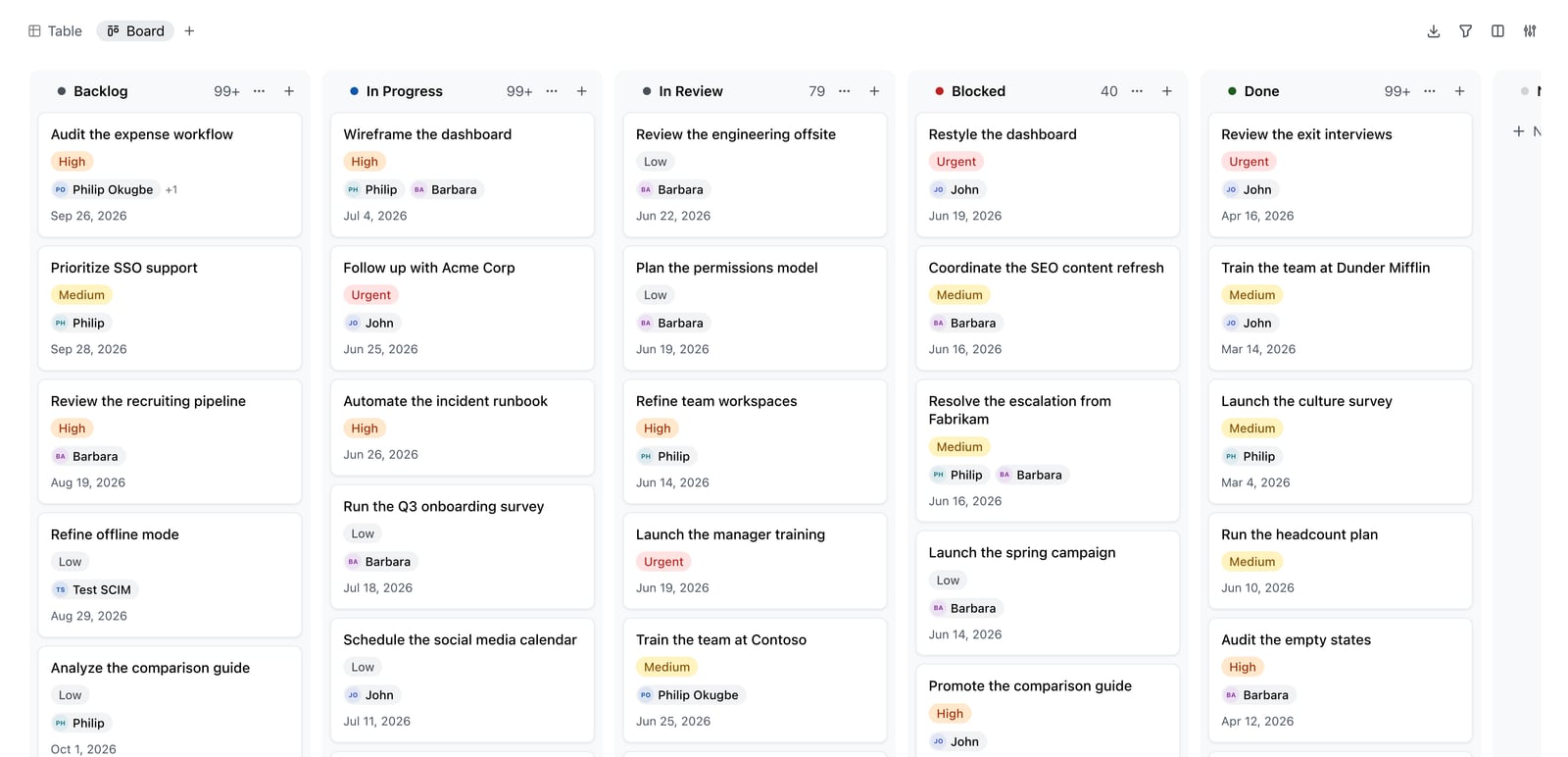
Docmost Kanban board.
Docmost is an open-source, enterprise-ready collaborative wiki built for teams that need full data control. It deploys on your own infrastructure and positions itself as a direct alternative to Confluence and Notion for on-premises knowledge management.
Evidence and strengths: The project has passed 3 million downloads and is trusted by a range of organizations, with a published feature comparison page for buyers doing due diligence. Its feature set covers real-time collaborative editing, team spaces with nested pages, RBAC permissions, page verification workflows, public sharing, Kanban and database views (Bases), and an AI assistant that can run against self-hosted LLMs such as Ollama and vLLM, or external providers like OpenAI.
Enterprise controls: SSO via SAML, OIDC, and LDAP, plus MFA, audit logs, and SCIM provisioning. The compliance story explicitly targets ITAR, FedRAMP, GDPR, SOC 2, and ISO 27001 use cases, and air-gapped deployment is supported.
Trade-offs: The richest enterprise features sit on the paid Business tier, so small teams should confirm which controls they need before standardizing.
Best for: Engineering and compliance-heavy organizations that want a modern, open-source wiki they can run entirely on their own terms.
2. Outline — Most Polished Self-Hosted Wiki Experience
Outline is widely regarded as the most polished self-hosted wiki available, with a block-based editor that feels closer to Notion than any other open alternative. Its API and integration ecosystem has been built over roughly eight years, making it the stronger choice when you want to build internal tooling on top of your knowledge base.
Evidence and strengths: The project has accumulated tens of thousands of GitHub stars and remains actively developed. It supports spaces, nested documents, real-time collaboration, and full-text search.
Trade-offs: Outline has no built-in authentication — you must connect an external OIDC or SAML provider before anyone can log in — and it requires S3-compatible storage for uploads. A production deployment is effectively four moving parts: Outline, PostgreSQL, Redis, and MinIO or hosted S3. Its BSL 1.1 license is source-available, not OSI-approved open source, which matters if your compliance team requires a recognized open-source license.
Best for: Organizations that already run an identity provider and want the most refined editing experience.
3. Wiki.js — Best Developer-Facing Wiki With Git-Backed Content
Wiki.js is built for developer teams that want documentation to live alongside code. It supports multiple editors — Markdown, WYSIWYG, AsciiDoc, and more — and can sync pages bidirectionally with a Git repository, so documentation changes go through the same review and version-control workflow as application code.
Evidence and strengths: Roughly 25,000 GitHub stars under AGPL-3.0, with a modular system covering access control, authentication providers, search backends including Elasticsearch, and support for PostgreSQL, MySQL, SQLite, and SQL Server.
Trade-offs: The project is in a v2-to-v3 transition. Version 2.x is stable and widely deployed, but v3.0 is a rewrite that is still maturing — factor that into production planning.
Best for: Developer-focused teams publishing public-facing or Git-backed documentation.
4. BookStack — Best Structured Wiki for Non-Technical Teams
BookStack enforces a strict hierarchy: shelves, books, chapters, and pages. That constraint is its biggest advantage. Anyone can navigate to the right section without understanding spaces, tags, or nested page structures, and there is nothing to configure about information architecture.
Evidence and strengths: Around 16,000 GitHub stars under the MIT license, built on PHP/Laravel with MySQL or MariaDB. Built-in email and password authentication means no external SSO provider is required to get started.
Trade-offs: The rigid hierarchy can feel limiting for teams that want flexible linking or real-time co-editing, and it is less suited to highly dynamic documentation.
Best for: Non-technical organizations whose main problem is that people cannot find or place information.
5. XWiki — Best for Custom Applications on Top of a Wiki
XWiki is a long-standing open-source enterprise wiki that goes beyond pages. It supports structured data and custom internal applications built directly on the wiki platform, which makes it a fit for organizations that want to model processes, not just write documents.
Evidence and strengths: A mature extension ecosystem, granular rights management, and a free self-hosted edition, with cloud plans available for teams that later want managed hosting. It has a substantial review footprint on major software directories.
Trade-offs: The flexibility comes with a steeper learning curve than simpler wikis, and administration requires more hands-on effort.
Best for: Enterprises that need structured data, custom apps, and deep extensibility.
6. MediaWiki — Best for Large-Scale, Long-Lived Knowledge Repositories
MediaWiki powers some of the largest reference wikis in the world, and that scale is exactly its appeal for enterprises with enormous, long-lived content sets.
Evidence and strengths: Free and open source, with decades of active maintenance, a vast extension library, and proven performance at very large content volumes. It is a common choice for internal knowledge repositories that must survive multiple platform migrations.
Trade-offs: The editing experience and default interface feel dated compared to modern wikis, and enterprise identity integration typically requires additional configuration.
Best for: Organizations prioritizing longevity, scale, and ecosystem depth over modern UX.
7. DokuWiki — Best Lightweight, Database-Free Wiki

Vilnius City.
DokuWiki stores content in plain files rather than a database, which makes it unusually simple to back up, migrate, and audit. For small teams that want a dependable wiki without database administration, it is a pragmatic option.
Evidence and strengths: Free and open source, actively maintained, with access control lists, plugins, and a long track record in technical environments. It has a solid, if not spectacular, review presence on software directories.
Trade-offs: The interface is functional rather than modern, and real-time collaboration is limited compared to newer platforms.
Best for: Small technical teams that value simplicity and file-based portability.
8. TikiWiki — Best All-in-One CMS, Wiki, and Groupware
TikiWiki bundles a wiki with CMS, forums, trackers, and groupware features in a single open-source package. That breadth lets organizations consolidate several tools into one self-hosted platform.
Evidence and strengths: Free and open source with a very long development history and a wide module set covering content, collaboration, and administration.
Trade-offs: The sheer number of features can overwhelm new administrators, and the interface is not as streamlined as single-purpose wikis. Review data is thinner than for mainstream options.
Best for: Teams that want one platform for wiki, CMS, and collaboration rather than several tools.
9. PmWiki — Best Minimalist Wiki for Technical Teams
PmWiki is a lightweight, file-based wiki that emphasizes simplicity and customization. It is easy to host, easy to theme, and easy to extend with recipes, which suits technical teams that want full control without a heavy stack.
Evidence and strengths: Free and open source, with a long maintenance history and a straightforward PHP deployment model.
Trade-offs: Documentation and community support are less polished than larger projects, and enterprise features like SSO require custom work. Review data is limited.
Best for: Technical teams that want a minimal, hackable wiki.
10. Gitea Wiki — Best Zero-Infrastructure Wiki for Teams Already on Gitea

Realtime Collaboration.
If your team already runs Gitea for source control, its built-in wiki is the lowest-friction documentation option available: no additional services, no new authentication system, and no extra infrastructure to monitor.
Evidence and strengths: MIT-licensed and bundled with Gitea, so there is nothing new to deploy. Markdown-only content keeps authoring simple.
Trade-offs: No real-time collaboration, no spaces, and no granular permissions beyond what the repository already provides. Teams typically outgrow it and migrate to a fuller wiki such as Docmost.
Best for: Development teams that need architecture notes and runbooks at zero extra cost.
How to Choose: A Quick Decision Guide
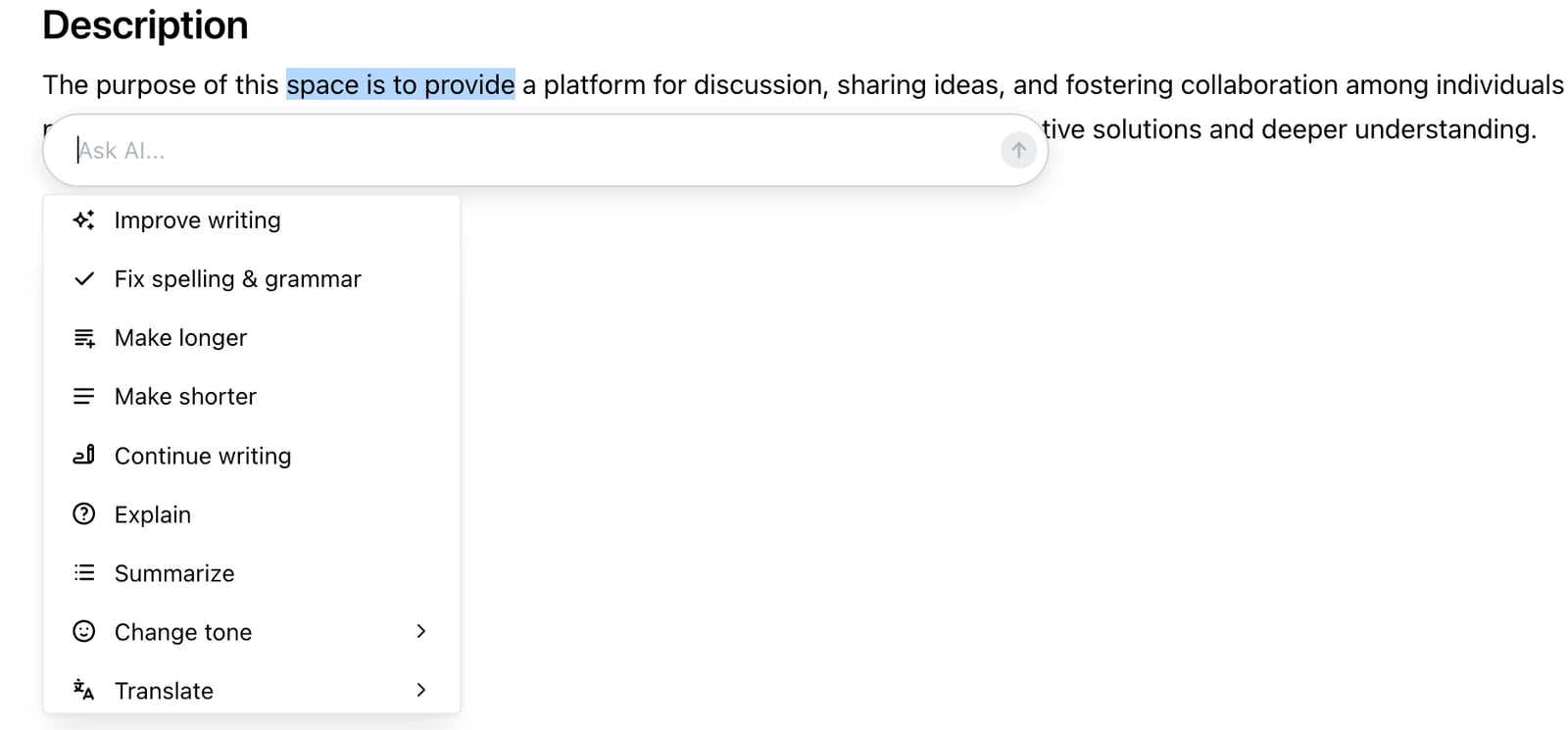
AI assistant.
- Regulated industry, open-source license required: Docmost or Wiki.js.
- Existing OIDC/SAML provider, want the best editor: Outline.
- Non-technical contributors, simple structure: BookStack.
- Custom internal apps on a wiki base: XWiki.
- Massive legacy content, long-term stability: MediaWiki.
- Minimal footprint, file-based storage: DokuWiki or PmWiki.
- Already running Gitea: Gitea Wiki, with a planned migration path.
One adjacent consideration: self-hosted wikis cover internal knowledge, but customer-facing help centers and AI-assisted support portals are a different category. If your roadmap includes a public self-service portal alongside your internal wiki, it is worth comparing dedicated AI knowledge base platforms such as HelpLook — a no-code, AI-powered knowledge base and help desk tool used by over 10,000 brands — against your wiki's public sharing features. For a broader view of that adjacent market, see our comparison of the top 10 AI knowledge base and customer support automation platforms in 2026.
Related reading
- HelpLook vs Mintlify vs Stonly: Which Platform Fits? - Compare HelpLook, Mintlify, and Stonly on audience, AI search, no-code editing, SEO, integrations, and pricing to pick the right knowledge platform.
- HelpLook vs Stonly vs DocsBot: Which AI Knowledge Base Wins? - Compare HelpLook, Stonly, and DocsBot on AI search, chatbots, no-code editing, integrations, and pricing to choose the right AI knowledge base for support.
- HelpLook vs Docsie vs Zendesk: Best Knowledge Base in 2026 - HelpLook vs Docsie vs Zendesk compared: AI knowledge base, help desk, documentation, pricing, and support fit. Find the right platform for your team.
Sources and further reading
- 10 Best Wiki Software Reviewed in 2026 - Discover the top wiki software and find the best option for your team. Compare features, pros and cons, prices, and more in my complete guide.
FAQ
What is the best self-hosted enterprise wiki software in 2026?
There is no single winner. Docmost leads for open-source, compliance-focused teams that want a modern Confluence alternative, while Outline leads on editing polish and API maturity. The right pick depends on your identity stack, licensing requirements, and contributor skill level.
Is Outline really open source?
Outline uses the BSL 1.1 license, which is source-available but not OSI-approved open source. It is free to self-host for internal use, but organizations with strict open-source procurement rules should verify this with legal before standardizing.
Which self-hosted wiki works best for air-gapped or regulated environments?
Docmost explicitly supports air-gapped deployment and targets compliance frameworks including ITAR, FedRAMP, GDPR, SOC 2, and ISO 27001. Wiki.js and BookStack can also run fully offline, but you should validate audit logging and identity integration against your specific controls.
Can a self-hosted wiki replace Confluence entirely?
For many engineering and operations teams, yes. Docmost and Outline cover spaces, nested pages, real-time editing, permissions, and search. The main gaps to check are marketplace-style integrations, advanced bulk import tooling, and any Atlassian-specific workflows your team depends on.
How much does self-hosted wiki software cost?
Several strong options are free and open source, including Docmost, Wiki.js, BookStack, MediaWiki, DokuWiki, PmWiki, and Gitea Wiki. Your real cost is infrastructure and administration. Outline is free to self-host internally under BSL 1.1, and some products charge for enterprise features such as SSO, SCIM, and advanced permissions.
Should I use a self-hosted wiki or a cloud knowledge base for customer support?
Self-hosted wikis are optimized for internal, security-sensitive knowledge. Customer-facing help centers, AI search, and chatbot deflection are usually better served by dedicated knowledge base platforms. Many organizations run both: an internal wiki for employees and a separate portal for customers.
Conclusion
The self-hosted enterprise wiki market in 2026 is mature enough that the hard part is no longer finding a tool — it is matching licensing, identity, and deployment constraints to the right one. Docmost stands out for regulated, open-source-first organizations. Outline wins on editing experience for teams with existing SSO. Wiki.js, BookStack, XWiki, MediaWiki, DokuWiki, PmWiki, TikiWiki, and Gitea Wiki each own a specific niche, from Git-backed developer docs to zero-infrastructure team notes.
Start by writing down your non-negotiables: license type, identity provider, air-gap requirement, and who will actually write the pages. That short list will eliminate most of the field faster than any feature matrix. Then pilot two candidates on real content for thirty days before you commit.
For further reading on how self-hosted options compare by stack and use case, see this self-hosted wiki and documentation tools comparison and this review of wiki software across use cases.