
HelpLook vs Stonly vs Docmost: Which Knowledge Base Fits Your Team?
Choosing a knowledge management tool is rarely a one-size-fits-all decision. HelpLook, Stonly, and Docmost all help teams organize and share information, but they approach the problem from very different angles. HelpLook is an AI-powered knowledge base and help desk aimed at customer-facing self-service. Stonly specializes in interactive, step-by-step support guides. Docmost is an open-source, self-hosted wiki built for internal documentation and strict data control.
This comparison breaks down where each product excels, where it falls short, and which use cases each one serves best.
The Three Products at a Glance

Stonly product interface.
| Criteria | HelpLook | Stonly | Docmost |
|---|---|---|---|
| Primary use case | Customer-facing knowledge base and help desk | Interactive support guides and agent enablement | Internal wiki and self-hosted documentation |
| Deployment | Cloud SaaS | Cloud SaaS | Self-hosted (on-premises or private cloud) |
| AI capabilities | AI search, AI chatbot, multi-model integration | AI-powered search, AI agents | AI assistant with self-hosted LLM support |
| Content style | Articles, FAQs, product manuals, blogs | Step-by-step interactive guides | Wikis, project docs, compliance docs |
| Best for | Support teams reducing ticket volume | Support teams improving resolution speed | IT, security, and compliance-focused teams |
Stonly: Interactive Guides That Walk Customers Through Solutions

Stonly product interface.
Stonly takes a fundamentally different approach to knowledge delivery. Instead of relying on long-form articles that users must read and interpret, Stonly builds interactive, step-by-step guides that walk customers or agents through a process one decision at a time.
Where Stonly Excels
Interactive troubleshooting flows. Stonly's core strength is its guide format. A customer who reports a billing issue does not read a 1,200-word article and hope they find the right section. They answer a simple question — "What type of billing issue are you experiencing?" — and Stonly routes them down a personalized path with clear actions at each step. This format is especially effective for technical products where problems follow predictable diagnostic trees.
Agent-facing process automation. Stonly is not only a customer-facing tool. Support agents use the same interactive guides internally to follow standardized procedures during live conversations. This reduces reliance on tribal knowledge and shortens onboarding for new agents. Stonly reports customer outcomes including up to an 80% decrease in support tickets, a 20% reduction in resolution time, and a 58% reduction in training time.
Deep help desk integrations. Stonly integrates with Zendesk, Salesforce, Freshdesk, and other major help desks. Agents can launch guides directly from within their ticketing interface, which keeps the tool embedded in existing workflows rather than requiring a separate tab.
Full-path analytics. Stonly tracks how users move through each guide, where they drop off, and which paths lead to successful resolutions. This granular data helps knowledge managers identify confusing steps and optimize guides over time.
Where Stonly Falls Short
Stonly is purpose-built for guided, decision-tree-style support. It is less suited for teams that need a traditional long-form knowledge base with rich article formatting, SEO-optimized public documentation, or a large library of reference material. Its guide-first paradigm is powerful for troubleshooting but can feel restrictive for open-ended research or browsing.
Docmost: Self-Hosted Wiki Software for Teams That Demand Data Control
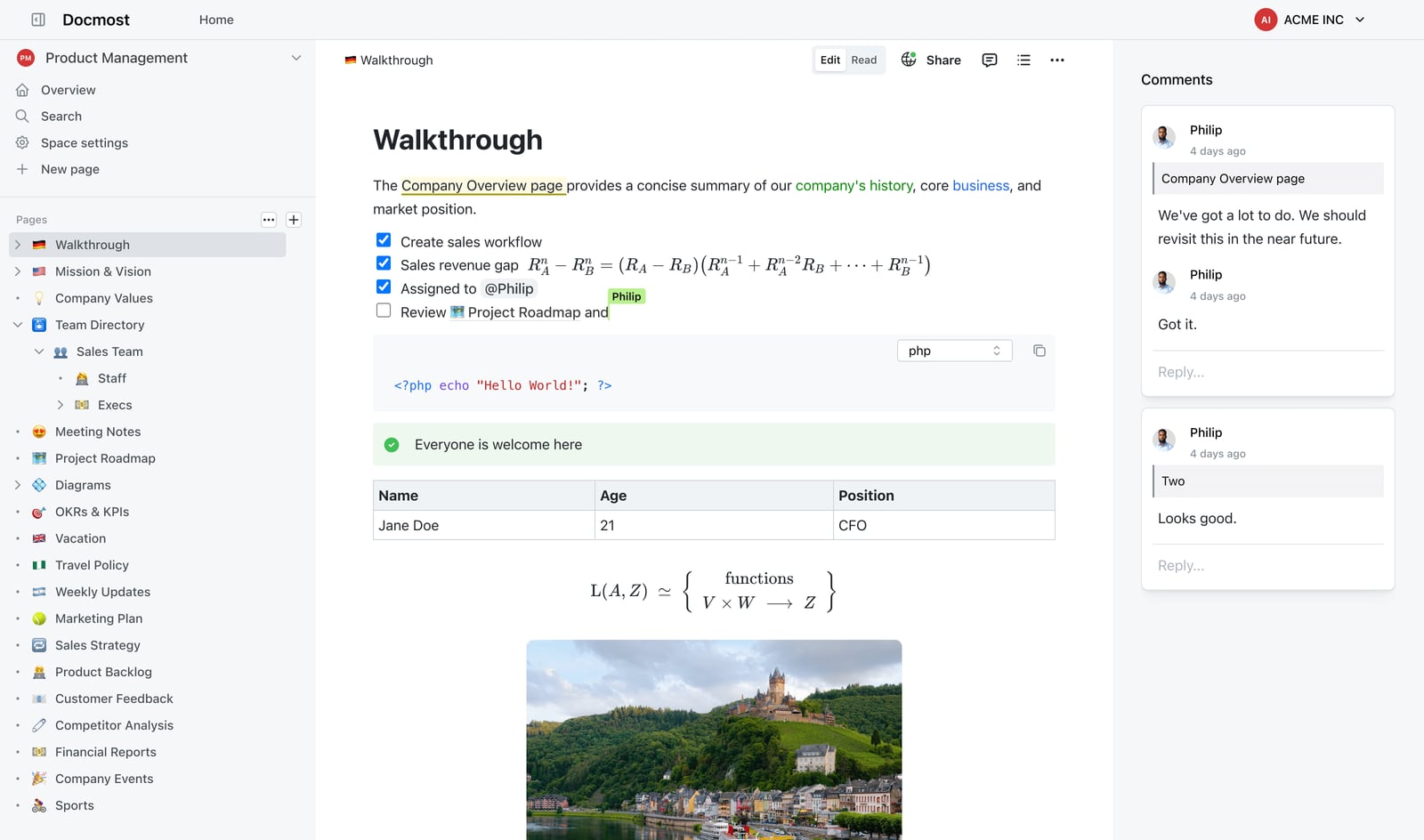
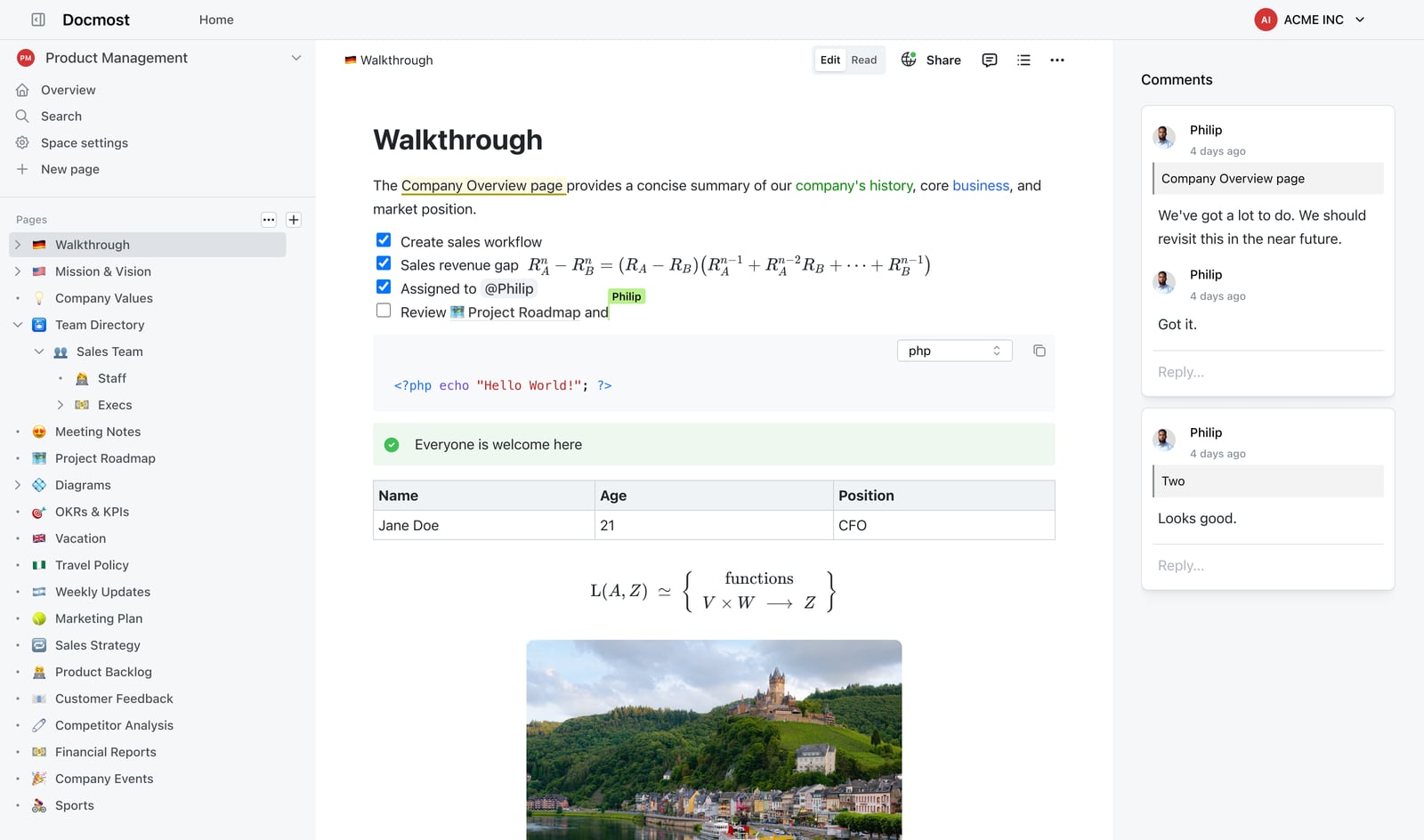
Docmost product interface.
Docmost is an open-source, enterprise-ready collaborative wiki. It positions itself as an alternative to Confluence and Notion, with one key differentiator: you host it yourself.
Where Docmost Excels
Complete data sovereignty. Docmost runs on your own infrastructure — on-premises or in a private cloud. For organizations subject to ITAR, FedRAMP, GDPR, SOC 2, or ISO 27001 requirements, this is often a non-negotiable requirement. Docmost explicitly supports air-gapped deployments, meaning the software can run in environments with no internet connection at all.
Enterprise security and governance. Docmost includes role-based access control (RBAC), page verification workflows, SSO/SAML/OIDC/LDAP authentication, multi-factor authentication, audit logs, and SCIM provisioning. These features are designed for large organizations where documentation must be reviewed, approved, and tracked.
Real-time collaborative editing. Multiple team members can edit the same page simultaneously, similar to Google Docs or Notion. This makes Docmost well-suited for living documents like project plans, internal policies, and technical specifications that evolve continuously.
Flexible AI with self-hosted models. Docmost includes an AI assistant that can connect to self-hosted LLMs such as Ollama and vLLM, as well as cloud providers like OpenAI. Teams that cannot send internal data to third-party AI services can run a fully local AI stack.
Beyond text: Kanban and database views. Docmost offers "Bases" — database-style views that support Kanban boards, tables, and structured data. This extends its usefulness beyond pure documentation into lightweight project management and structured knowledge organization.
Free and open source. Docmost is free to self-host, with over 3 million downloads. Organizations with engineering resources can deploy it without licensing costs, paying only for infrastructure and maintenance.
Where Docmost Falls Short
Docmost requires technical expertise to deploy, maintain, and upgrade. There is no fully managed cloud version operated by the vendor, which means teams without DevOps capacity will face meaningful operational overhead. It is also designed primarily for internal documentation rather than public-facing customer portals. While it supports public sharing, it lacks the built-in SEO tooling, customer-facing branding controls, and help desk integrations that a dedicated customer support knowledge base provides.
HelpLook: AI-Powered Knowledge Base for Customer Self-Service
Powerful Editor.
HelpLook focuses on one core problem: helping businesses build public-facing, self-service portals that reduce support costs and improve customer satisfaction. It combines a no-code knowledge base builder with AI search, an AI chatbot, and usage analytics.
Where HelpLook Excels
No-code content creation and site building. HelpLook lets teams build a branded knowledge base without writing code. The interface is designed for support and content teams, not developers. Custom branding, domain configuration, and layout options are available without engineering involvement.
Built-in SEO optimization. For businesses that want their documentation to rank in search engines and deflect support queries before they become tickets, HelpLook includes SEO features such as customizable metadata, sitemap support, and search-friendly page structures. This is a meaningful advantage for public-facing documentation compared to self-hosted wikis that require manual SEO configuration.
AI-driven search and chatbot. HelpLook integrates with leading AI models including OpenAI, ERNIE Bot, and Azure. Its AI search understands natural language queries, and its chatbot can answer customer questions directly from the knowledge base. This reduces the need for customers to browse manually and shortens time-to-resolution.
Multi-use-case flexibility. HelpLook supports customer support knowledge bases, e-commerce product manuals, enterprise blogs, and internal knowledge bases. This breadth makes it suitable for teams that need one platform for multiple content types rather than separate tools for each.
QR code access and PDF downloads. HelpLook includes practical distribution features such as QR codes for physical product packaging and PDF export for offline documentation. These are particularly useful for hardware products, e-commerce sellers, and field-service teams.
Scalable subscription plans. HelpLook offers a free tier through enterprise-level pricing, with AI credits and scalable resources. This makes it accessible to small teams while accommodating larger deployments.
Where HelpLook Falls Short
HelpLook is a cloud SaaS product. Organizations that require on-premises deployment, air-gapped operation, or full data sovereignty will need to look at self-hosted alternatives like Docmost. Additionally, while HelpLook supports interactive elements, it does not offer the same depth of decision-tree-style guide building that Stonly specializes in.
Side-by-Side Feature Comparison
Deployment and Data Control
- Docmost is the clear winner for self-hosted, air-gapped, or compliance-driven deployments. Full data control is its core value proposition.
- HelpLook and Stonly are cloud-based SaaS platforms. They offer faster setup and lower maintenance but do not provide on-premises deployment.
Content Format and Interaction Model
- Stonly leads in interactive, step-by-step guides. Its decision-tree format is unmatched for troubleshooting and process automation.
- HelpLook leads in traditional knowledge base content with strong SEO, rich article formatting, and multi-content-type support.
- Docmost leads in collaborative, living internal documentation with real-time editing and database views.
AI Capabilities
- HelpLook offers AI search and chatbot with multi-model integration, designed for customer-facing self-service.
- Stonly offers AI-powered search and AI agents, designed to accelerate both customer and agent resolution.
- Docmost offers an AI assistant with self-hosted LLM support, designed for teams that need AI without sending data to third-party cloud providers.
Analytics and Optimization
- Stonly provides full-path analytics that show exactly where users drop off in interactive guides.
- HelpLook provides usage analytics to track knowledge base performance and identify content gaps.
- Docmost focuses on documentation governance rather than usage analytics, with features like page verification and audit logs.
Integrations
- Stonly integrates deeply with help desks like Zendesk, Salesforce, and Freshdesk.
- HelpLook offers third-party integrations and supports multiple AI model providers.
- Docmost integrates with identity providers via SSO/SAML/OIDC/LDAP and supports SCIM provisioning.
How to Choose: Decision Guide by Use Case
Choose Stonly if:
- Your support volume is driven by repetitive, step-by-step troubleshooting.
- You want to reduce agent training time through guided workflows.
- You already use Zendesk, Salesforce, or Freshdesk and want embedded guides.
- Your primary metric is resolution time or ticket deflection.
Choose Docmost if:
- You need self-hosted or air-gapped deployment for compliance reasons.
- Your primary use case is internal documentation, not public-facing support.
- You have DevOps or IT resources to manage infrastructure.
- You want an open-source alternative to Confluence or Notion.
Choose HelpLook if:
- You need a public-facing, SEO-optimized customer knowledge base.
- You want AI search and chatbot capabilities without managing infrastructure.
- You need to publish product manuals, FAQs, and blogs from one platform.
- Your team lacks dedicated engineering resources for deployment and maintenance.
For a deeper look at how HelpLook compares with other knowledge base tools, see our HelpLook vs KnowledgeBase vs Docmost comparison and our HelpLook vs KnowledgeBase vs Stonly comparison.
Practical Example: A SaaS Support Team's Decision
Imagine a B2B SaaS company with 15 support agents handling 3,000 tickets per month. The team's biggest pain points are repetitive troubleshooting questions and long agent onboarding.
If they choose Stonly, they build interactive guides for their top 20 issue types. Customers self-resolve common problems without opening tickets, and new agents follow guided workflows during live chats. The team sees faster resolution times and shorter training periods.
If they choose HelpLook, they build a public knowledge base with SEO-optimized articles that rank in search results. Their AI chatbot answers customer questions directly from the knowledge base. Support volume drops as customers find answers before contacting support.
If they choose Docmost, they create an internal wiki for product specs, runbooks, and engineering documentation. The team gains full control over sensitive technical data and avoids sending internal information to third-party AI services.
These are not mutually exclusive choices. Many organizations use a combination — for example, Docmost for internal documentation and HelpLook for the public-facing knowledge base.
Related reading
- HelpLook vs Documentation.AI vs Archbee: 2026 Comparison - Compare HelpLook, Documentation.AI, and Archbee on AI search, content creation, pricing, and ease of use. Find the best AI knowledge base for your team.
- HelpLook vs Documentation.AI vs Helpjuice: 2026 Comparison - Compare HelpLook, Documentation.AI, and Helpjuice on AI search, content creation, pricing, and ease of use. Find the best AI knowledge base for your team.
Sources and further reading
- Cheapest Medical Schools in the US - These are the most affordable medical school options for 2023-24. If you want to avoid tons of student loan debt, check out this list.
- How often do you replace your stakes/pegs, if ever? - Reddit - Dec 10, 2025 ... Straighten them! I used to help look after kit for a school DofE group so I have done hundreds of pegs. You can use a vice, or hammer ...
- The Epic Retirement Club | I retire tomorrow | Facebook - I retire tomorrow. Mixed feelings. Love my work colleagues but not the work so much these days. It will be emotional. Then on to a new life. Love reading how people cope on here. That will be...
Frequently Asked Questions
Is Docmost free?
Yes. Docmost is open-source and free to self-host. You pay only for the infrastructure you run it on and any engineering time required for deployment and maintenance.
Does Stonly replace a traditional knowledge base?
Stonly can serve as a knowledge base, but its strength lies in interactive guides rather than long-form reference articles. Teams that need both guided troubleshooting and rich article content may need to pair Stonly with another documentation tool.
Can HelpLook be self-hosted?
No. HelpLook is a cloud-based SaaS platform. Teams that require on-premises or air-gapped deployment should consider self-hosted alternatives like Docmost.
Which tool is best for reducing support tickets?
Both Stonly and HelpLook are designed to reduce support tickets, but through different mechanisms. Stonly uses interactive guides to help customers self-resolve issues, while HelpLook uses SEO-optimized content and AI search to help customers find answers before contacting support. Stonly reports up to an 80% decrease in support tickets among its customers.
Does Docmost support AI features?
Yes. Docmost includes an AI assistant that can connect to self-hosted LLMs such as Ollama and vLLM, as well as cloud providers like OpenAI. This allows teams to use AI without sending internal data to third-party services.
Which tool is easiest to set up?
HelpLook and Stonly are both cloud SaaS products with minimal setup requirements. Docmost requires technical expertise for deployment, server configuration, and ongoing maintenance.
Conclusion
HelpLook, Stonly, and Docmost each solve a distinct problem. Stonly is the best choice for support teams that want interactive, step-by-step guides embedded in their help desk workflow. Docmost is the best choice for organizations that need self-hosted, compliance-ready internal documentation with full data control. HelpLook is the best choice for businesses that want a no-code, AI-powered, public-facing knowledge base with strong SEO and chatbot capabilities.
The right decision depends on your primary use case: guided troubleshooting, internal documentation with data sovereignty, or customer-facing self-service. For more comparisons of knowledge base platforms, explore our HelpLook vs Document360 vs KnowledgeBase comparison or our HelpLook vs GitBook vs Zendesk comparison.