
HelpLook vs Bloomfire vs Docmost: Which Knowledge Tool Actually Fits Your Team?
Choosing between a modern AI knowledge base, an enterprise intelligence hub, and an open-source collaborative wiki isn’t just about features—it’s about who needs access and how you control your information. HelpLook, Bloomfire, and Docmost each take a distinct path to solving the information silo problem. In this comparison, we break down where each platform shines, where they differ, and which one aligns with your team’s real-world workflow, security requirements, and budget.
Platform Overviews

HelpLook vs Bloomfire vs Docmost: 2025 Comparison Guide product interface and feature overview.
HelpLook
HelpLook is an all-in-one, AI-powered self-service platform that lets you build public help centers, internal knowledge bases, e-commerce product manuals, and company blogs—all without coding. Its value lies in rapid deployment, built-in SEO and multilingual capabilities, and an AI chatbot that instantly answers questions from your content. Over 10,000 companies use HelpLook to reduce support tickets and improve content discovery.
Bloomfire
Bloomfire is an award-winning knowledge management platform purpose-built for enterprise intelligence. It transforms static repositories into a dynamic system that indexes over 29 file types, transcribes audio/video, and uses AI to surface contextually relevant answers across the organization. Trusted by Global 2000 companies, Bloomfire excels at capturing deep institutional knowledge and making it discoverable for sales enablement, market research, and customer support.
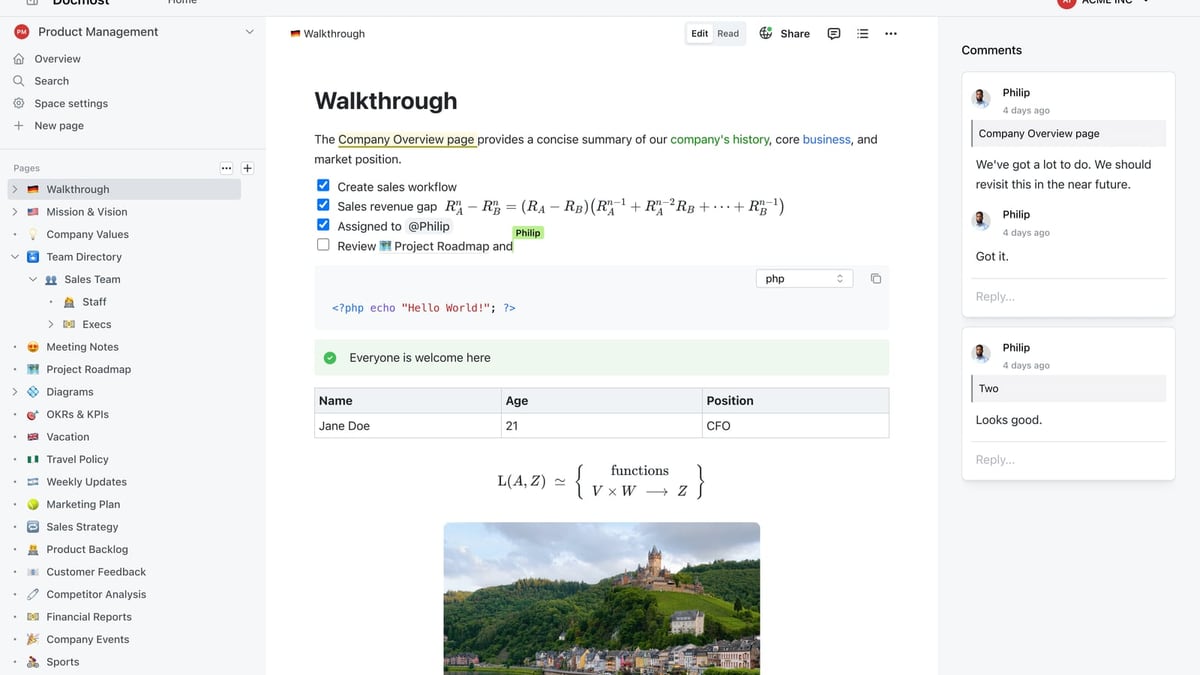
Docmost
Docmost is an open-source, self-hosted collaborative wiki that puts data control first. It combines real-time editing with an AI assistant that can connect to your own large language models (via Ollama, vLLM, etc.). With features like page verification, air-gapped deployment, and ITAR-compliant workflows, Docmost is a direct alternative to Confluence or Notion for teams that must keep everything on their own infrastructure.
Head-to-Head Comparison: Where Each Tool Excels

HelpLook vs Bloomfire vs Docmost: 2025 Comparison Guide product interface and feature overview.
AI-Powered Search and Assisted Answers
HelpLook integrates with multiple AI models (OpenAI, Azure, ERNIE Bot) to deliver an embeddable chatbot that turns your knowledge base into a 24/7 self-service agent. Both internal teams and external customers get instant, conversational answers inside your app, website, or help center.
Bloomfire uses its Synapse AI to provide natural-language answers from certified company content, with visible source citations. It also automatically transcribes video and audio, making spoken knowledge fully searchable—a standout capability for enterprises with recorded trainings, research interviews, and meeting archives. For a closer look at how Bloomfire compares to documentation-focused platforms, see their detailed analysis against Document360.
Docmost supports a self-hosted AI assistant that you can connect to your own LLM infrastructure (Ollama, vLLM, OpenAI, and others). This keeps sensitive queries within your perimeter, which is critical for regulated industries. The assistant helps with drafting, summarizing, and finding information inside your wiki spaces.
Ease of Setup, Access, and Adoption
HelpLook wins on frictionless onboarding. You can go from sign-up to a published knowledge base—complete with a custom domain and matched brand styling—in hours, no developers required. Its free tier further lowers the barrier for startups and small teams to start structuring their knowledge immediately.
Bloomfire is designed for enterprise-wide adoption with an intuitive interface that requires minimal training. However, deployment typically involves a longer scoping and implementation process, and pricing reflects a full-scale organizational rollout. External reviews note that employees often adopt it quickly without heavy IT involvement (see Guru vs Bloomfire comparison for user feedback on adoption).
Docmost requires technical ownership from the start. You deploy it on your own servers, configure SSO, and manage the underlying infrastructure. While that demands more initial effort, it rewards teams with complete control and a familiar wiki-style editing experience that encourages internal collaboration.
Content Creation, Organization, and Governance
HelpLook offers a structured portal editor with built-in SEO tools, analytics, and the ability to create nested categories and article hierarchies. Content stays organized from the start, making it easy to maintain a professional help center that ranks in search engines.
Bloomfire provides smart content organization through customizable categories, communities, and AI-assisted tagging. Its self-healing knowledge base flags outdated or redundant content, and the Q&A engine captures loose expertise that might otherwise stay in email threads. These governance features keep large, multi-department repositories trustworthy over time.
Docmost focuses on collaborative, real-time editing with page verification workflows and advanced RBAC. Teams can build structured wikis, project docs, and knowledge bases using Kanban and database views (Bases). The ability to enforce review and sign-off before pages go live supports compliance-heavy environments.
Deployment and Data Control
This is where the three products diverge most sharply.
Docmost is the only option that supports truly air-gapped, on-premises deployment. Organizations bound by ITAR, FedRAMP, or strict GDPR requirements can run Docmost entirely within their own network, with full control over data, encryption, and access logs. Self-hosted LLM support means even AI queries never leave your infrastructure.
HelpLook is a cloud-hosted SaaS platform that offers private and public knowledge bases, SSO, and role-based access. It is ideal for businesses that want fast global access without managing servers but still need reliable security and performance.
Bloomfire is also a cloud-based SaaS, with enterprise security credentials including SOC 2, GDPR compliance, SSO, SCIM, and encryption. It provides granular admin controls and integration-level security, suiting large organizations that trust a proven enterprise vendor.
If you’re weighing HelpLook against other self-hosted and enterprise tools, our HelpLook vs Archbee vs Docmost comparison breaks down similar deployment trade-offs.
Pricing and Scalability
HelpLook offers flexible plans starting with a free tier, making it accessible for startups, small businesses, and teams that want to scale as they grow. Pricing scales with the features and capacity you need, rather than imposing a blanket per-user tax.
Bloomfire uses custom, value-based pricing. Industry estimates place median enterprise costs around $158,000 per year, which includes implementation and support. That investment can drive substantial ROI through reduced call volumes and improved decision-making, but it suits well-funded organizations with broad knowledge management mandates.
Docmost is open-source and free to self-host, though you bear the full operational cost of servers, maintenance, backups, and your team’s time. For organizations that already run their own infrastructure, this can be highly cost-effective; for others, the hidden ownership costs should be calculated upfront.
For a broader look at how HelpLook stacks up against enterprise platforms on price and features, check out our HelpLook vs Document360 vs Bloomfire showdown.
Which One Should You Choose?
HelpLook vs Bloomfire vs Docmost: 2025 Comparison Guide product interface and feature overview.
| Your Primary Need | Best Fit | Why |
|---|---|---|
| Quickly launch a public help center with AI chatbot and SEO | HelpLook | No-code builder, free tier, multilingual SEO, embeddable widget |
| Activate enterprise-wide knowledge across departments and media formats | Bloomfire | Deep file indexing, video transcription, self-healing content, and knowledge engagement analytics |
| Keep all documentation and AI processing inside your own infrastructure | Docmost | Self-hosted, air-gapped, real-time collab, bring-your-own LLM |
| Need an affordable, AI-powered knowledge base to reduce support tickets | HelpLook | Cost-effective plans, rapid deployment, intent-based AI chatbot |
| Manage compliance-heavy documentation with strict review workflows | Docmost | Page verification, RBAC, audit logs, and full data sovereignty |
Related reading
- HelpLook vs Helpjuice vs Docmost: Which Tool Fits You? - A balanced comparison of HelpLook, Helpjuice, and Docmost: AI search, pricing, security, and ease of use. Find the best knowledge base for your team’s needs.
- HelpLook vs Documentation.AI vs GitBook: 2025 Comparison - Compare HelpLook, Documentation.AI, and GitBook for AI-powered knowledge bases. Discover strengths in AI search, content maintenance, pricing, and more to choose the right fit.
- HelpLook vs Docsie vs Stonly: AI Knowledge Base Showdown - Compare HelpLook, Docsie, and Stonly on AI search, interactive guides, content creation, integrations, pricing, and more. See which AI knowledge platform fits your self-service needs.
Sources and further reading
- Bloomfire Vs. Guru: A Comprehensive Guide | Bloomfire - Considering Bloomfire and Guru for knowledge management? Compare Bloomfire vs. Guru, including their features, benefits, and differences.
Frequently Asked Questions
Can I use these tools for customer-facing knowledge bases?
Yes. HelpLook and Bloomfire both support public-facing portals. HelpLook specializes in SEO-optimized, brandable customer help centers. Bloomfire allows external knowledge sharing but is primarily built for internal use. Docmost is designed for internal collaboration; public sharing is possible but a secondary use case.
Which platform works best for a small team with a limited budget?
HelpLook’s free tier and low-cost entry points make it the strongest choice for small teams wanting to start immediately. Docmost is free to deploy if you have the technical resources to self-host; otherwise, the operational overhead may cost more than a SaaS subscription.
How do these tools handle AI responses when information is missing?
HelpLook’s chatbot can be configured to escalate or deflect when confident answers aren’t available. Bloomfire’s Synapse surfaces sourced answers only from certified content, so gaps are visible via its self-healing analytics. Docmost’s AI assistant depends on the connected model’s behavior—you control the training data and response policies entirely.
Is there a tool that combines good internal wiki features with external help center?
HelpLook bridges both worlds: you can build internal knowledge bases and client-facing portals from the same platform. Bloomfire leans heavily toward internal enterprise intelligence, while Docmost is built for internal wikis first and foremost.
The Bottom Line
HelpLook vs Bloomfire vs Docmost: 2025 Comparison Guide product interface and feature overview.
HelpLook, Bloomfire, and Docmost each solve the knowledge chaos problem from their own corner. If you need a public help center that’s up and running today with AI that answers customers directly, HelpLook is the lowest-friction path. If you’re a large enterprise drowning in documents, videos, and tribal knowledge spread across departments, Bloomfire’s deep indexing and self-healing intelligence will pay off. And if security mandates require you to host everything yourself—including the AI—Docmost gives you the control that no cloud platform can match.
At HelpLook, we cut through the noise to help you pick the right knowledge infrastructure. Whether you’re comparing alternatives or ready to get hands-on, start with the platform that matches your most non-negotiable requirement: speed to launch, enterprise scale, or data sovereignty.