
HelpLook vs Docsie vs Docmost: Which Knowledge Platform Fits Your Team?
Choosing between a customer-facing AI help desk, an AI documentation platform, and a self-hosted enterprise wiki can feel like comparing apples to oranges. Yet many growing teams find themselves exactly at this crossroads. HelpLook, Docsie, and Docmost each solve overlapping problems—organizing knowledge and answering questions—but from fundamentally different angles. One prioritizes no-code self-service portals for support teams, another converts your existing recordings into structured docs, and the third gives you complete data control with open-source wiki software.
This comparison cuts through the surface-level feature lists. We’ll examine where each product genuinely excels, where they diverge, and how to match them to your team’s actual workflow, security requirements, and budget reality.
Quick Overview
HelpLook product interface.
HelpLook is an AI-powered knowledge base and help desk designed for businesses that want to build self-service portals without writing code. It combines a no-code content builder, AI-driven search and chatbot, SEO tools, and analytics. The platform targets customer support teams, e-commerce product manuals, and internal knowledge bases, with integrations into OpenAI, ERNIE Bot, and Azure. Over 10,000 brands use it to reduce support tickets and improve customer satisfaction.
Docsie positions itself as an AI documentation and training platform that converts raw content—videos, PDFs, SOPs, Loom recordings—into structured, multilingual knowledge bases. Its core workflow is CONVERT → MANAGE → DELIVER, emphasizing multi-tenant portals where one source knowledge base serves multiple branded client sites. It includes AI chatbots with agentic search, 40+ language translation, version control, and granular permissions. Docsie is built for consultancies, implementation partners, and SaaS companies managing documentation across many clients.
Docmost is an open-source, self-hosted collaborative wiki. It serves as an alternative to Confluence and Notion for teams that need on-premises deployment, full data control, and enterprise compliance (ITAR, FedRAMP, GDPR, SOC 2, ISO 27001). It offers real-time editing, an AI assistant with self-hosted LLM support (Ollama, vLLM, OpenAI), RBAC permissions, page verification workflows, SSO/SAML/OIDC/LDAP, MFA, audit logs, and air-gapped deployment. With over 3 million downloads, it’s trusted by organizations that cannot risk third-party data exposure.
Feature Comparison: Where They Diverge
Content Creation Philosophy
Docsie takes a conversion-first approach. Instead of starting from a blank editor, you upload training videos, PDFs, or websites, and its multimodal AI generates structured documentation with chapters, searchable transcripts, and summaries. This is particularly valuable when your best knowledge already exists in Zoom recordings, onboarding PDFs, or internal wikis. You monetize existing assets rather than recreating them manually.
Docmost provides real-time collaborative editing with a familiar wiki experience. Teams write documentation together in a shared space, with page verification workflows ensuring accuracy before publication. The AI assistant can help draft content, but the core model is human-driven creation with AI augmentation. This suits organizations where documentation is an ongoing, collaborative process requiring formal approval chains.
HelpLook offers a no-code, block-based content editor designed for support teams without technical writers. You build knowledge base articles, FAQs, and help centers using a visual interface. The platform emphasizes SEO optimization for public-facing portals, making it straightforward for customer support teams to create and maintain self-service content without developer assistance.
AI Capabilities and Search
HelpLook integrates with leading AI models (OpenAI, ERNIE Bot, Azure) to power its search and chatbot features. The AI-driven search understands user intent and delivers relevant articles from your knowledge base. The chatbot can deflect support tickets by answering common questions automatically. Built-in analytics track what users search for, revealing content gaps.
Docsie implements agentic AI search with tool calls—a step beyond standard RAG (Retrieval-Augmented Generation). Its AI can execute specific actions based on user questions, call APIs for real-time data, chain multiple queries for complex questions, and provide cited, traceable answers with source links. For customer-facing documentation, this means the chatbot reasons about intent and executes workflows, not just retrieves text chunks.
Docmost offers an AI assistant that supports self-hosted LLMs (Ollama, vLLM) alongside cloud models like OpenAI. This is critical for organizations that cannot send data to external AI providers. The assistant helps with writing, summarization, and search within your wiki, all while keeping data within your own infrastructure.
Deployment and Data Control
Docmost is the clear leader for self-hosting and data sovereignty. It supports on-premises deployment, air-gapped environments, and full control over where data resides. Compliance certifications (ITAR, FedRAMP, SOC 2, ISO 27001) and enterprise security features (SCIM provisioning, audit logs, MFA) make it suitable for government, defense, healthcare, and financial services. If your organization mandates that documentation never leaves your servers, Docmost is purpose-built for this requirement.
Docsie and HelpLook are cloud-hosted SaaS platforms. Docsie offers data residency options and enterprise compliance features for regulated industries, but the core architecture is cloud-based. HelpLook provides customizable site branding and secure access controls, but does not offer self-hosted deployment.
Multi-Tenant Portals and Client Delivery
Docsie was architected for multi-tenancy. You create one knowledge base and deploy it to unlimited client-branded portals, each with custom domains, white-labeling, and separate analytics. Update the source once, and all portals sync. This architecture serves consultancies, implementation partners, and SaaS companies delivering documentation to multiple enterprise customers from a single source of truth.
HelpLook supports multiple use cases (customer portals, internal knowledge bases, product manuals) within its platform, but is designed around individual site instances rather than a centralized multi-tenant management layer.
Docmost focuses on internal team collaboration. While it supports public sharing and team spaces, it is not built for delivering branded, multi-tenant client portals at scale.
Pricing Transparency
Docsie offers all-inclusive pricing tiers that bundle AI chatbots, analytics, API access, embeddable widgets, multi-tenant portals, and 100+ language translation into transparent plans. This avoids the add-on escalation common in documentation tools where base prices look low but essential features cost extra.
HelpLook provides a free tier alongside subscription plans that scale with AI credits and resources. This allows teams to start without upfront investment and upgrade as usage grows.
Docmost is open-source, meaning the software itself is free. Costs come from your own infrastructure, maintenance, and optional enterprise support. For organizations with existing DevOps capabilities, this can be highly economical at scale, though it requires internal resources to manage.
When HelpLook Has the Edge

HelpLook product interface.
HelpLook stands out when your primary goal is building a customer-facing self-service portal that reduces support tickets. Its no-code interface lets support teams—not developers—create and maintain help centers. The integrated AI chatbot, powered by models like OpenAI and ERNIE Bot, deflects common questions automatically. Built-in SEO optimization ensures your help content ranks in search engines, helping customers find answers before contacting support. For e-commerce product manuals, SaaS help desks, and internal knowledge bases where ease of setup and AI-driven deflection matter most, HelpLook provides a streamlined path from zero to live portal.
When Docsie Excels
Docsie product interface.
Docsie is the right choice when your documentation debt lives in videos, PDFs, and recordings rather than in unwritten drafts. Its video-to-docs conversion and multi-tenant architecture solve two painful problems: recreating existing knowledge manually and managing documentation across multiple clients or subsidiaries. If you’re a consultancy delivering branded knowledge bases to 20 clients, a SaaS company serving enterprise customers with separate portals, or a training-heavy organization with hundreds of hours of recorded sessions, Docsie’s convert-and-deliver model saves weeks of manual work. The agentic AI search also provides more sophisticated chatbot interactions than basic semantic search.
When Docmost Wins
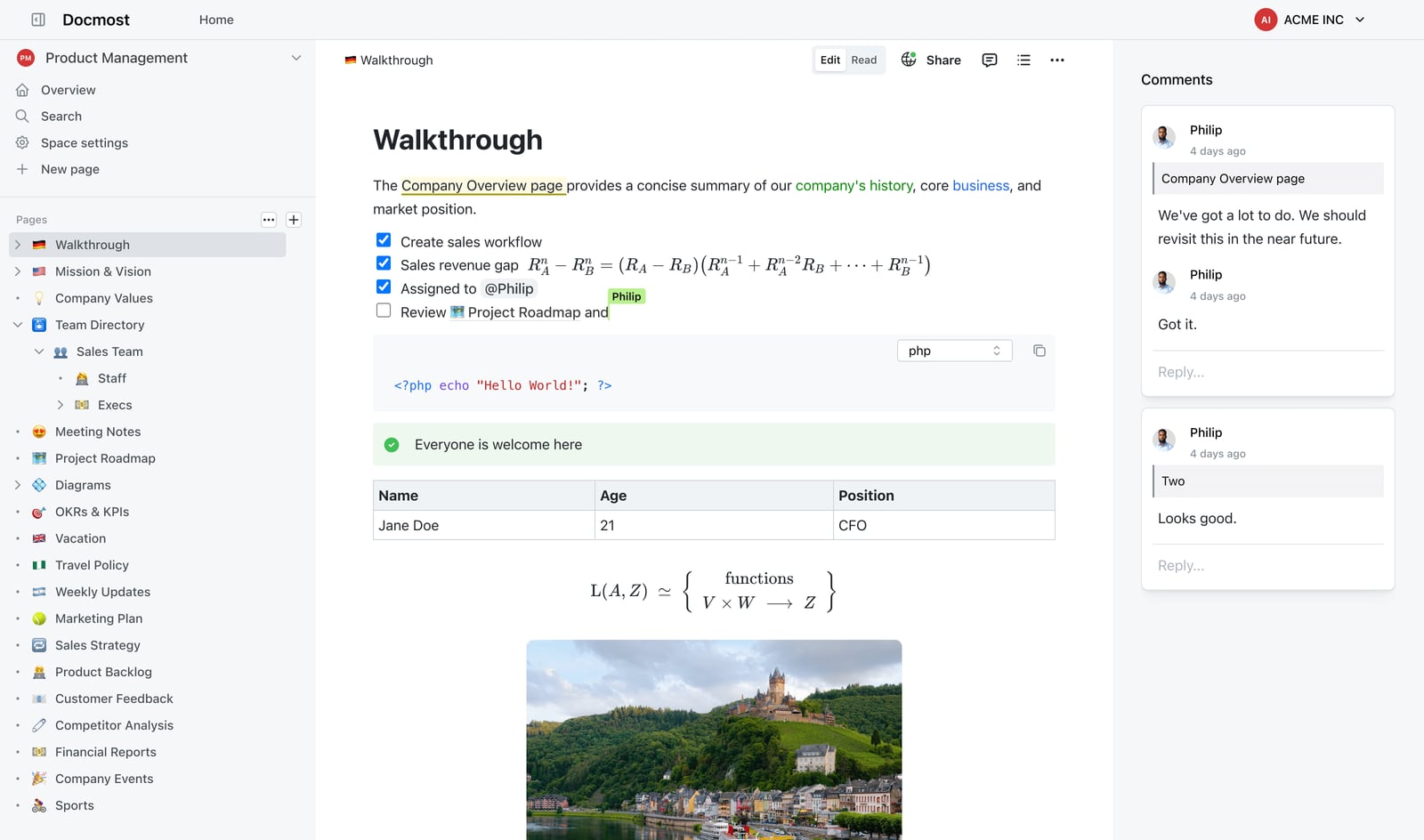
Docmost product interface.
Docmost is the answer when data control is non-negotiable. Government agencies, defense contractors, healthcare providers, and financial institutions that must comply with ITAR, FedRAMP, or strict GDPR requirements need documentation that never leaves their infrastructure. Docmost’s self-hosted architecture, air-gapped deployment support, and self-hosted LLM integration make it uniquely suited for these environments. It’s also the best fit for organizations that prefer open-source software, want to avoid vendor lock-in, and have the DevOps resources to manage their own wiki. The collaborative editing and page verification workflows make it strong for internal knowledge management where formal approval processes matter.
Side-by-Side Comparison Table
| Criteria | HelpLook | Docsie | Docmost |
|---|---|---|---|
| Primary Use Case | Customer self-service portals & help desks | AI documentation from existing content; multi-tenant delivery | Self-hosted internal wikis & compliance docs |
| Content Creation | No-code block editor | Video/PDF/website conversion + editor | Real-time collaborative editing |
| AI Search | AI search & chatbot (OpenAI, ERNIE, Azure) | Agentic AI with tool calls | AI assistant with self-hosted LLM support |
| Deployment | Cloud SaaS | Cloud SaaS (data residency options) | Self-hosted, air-gapped, on-premises |
| Multi-Tenant Portals | Individual site instances | Unlimited branded portals from one KB | Team spaces, not multi-tenant client portals |
| Compliance | Standard cloud security | Enterprise SSO, audit logs | ITAR, FedRAMP, SOC 2, ISO 27001, GDPR |
| Languages | Multi-language support | 40+ language auto-translation | Community translations |
| Pricing Model | Free tier + subscription plans with AI credits | All-inclusive transparent tiers | Open-source (free) + infrastructure costs |
| Best For | Support teams, e-commerce, SaaS help desks | Consultancies, training-heavy orgs, multi-client delivery | Regulated industries, government, defense, healthcare |
Decision Framework: Which One Should You Choose?
Choose HelpLook if:
- You need a customer-facing help desk and self-service portal with minimal setup.
- Your support team wants to build and maintain content without developers.
- AI-driven ticket deflection and SEO-optimized help articles are priorities.
- You want integrated analytics to track what customers search for.
Choose Docsie if:
- You have extensive training videos, PDFs, or recordings that need to become structured documentation.
- You serve multiple clients or subsidiaries and need branded, multi-tenant portals from one knowledge base.
- You want all-inclusive pricing without add-on surprises for AI, analytics, and multilingual support.
- Your chatbot needs to execute workflows, not just retrieve text chunks.
Choose Docmost if:
- Your organization requires self-hosted, air-gapped deployment for compliance or security reasons.
- You need ITAR, FedRAMP, SOC 2, or ISO 27001 compliant documentation.
- You prefer open-source software with full data control and no vendor lock-in.
- You have DevOps resources to manage your own infrastructure.
Real-World Scenarios
Scenario 1: SaaS Support Team Scaling Self-Service A growing SaaS company wants to reduce support tickets by building a public help center. The support team has no dedicated technical writers. They need an AI chatbot that answers questions from existing articles and SEO tools to help customers find answers via search engines. HelpLook fits this scenario with its no-code editor, integrated AI chatbot, and SEO optimization.
Scenario 2: Consultancy Delivering Documentation to Multiple Clients An implementation partner configures the same software platform for 15 enterprise clients. Each client needs a branded documentation portal with custom domain and separate analytics. The consultancy has hundreds of training videos and PDFs from past implementations. Docsie solves this with video-to-docs conversion and multi-tenant portals that sync updates across all clients from one source knowledge base.
Scenario 3: Defense Contractor Managing Internal Procedures A defense contractor needs to document internal SOPs, compliance procedures, and engineering specifications. All documentation must remain on-premises with air-gapped deployment. The team requires page verification workflows, SSO integration, and audit logs for every access. Docmost meets these requirements with self-hosted deployment, FedRAMP/ITAR support, and granular permissions.
Related reading
- HelpLook vs Bloomfire vs GitBook: 2026 Comparison - Compare HelpLook, Bloomfire, and GitBook on AI search, knowledge management, pricing, and ease of use. Find the best fit for your team in 2026.
- HelpLook vs HelpCenter.io vs Stonly: 2026 Comparison - Compare AI knowledge bases HelpLook, HelpCenter.io, and Stonly on interactive guides, AI search, pricing, and self-service support. Find the best fit for your team.
Sources and further reading
- Docsie vs Archbee Documentation Platform Comparison 2026 | Features Pricing & AI Tools Guide | Best Documentation Software for Dev Teams & Technical Writers | Knowledge Base Platform Review - Docsie and Archbee both serve documentation needs, but differ fundamentally in scope and pricing transparency. Docsie converts videos, PDFs, and websites into multi-tenant knowledge bases with full AI capabilities included. Archbee targets developer
- Docsie Reviews 2026: Details, Pricing, & Features - Docsie is an innovative documentation management tool designed for ease of use and efficiency. It stands out with its AI-powered features, enabling automated ...
- How to Use Docsie AI Templates to Turn Videos into a Technical Runbooks - Enjoy the videos and music you love, upload original content, and share it all with friends, family, and the world on YouTube.
FAQ
Can I migrate my existing knowledge base to these platforms? Yes, all three support imports. HelpLook offers content import tools for common formats. Docsie specializes in converting existing content—videos, PDFs, websites—into structured documentation automatically. Docmost supports markdown and rich text imports for wiki migration.
Which platform is best for API documentation? Docsie and HelpLook can both host API documentation, but neither is purpose-built for OpenAPI/Swagger interactive explorers. If API docs are your primary use case, you may want to evaluate specialized tools alongside these platforms.
Does HelpLook support self-hosting? No, HelpLook is a cloud-hosted SaaS platform. For self-hosting requirements, Docmost is the appropriate choice among these three options.
How does pricing scale for larger teams? HelpLook offers tiered plans with AI credits that scale with usage. Docsie provides all-inclusive pricing tiers without per-seat add-on escalation. Docmost is open-source and free, with costs scaling based on your infrastructure rather than user count.
Can I use these platforms for internal documentation only? Yes. HelpLook supports internal knowledge bases. Docsie handles internal training documentation and SOPs. Docmost is purpose-built for internal wikis and knowledge management, with team spaces and verification workflows.
Conclusion
HelpLook, Docsie, and Docmost represent three distinct philosophies in knowledge management. HelpLook optimizes for support teams building customer-facing self-service portals with AI-driven deflection. Docsie reimagines documentation as a conversion and multi-tenant delivery problem, turning existing recordings into structured knowledge bases that serve many clients from one source. Docmost prioritizes data sovereignty and compliance, giving regulated organizations an open-source wiki they fully control.
The right choice depends on what you’re protecting, who creates your content, and who consumes it. If you’re curious about how HelpLook stacks up against other knowledge base and documentation tools, explore our comparisons with HelpLook vs KnowledgeOwl vs Docmost for a deeper look at self-hosting and permissions, or HelpLook vs Docsie vs Mintlify to see how developer-focused documentation tools compare. For a broader view on AI knowledge bases for customer support, check out our HelpCenter.io vs DocsBot vs HelpLook comparison.