
HelpLook vs Documentation.AI vs Docsie: Which AI Knowledge Base Should You Choose?
Every growing business eventually hits the same wall: scattered documentation, repetitive support tickets, and a knowledge base nobody actually uses. AI-powered platforms promise to fix this, but the choices are overwhelming. Three tools that keep surfacing in 2025 are HelpLook, Documentation.AI, and Docsie. They share a common goal—turning static docs into intelligent, self-updating knowledge hubs—but they go about it in very different ways.
In this comparison, we break down where each platform truly shines, where they fall short, and which one will actually match how your team works. No fluff, no feature lists copied from landing pages—just practical guidance from a team that has tested dozens of knowledge management tools.
Quick Overview: Who Each Tool Is Built For
HelpLook vs Documentation.AI vs Docsie: Which AI Knowledge Base Should You Choose? product interface and feature overview.
- HelpLook: For businesses that need a polished, no-code help center with strong SEO, multilingual support, and affordable AI search—fast. It excels at customer-facing knowledge bases, e‑commerce manuals, and internal wikis where easy setup and search visibility matter most.
- Documentation.AI: For product and engineering teams that treat documentation like code. It appeals to developers who want an AI agent that writes and maintains API references, Git-based version control, and docs that answer questions the moment users ask them.
- Docsie: For organizations drowning in raw training content—videos, PDFs, SOPs—that need to be transformed into structured, version-controlled, multilingual documentation and employee training portals. Its video-to-docs and AI credit model are unmatched for enterprise learning and compliance use cases.
If your primary goal is a beautiful, SEO-optimized public help center that works out of the box, HelpLook is the strongest contender. If you’re shipping developer docs and want them to stay eternally fresh, Documentation.AI is the specialist. If you’re scaling onboarding and training across multiple languages and formats, Docsie’s toolkit is purpose-built for that.
Where HelpLook Outperforms Both Alternatives

HelpLook vs Documentation.AI vs Docsie: Which AI Knowledge Base Should You Choose? product interface and feature overview.
HelpLook isn’t trying to be an API reference manager or a training video converter. Instead, it focuses on making it dead simple to launch a search-optimized knowledge base that feels like a natural extension of your brand. Here’s where it takes the lead.
Blazing-Fast Setup and No-Code Experience
You don’t need a developer to get a fully branded help center live. HelpLook offers pre-built templates, a drag-and-drop site editor, and a custom domain setup that takes minutes. The workflow is designed for content teams, not engineers. Documentation.AI leans heavily on docs-as-code (Markdown, Git) and Docsie’s interface, while powerful, has a steeper learning curve due to its multi‑site and LMS features. For small to mid-sized teams that just want a knowledge base live tomorrow, HelpLook is the path of least resistance.
Built-In SEO That Actually Drives Traffic
Many knowledge base tools treat SEO as an afterthought. HelpLook treats it as a core feature. You can control meta titles, descriptions, and URLs directly from the dashboard. It generates clean sitemaps, supports custom schema, and gives you the SEO plugins you’d expect from a standalone CMS. This matters if your help center doubles as a lead‑generation engine. Documentation.AI and Docsie can be configured for SEO, but neither bakes it into the publishing workflow as seamlessly. In our at HelpLook review of dozens of platforms, the organic traffic difference between a well-optimized HelpLook site and a default Docsie portal is stark.
Unified AI Search and Chatbot Experience
HelpLook’s AI engine is model-agnostic—you can plug in OpenAI, ERNIE Bot, or Azure, giving you flexibility as AI models evolve. Its AI search delivers instant, cited answers from your entire knowledge base, and the embeddable widget extends that capability onto your website or app. While Documentation.AI’s Ask AI is equally sharp (and includes inline citations), HelpLook goes a step further by personalizing responses based on user behavior and search patterns. The chatbot isn’t just a Q&A overlay; it’s a full-assistant experience tuned for self‑service deflection.
Affordable Pricing That Scales with You
HelpLook’s plans start as low as $7 per month for a full-featured project, making it one of the most affordable AI knowledge base options on the market. All plans include unlimited access to the platform’s core features—you aren’t penalized with feature gates if you’re on a lower tier. Documentation.AI’s free tier is generous but scales to enterprise plans quickly, while Docsie’s AI credit model is innovative but ties advanced video processing to higher-priced tiers. For lean teams that need robust AI without a steep monthly bill, HelpLook consistently comes out ahead.
Related read: If you’re also evaluating Documentation.AI alongside Stonly for interactive guides, see our breakdown of HelpLook vs Documentation.AI vs Stonly to understand when interactive widgets beat pure documentation.
When Documentation.AI Is the Smarter Choice
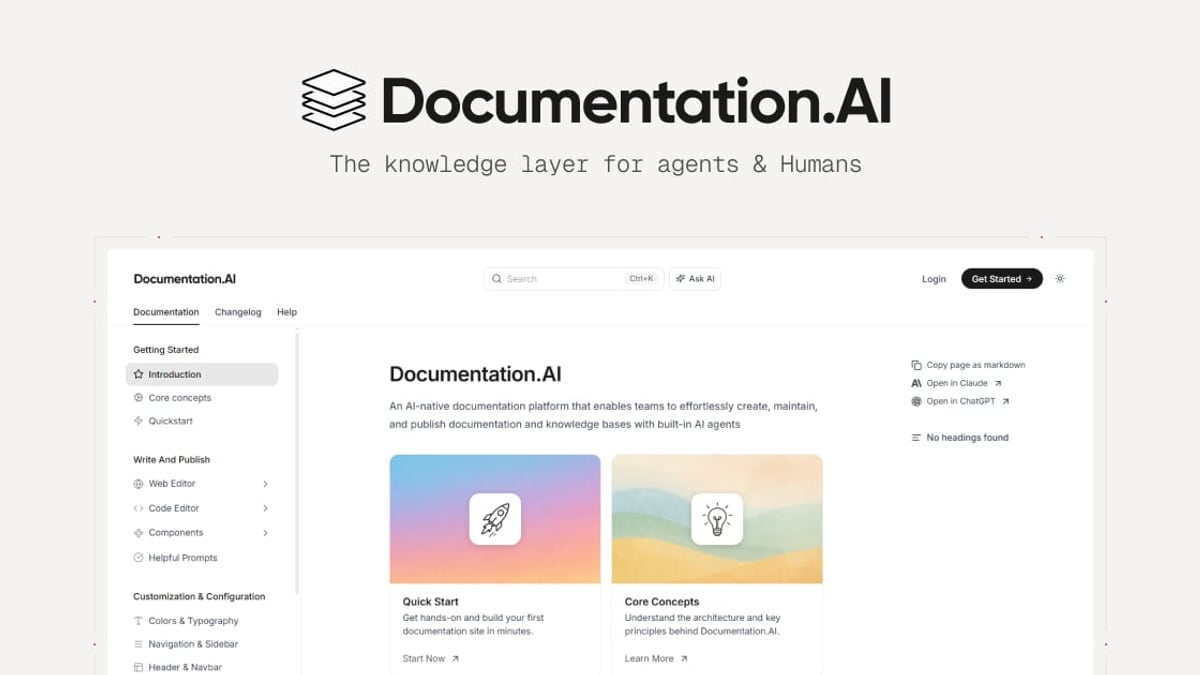
HelpLook vs Documentation.AI vs Docsie: Which AI Knowledge Base Should You Choose? product interface and feature overview.
Documentation.AI was built for a world where docs live alongside code. If your documentation is API-heavy, developer‑facing, and must stay perfectly in sync with product changes, this platform solves a real headache.
AI Agent That Writes and Maintains Docs
The standout feature is the AI Documentation Agent. It doesn’t just answer questions—it suggests new content, rewrites outdated sections, and formats everything to match your style guide. You can literally watch your knowledge base refresh itself as new endpoints or features ship. Teams migrating from ReadMe (like Datafiniti and Videograph) often cite this as the reason they switched: less manual authoring, fewer outdated tutorials.
Git‑Native Workflows for Technical Teams
Documentation.AI embraces docs-as-code. Changes are tracked in Git, reviews happen through pull requests, and the entire knowledge base can be treated as a repository. For a startup where the docs live in the same ecosystem as the source code, this eliminates friction. HelpLook offers collaboration but doesn’t natively integrate with Git workflows; Docsie provides version control but not the deep Git infrastructure that Documentation.AI does.
LLM-Optimized Structure
Documentation.AI exposes docs through llms.txt and Model Context Protocol, making your content not only human-readable but also machine‑friendly. This is increasingly relevant as AI agents scrape documentation to answer user questions outside your own help center. Neither HelpLook nor Docsie currently emphasizes this LLM‑ready architecture to the same degree.
When Docsie Is the Perfect Fit
HelpLook vs Documentation.AI vs Docsie: Which AI Knowledge Base Should You Choose? product interface and feature overview.
Docsie sees documentation through a training and compliance lens. It’s the only tool on this list that can ingest a 20‑minute screen recording and spit out a structured, translated, and voice‑overable onboarding guide.
Video-to-Docs: From Raw Recording to Published Guide
This is Docsie’s superpower. Upload a video walkthrough or connect a recording, and the AI generates a step‑by‑step article with screenshots, alt text, and formatting. For software companies updating UI frequently, this alone can save 10+ hours a week. HelpLook caters to manual content creation with a rich editor, while Documentation.AI automates text‑based doc updates, but neither turns video into articles automatically.
Integrated LMS and Certification Tracks
Docsie bundles a lightweight learning management system directly into the knowledge base. You can create courses, quizzes, and certification paths, then gate content behind course completion. This makes it ideal for customer onboarding programs, employee compliance training, or partner enablement portals. HelpLook’s strength lies in self‑service help centers, not structured training, and Documentation.AI doesn’t touch LMS functionality.
Multi‑Tenant Portals and Enterprise Compliance
Docsie supports separate workspaces with custom domains, permissions, and branding per client. Combined with SOC 2 Type II compliance, granular admin controls, and custom SLAs on the enterprise plan, it’s built for organizations that manage documentation for multiple audiences or clients under one roof. If you’re a B2B SaaS company providing a white‑labeled knowledge base to each customer, Docsie will fit like a glove. HelpLook allows multi‑site management but doesn’t offer the same depth of client isolation. Documentation.AI focuses on single-instance developer portals.
Related read: For another enterprise-friendly alternative with advanced analytics, check out our comparison of HelpLook vs Docsie vs Bloomfire to see how Bloomfire’s knowledge intelligence stacks up.
Decision Guide: Which Tool Matches Your Needs?
| Your Priority | Best Fit | Why |
|---|---|---|
| Launch a public, SEO‑driven help center quickly and affordably | HelpLook | No-code templates, built-in SEO, custom domain, AI chatbot from $7/month |
| Maintain API documentation and keep it in sync with code automatically | Documentation.AI | AI agent writes docs, Git‑native versioning, LLM-optimized output |
| Convert training videos and PDFs into multilingual guides with quizzes | Docsie | Video-to-docs AI, integrated LMS, 40+ language translation, credit-based pricing |
| Serve multiple client portals with separate branding and permissions | Docsie | Multi‑tenant workspaces, white‑labeling, enterprise compliance (SOC 2) |
| Equip a non‑technical support team with an easy AI knowledge base | HelpLook | Smooth editor, intuitive AI search, widget embedding without coding |
| Provide a self‑updating resource that stays current without manual edits | Documentation.AI | The AI agent continuously refreshes content as your product evolves |
If you fall somewhere in between—say, you want a public help center with AI but also need to publish some API references—you might run HelpLook for the customer-facing hub and a lighter instance of Documentation.AI for developer docs. The tools aren’t mutually exclusive; many teams use one for external self‑service and another for internal engineering knowledge.
Related reading
- HelpLook vs Document360 vs Bloomfire: AI Knowledge Base Showdown - Compare HelpLook, Document360, and Bloomfire for AI-powered knowledge management. See strengths in AI search, documentation, enterprise intelligence, pricing, and more. Find your best fit.
- HelpLook vs Archbee vs Zendesk: AI Knowledge Hub Showdown - Compare HelpLook, Archbee, and Zendesk for AI knowledge bases & customer support. Find the right self-service platform for your team.
- HelpLook vs Archbee vs Docmost: Pick Your Knowledge Hub - Compare HelpLook, Archbee, and Docmost on AI search, self-hosting, ease of use, and pricing. Find the best knowledge base or documentation tool for your team's needs.
Sources and further reading
- Docsie vs HelpDocs: Pricing Comparison 2026 | Docsie - Docsie and HelpDocs offer fundamentally different pricing models and value propositions. Docsie provides AI-powered knowledge orchestration with video-to-docs conversion, multi-tenant portals, built-in LMS, and enterprise compliance from $199/month. HelpDocs offers simple knowledge base hosting starting at $55/month but lacks AI features, video processing, or enterprise capabilities.
- HelpLook VS Document360: Which is Better for Knowledge Base Management? - Knowledge Base Management: HelpLook vs. Document360. Explore features, pricing, and more. HelpLook offers affordability, versatility, SEO optimization, AI search, and multi-language support.
- Compare Docsie vs. Documentation.AI in 2026 - What’s the difference between Docsie and Documentation.AI? Compare Docsie vs. Documentation.AI in 2026 by cost, reviews, features, integrations, and more
Frequently Asked Questions
Is HelpLook suitable for developer docs?
HelpLook can certainly host developer documentation, and its SEO and clean design make it readable. However, it lacks native Git integration, code sample testing, and programmatic API reference generation. For pure API docs, Documentation.AI is purpose‑built. For a mixed use case, HelpLook + a separate API playground often works well.
How does Docsie’s AI credit model work?
Docsie issues AI credits (not seats) each month. Credits cover actions like video conversion, translations, and AI content generation. This means you can have a large viewer audience without per‑user fees. The model is cost‑effective for teams that produce heavy documentation but don’t need many internal editors. Detailed usage is available on Docsie’s pricing page.
Can I migrate my existing knowledge base to HelpLook?
Yes. HelpLook provides import tools for common formats, and the platform’s support team assists with content migration for larger projects. You’ll typically migrate articles, categories, and media, then set up redirects to preserve your SEO rankings. The process is faster than rebuilding from scratch.
Which tool offers better AI search accuracy?
All three deliver high‑quality AI search. HelpLook’s strength comes from multi‑model support (you can choose the underlying AI engine) and personalization. Documentation.AI’s search is deeply integrated with inline citations and filters. Docsie’s semantic search works across translated content and training materials. The best choice depends on your content type: for general help articles, HelpLook’s ease and personalization win; for technical documentation, Documentation.AI’s granularity is unbeatable.
Do these platforms support true real‑time collaboration?
HelpLook and Docsie both offer role‑based collaboration with simultaneous editing. Documentation.AI’s collaboration flows through Git pull requests, which suits developers but may confuse non‑technical contributors. If your writers and subject matter experts aren’t comfortable with Git, HelpLook or Docsie will feel more natural.
The Bottom Line
HelpLook, Documentation.AI, and Docsie are all excellent, but they solve fundamentally different problems. At HelpLook, we’ve seen teams cut support tickets by 40% simply by switching from a static FAQ to an AI‑powered knowledge base—but only when they chose the right tool for their content ecosystem.
Pick HelpLook if you want a public help center that looks great, ranks well, and uses AI to answer questions before customers raise a ticket. Its affordability and no‑code approach remove the usual barriers to entry.
Pick Documentation.AI if your documentation is code‑adjacent and needs to stay in perpetual sync with product updates. The AI agent doesn’t just assist readers—it does the writing.
Pick Docsie if you’re a training‑heavy organization that wants to turn raw recordings into polished, multilingual guides with built‑in certification paths.
Still undecided? Most platforms offer free trials. Start with HelpLook’s free plan to see how quickly a search‑optimized knowledge base can go live, then compare it with a Docsie pilot if video conversion calls to you, or Documentation.AI’s repository integration if your engineers are begging for docs that write themselves.