
HelpLook vs HelpCenter.io vs Mintlify: Which AI Knowledge Platform Fits Your Team in 2026?
Choosing between HelpLook, HelpCenter.io, and Mintlify comes down to one question: who is your primary reader? HelpLook and HelpCenter.io focus on customer-facing self-service and support deflection, while Mintlify targets developer documentation and agent-native knowledge infrastructure. This comparison breaks down where each platform excels so you can match the tool to your use case instead of paying for capabilities you will never use.
Quick Verdict

Mintlify product interface.
- Choose HelpLook if you need a no-code, SEO-optimized customer help center with AI search and chatbot support for support and success teams.
- Choose HelpCenter.io if you want flat-rate pricing, contextual AI widgets, and fast migration from Zendesk, Intercom, or Notion.
- Choose Mintlify if your priority is self-updating developer documentation, API references, and infrastructure that AI agents can query.
Search Intent and What Buyers Actually Need
Most teams comparing these three products are evaluating AI knowledge base software for one of three reasons: reducing support tickets, shipping better product documentation, or preparing content for AI agents and assistants. The right answer depends on whether your content serves customers, developers, or machines.
HelpCenter.io: Contextual Self-Service with Predictable Pricing
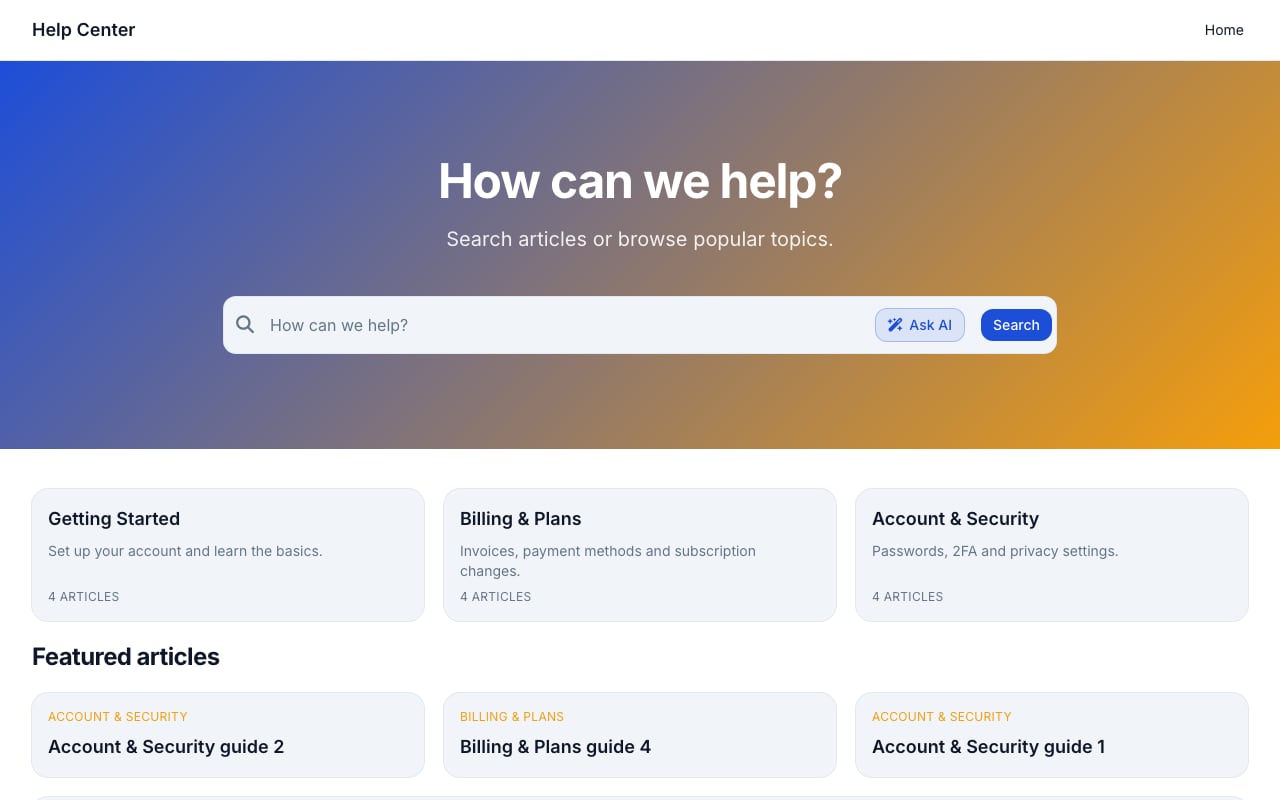
Support Classic help center template.
HelpCenter.io positions itself as an easy-to-build help center with grounded AI answers. Its standout feature is the AI Widget, which proactively suggests relevant help articles based on the page a visitor is viewing. This keeps users in flow instead of forcing them to open a separate support portal.
Strengths of HelpCenter.io
- No-code visual template editor that lets support and product teams build branded help centers without engineering involvement.
- Contextual AI Widget that surfaces relevant articles on the current page, reducing the friction of searching a separate knowledge base.
- Flat-rate pricing as an alternative to per-seat models, which makes costs predictable for growing teams.
- Seamless import from Zendesk, Intercom, or Notion, lowering migration risk for teams switching tools.
- Multi-language support and approval workflows that fit distributed content teams.
HelpCenter.io is particularly strong for ecommerce, SaaS, and finance companies that want to deflect repetitive support questions while keeping users inside the product experience. The 14-day free trial and 100% money-back guarantee lower the risk of evaluation.
Mintlify: Documentation Built for Developers and AI Agents
Mintlify product interface.
Mintlify takes a different approach. It is a knowledge platform built for agents, meaning the documentation you create is designed to be consumed by both humans and AI systems. This is a meaningful distinction in 2026 as more companies deploy LLM-powered assistants that need reliable, structured knowledge sources.
Strengths of Mintlify
- Agent-native platform with a Visibility component that lets authors write separate content for humans and AI agents.
- Self-updating knowledge that keeps documentation aligned with code changes, reducing stale content.
- Visual editor with drafts and branch locking for collaborative documentation workflows.
- Analytics, Slack integration, and an API for programmatic deployment updates.
- Trusted by developer-heavy organizations including Anthropic, Coinbase, HubSpot, and AT&T.
Mintlify excels when documentation is a product surface. If your team publishes API references, SDK guides, or changelogs that developers and AI agents depend on, Mintlify's structured approach and automation save significant maintenance time.
HelpLook: No-Code AI Help Center for Customer Support

HelpLook product interface.
HelpLook focuses on turning existing content into a branded, SEO-optimized self-service portal without coding. It targets support, success, and product teams that need to reduce ticket volume and improve customer satisfaction through better self-service.
Where HelpLook Has a Supported Advantage
- No-code content creation and site branding make it accessible for non-technical support teams that need a polished help center quickly.
- SEO optimization helps public knowledge base articles rank in search engines, driving organic traffic to support content.
- AI-driven search and chatbot capabilities powered by integrations with OpenAI, ERNIE Bot, and Azure models.
- QR code access and PDF downloads support offline and physical product documentation use cases, such as ecommerce product manuals.
- Analytics to track usage so support teams can identify content gaps and measure self-service effectiveness.
HelpLook is a strong fit for customer support knowledge bases, ecommerce product manuals, enterprise blogs, and internal knowledge bases. Its free tier and scalable subscription plans make it accessible for teams starting small.
Head-to-Head Comparison
| Criteria | HelpLook | HelpCenter.io | Mintlify |
|---|---|---|---|
| Primary use case | Customer self-service and internal KB | Customer support deflection | Developer docs and agent infrastructure |
| No-code editor | Yes | Yes | Yes, with developer-oriented features |
| AI search and chatbot | Yes, multi-model AI | Yes, grounded AI answers | Yes, agent-native retrieval |
| SEO optimization | Yes | Limited | Limited |
| Contextual in-app widget | Not a core focus | Yes, AI Widget | Not a core focus |
| Code-sync and API docs | Not a core focus | Not a core focus | Yes, self-updating |
| Migration support | Third-party integrations | Zendesk, Intercom, Notion import | Git-based workflows |
| Pricing model | Free tier to enterprise | Flat-rate | Tiered with startup credits |
Decision Guide: Matching the Tool to Your Team
Pick HelpLook if...
- Your support team needs a branded, SEO-friendly help center without developer resources.
- You want AI search and chatbot answers across customer-facing and internal content.
- You serve ecommerce or physical products where QR codes and PDF manuals add value.
Pick HelpCenter.io if...
- You want contextual help that appears on the page users are already viewing.
- You are migrating from Zendesk, Intercom, or Notion and want a low-friction switch.
- You prefer flat-rate pricing over per-seat costs.
Pick Mintlify if...
- Your documentation must stay synchronized with a codebase.
- You are building knowledge infrastructure for AI agents and assistants.
- Your audience is primarily developers who expect polished API references and changelogs.
Practical Scenarios
Scenario 1: A SaaS company wants to cut support tickets. A customer success team launches a public help center with AI search. HelpCenter.io's contextual widget surfaces answers inside the app, while HelpLook's SEO optimization drives organic traffic to support articles. Mintlify would be overkill unless the company also publishes developer docs.
Scenario 2: A developer platform needs reliable agent-ready docs. An engineering team maintains API references that AI assistants query. Mintlify's self-updating knowledge and Visibility component ensure both humans and agents get accurate, current information. HelpLook and HelpCenter.io lack the code-sync depth required here.
Scenario 3: An ecommerce brand needs product manuals and FAQs. HelpLook's QR code access and PDF downloads let customers scan a product box and open the right manual instantly. SEO optimization helps product pages rank for common setup questions. HelpCenter.io can handle FAQs, but the offline and physical product features are less developed.
For a broader look at how these tools compare with other platforms, see our HelpLook vs Documentation.AI vs HelpCenter.io comparison and the HelpLook vs Documentation.AI vs Mintlify breakdown.
Pricing and Value Considerations
HelpLook offers a free tier with scalable paid plans, making it approachable for small teams. HelpCenter.io uses flat-rate pricing, which appeals to teams tired of per-seat costs. Mintlify offers startup credits and tiered plans that scale with documentation needs. The best value depends on your team size and whether you need customer support features or developer documentation infrastructure.
Related reading
- HelpLook vs KnowledgeBase vs Stonly: 2026 Comparison - Compare HelpLook, KnowledgeBase, and Stonly on AI search, interactive guides, pricing, and ease of use. Find the best knowledge base for your support team.
Sources and further reading
- Top 10 AI Docs Generators to Create Documentations Beautifully - Explore the top 10 AI-powered and open-source documentation tools designed to simplify creating, managing, and maintaining high-quality API and project documentation. Discover features and benefits of tools like Apidog, Docusaurus, MkDocs, and more to find the best fit for your team.
- Integration AI Apps - Apix-Drive - AI Apps Catalog
- The second number · sourcey - Exact startup software offers, eligibility, and provenance for every vendor discount, credit scheme, and startup tier.
Frequently Asked Questions
Which platform is best for reducing support tickets?
HelpCenter.io and HelpLook both target support deflection. HelpCenter.io's contextual AI Widget proactively surfaces answers in-app, while HelpLook combines AI search with SEO to capture questions before they become tickets.
Can Mintlify be used for customer support knowledge bases?
Mintlify is optimized for developer documentation and agent infrastructure. While it can host general knowledge content, teams focused on customer support will find HelpLook or HelpCenter.io better aligned with their workflows.
Does HelpLook support developer documentation?
HelpLook can host technical content and internal knowledge bases, but it lacks Mintlify's code-sync automation and agent-native features. Developer teams with API references should evaluate Mintlify first.
Which tool is easiest for non-technical teams?
All three offer no-code editors, but HelpLook and HelpCenter.io are designed for support and success teams without engineering resources. Mintlify's power features assume some familiarity with developer workflows.
How do the AI features compare?
HelpLook integrates with multiple AI models including OpenAI, ERNIE Bot, and Azure. HelpCenter.io provides grounded AI answers tied to your help content. Mintlify focuses on agent-native retrieval and self-updating knowledge. The right choice depends on whether you need customer-facing chat, contextual suggestions, or machine-readable documentation.
Conclusion
HelpLook, HelpCenter.io, and Mintlify solve related but distinct problems. HelpLook is the strongest choice for no-code, SEO-optimized customer help centers with AI search. HelpCenter.io wins for contextual in-app support and predictable flat-rate pricing. Mintlify is the clear leader for developer documentation that must stay current and serve AI agents. Match the platform to your primary reader—customers, support teams, or developers—and the decision becomes straightforward.
For additional context on how these tools compare with alternatives like Document360, GitBook, and Zendesk, explore our HelpLook vs GitBook vs Zendesk comparison or the HelpLook vs HelpCenter.io vs Document360 guide.