
HelpLook vs KnowledgeBase vs Docmost: Which Knowledge Base Fits Your Team?
Choosing between HelpLook, KnowledgeBase, and Docmost comes down to one question: what problem are you actually solving? HelpLook is a no-code, AI-powered customer support knowledge base. KnowledgeBase is an AI-driven self-service platform built for support teams that already live in the Text ecosystem. Docmost is an open-source, self-hosted enterprise wiki for teams that need full data control. They overlap on the surface, but each one wins in a different scenario.
This guide breaks down the strengths of each tool, where they differ, and how to pick the right one for your use case.
What Each Tool Is Built For
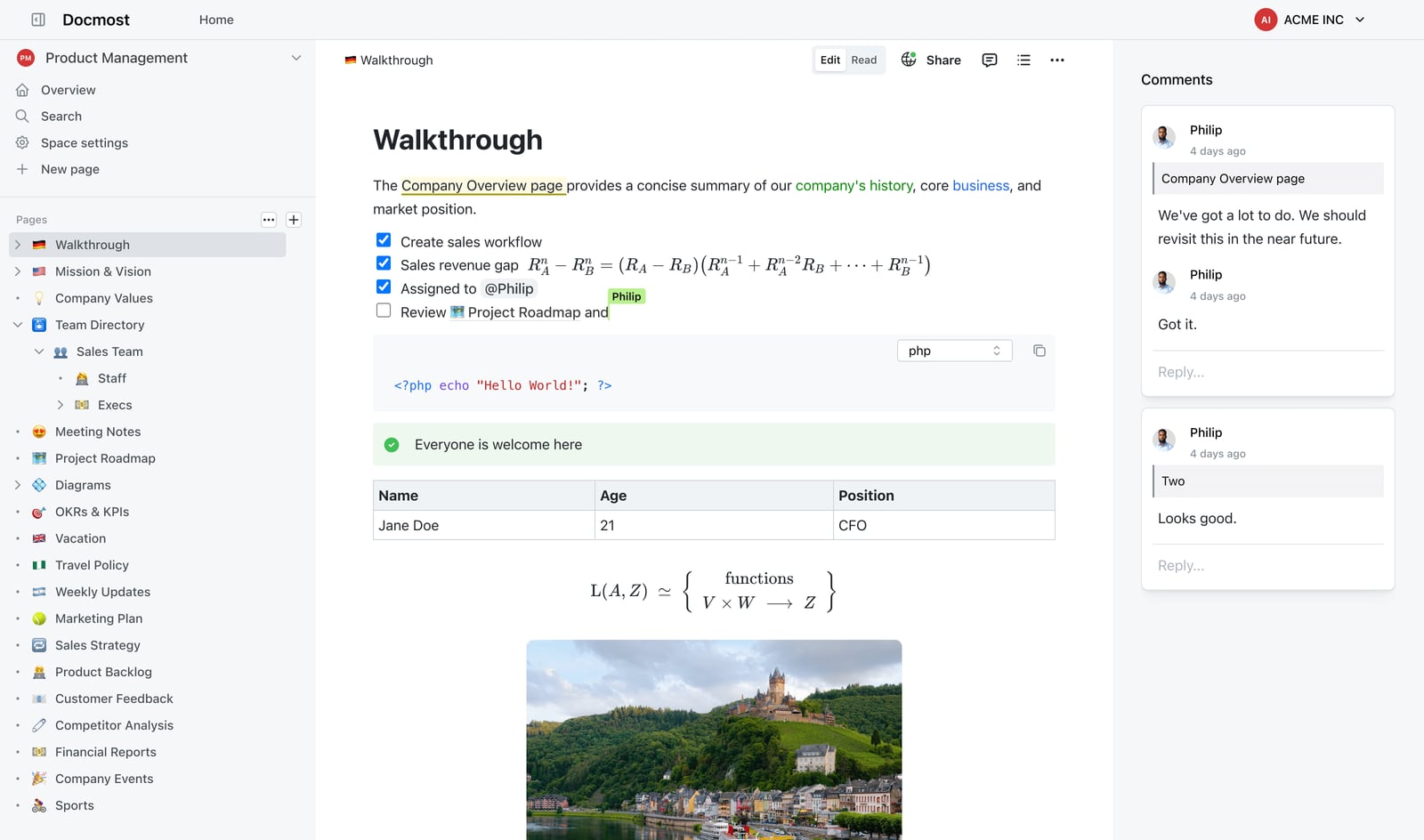
Docmost product interface.
HelpLook: AI-Powered Customer Self-Service Without Code
HelpLook is designed for businesses that want to launch a polished, public-facing knowledge base quickly. It combines a no-code content editor with AI search and chatbot features, so customers can find answers without opening a support ticket. The platform supports customer support portals, e-commerce product manuals, enterprise blogs, and internal knowledge bases.
Key strengths include:
- No-code setup with customizable site branding and SEO optimization
- AI-driven search and chatbot powered by integrations with OpenAI, ERNIE Bot, and Azure
- Built-in analytics to track article usage and customer behavior
- QR code access and PDF downloads for distributing content beyond the browser
- Free tier available, with paid plans scaling up to enterprise levels
HelpLook is positioned for teams that need a customer-facing knowledge base live in days, not weeks, and want AI features without building them from scratch.
KnowledgeBase: Fast Self-Service for Support Teams
KnowledgeBase is an AI-powered knowledge base software from Text, Inc., the company behind LiveChat, ChatBot, and HelpDesk. It is built specifically for customer support teams that want to reduce ticket volume and speed up agent response times.
Its standout capabilities include:
- AI-powered QuickAnswer that delivers instant, tailored responses to customers
- AI-generated articles, titles, and keywords to speed up content creation
- Customizable help centers for external and internal knowledge bases
- Native integrations with LiveChat, ChatBot, and HelpDesk for a connected support stack
- 14-day free trial with no credit card required
The value proposition is straightforward: fewer support tickets, faster agent responses, and a knowledge base that scales across multiple teams or products.
Docmost: Open-Source, Self-Hosted Enterprise Wiki
Docmost is an enterprise-ready collaborative wiki and documentation platform. It is open-source and self-hosted, which means your data stays on your own infrastructure. It is positioned as an alternative to Confluence and Notion for teams with strict security, compliance, or data residency requirements.
Notable features include:
- Real-time collaborative editing with support for LaTeX, tables, callouts, and diagramming tools like Drawio, Excalidraw, and Mermaid
- AI assistant with self-hosted LLM support, including Ollama, vLLM, and OpenAI
- RBAC permissions, page verification workflows, and team spaces for controlled collaboration
- SSO/SAML/OIDC/LDAP, MFA, audit logs, and SCIM provisioning for enterprise security
- Air-gapped deployment for organizations that cannot use cloud services
- Kanban boards and database views (Bases) for structured information management
Docmost has over 3 million downloads and is used by organizations such as Airbus, the Australian Government, the German Red Cross, and the University of Bern. It is built for teams where data control and compliance are non-negotiable.
Head-to-Head Comparison
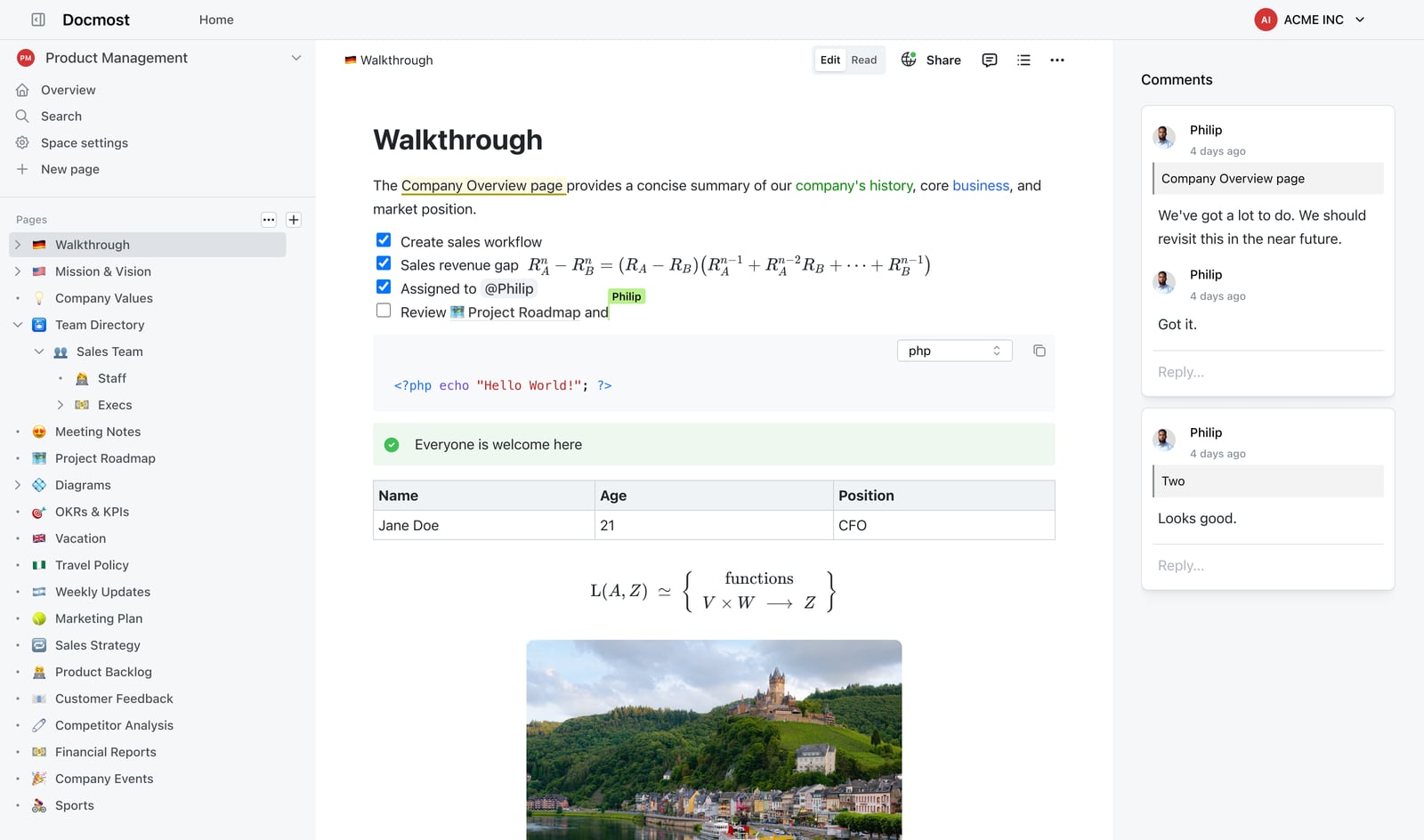
Powerful Editor.
Deployment and Data Control
This is the clearest dividing line between the three tools.
- Docmost is self-hosted and open-source. You deploy it on your own servers, keep full control of your data, and can modify the source code. It supports air-gapped environments and helps organizations meet ITAR, FedRAMP, GDPR, SOC 2, and ISO 27001 requirements.
- HelpLook is a cloud-based SaaS platform. You do not manage infrastructure, but you also do not control where your data lives. It is the right choice when speed to launch matters more than on-premises control.
- KnowledgeBase is also a cloud SaaS product, hosted by Text, Inc. It is designed for support teams that want a managed solution with minimal setup.
If your organization requires on-premises deployment or cannot use public cloud services, Docmost is the only option in this comparison that fits.
AI Capabilities
All three tools offer AI features, but they approach AI differently.
- KnowledgeBase focuses on customer-facing AI. QuickAnswer generates instant, tailored responses directly in the help center, reducing the need for customers to browse articles. AI also assists with generating article titles, keywords, and content.
- HelpLook combines AI search with chatbot functionality. It integrates with multiple AI models, including OpenAI, ERNIE Bot, and Azure, giving teams flexibility in which model powers their search and assistant features.
- Docmost takes a self-hosted approach to AI. Its AI assistant can connect to self-hosted LLMs via Ollama or vLLM, which is critical for organizations that cannot send data to third-party AI providers. It can answer questions across your knowledge base, translate pages, and generate summaries.
For support teams that want AI to deflect tickets immediately, KnowledgeBase and HelpLook are stronger fits. For security-conscious teams that still want AI, Docmost's self-hosted LLM support is a differentiator.
Content Creation and Editing
- HelpLook offers a no-code content creation interface. Non-technical users can build and publish articles, customize branding, and optimize pages for SEO without touching code.
- KnowledgeBase accelerates content production with AI-generated articles, titles, and keywords. Teams can create a knowledge base faster by letting AI draft initial content.
- Docmost provides a real-time collaborative editor with advanced formatting options. Multiple users can edit the same page simultaneously, and the editor supports LaTeX, tables, callouts, and embedded diagrams. This makes it well-suited for technical documentation and internal wikis.
Docmost's editor is the most powerful for complex, collaborative documentation. HelpLook and KnowledgeBase prioritize speed and simplicity for support content.
Integrations and Ecosystem
- KnowledgeBase has a clear advantage for teams already using Text products. It integrates natively with LiveChat, ChatBot, and HelpDesk, creating a unified support workflow.
- HelpLook offers third-party integrations and connects to multiple AI models. It is designed to fit into existing support stacks without requiring a specific ecosystem.
- Docmost integrates with authentication providers like LDAP, SAML 2.0, and OIDC. It also supports embedding content from Airtable, Loom, YouTube, and other tools. Its integration focus is on enterprise identity and content, not support ticketing.
Pricing and Accessibility
- HelpLook offers a free tier, with paid plans scaling to enterprise levels. AI credits and resources scale with the subscription.
- KnowledgeBase offers a 14-day free trial with no credit card required. Pricing is subscription-based through Text, Inc.
- Docmost is open-source, so the core software is free to self-host. The enterprise edition adds features like SSO, Confluence import, and high availability. You pay with infrastructure and maintenance effort rather than a per-seat SaaS fee.
For teams with a zero-budget start, HelpLook's free tier and Docmost's open-source core are both attractive. KnowledgeBase's trial lets you test the full experience before committing.
When to Choose Each Tool

KnowledgeBase product interface.
Choose HelpLook if:
- You need a customer-facing knowledge base live quickly without coding
- You want SEO-optimized public documentation with customizable branding
- You need AI search and chatbot features with flexible model choices
- You serve e-commerce customers or need QR code and PDF distribution
- You want a free tier to start and scale later
Choose KnowledgeBase if:
- Your primary goal is reducing support ticket volume
- You already use LiveChat, ChatBot, or HelpDesk
- You want AI to generate articles and answer customer questions instantly
- You need multiple knowledge bases for different products or audiences
- You want a support-focused tool rather than a general documentation platform
Choose Docmost if:
- You need self-hosted, on-premises deployment
- Your organization has strict compliance requirements like ITAR, FedRAMP, or GDPR
- You want open-source software with full data control
- You need real-time collaborative editing for technical documentation
- You are migrating from Confluence and want a comparable self-hosted alternative
A Practical Decision Framework
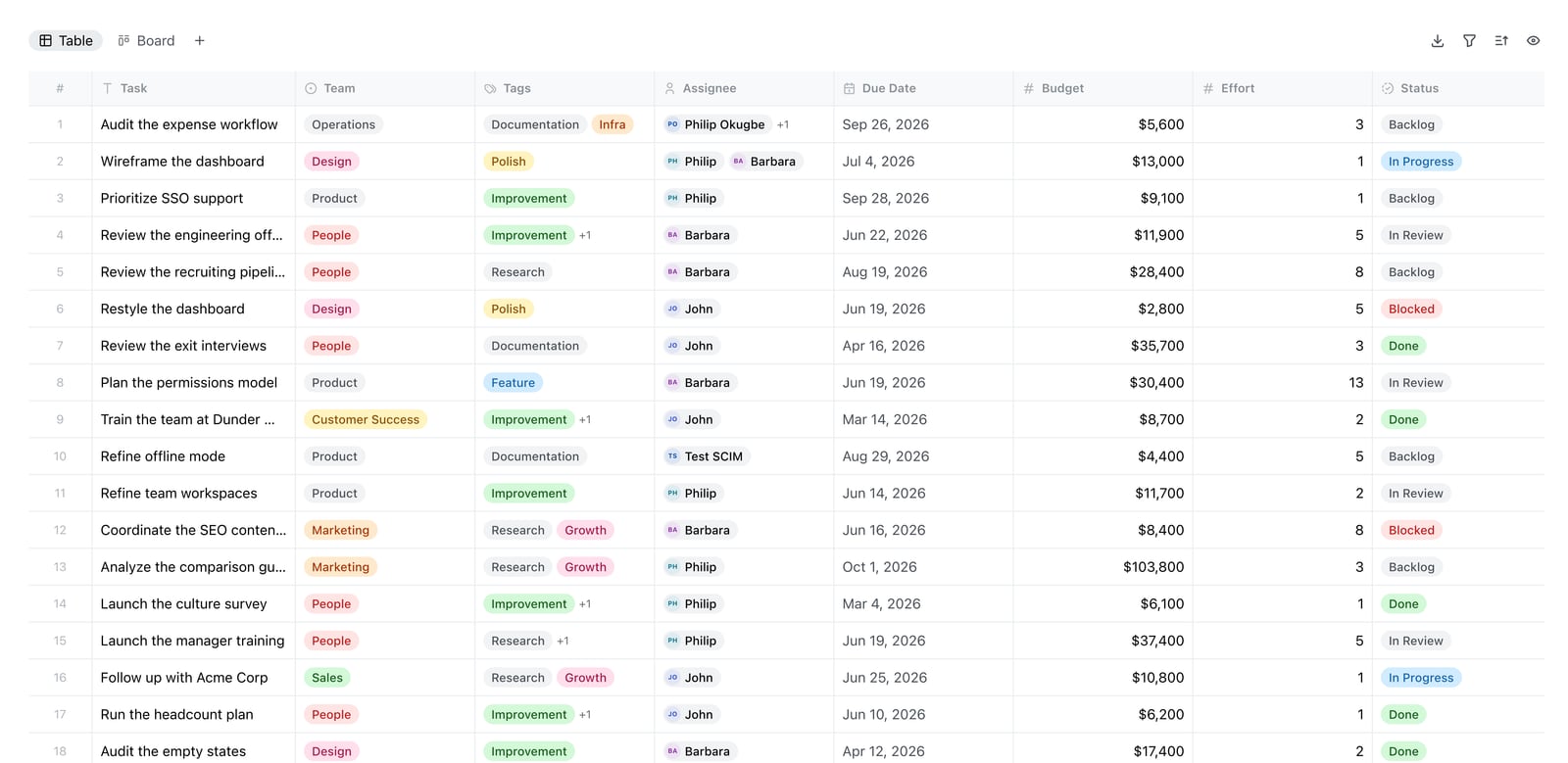
Docmost Bases table view.
Start with your deployment constraint. If you cannot use cloud software, Docmost is your answer. If cloud is fine, move to your primary use case.
For customer support teams, the choice between HelpLook and KnowledgeBase depends on your existing stack. If you already use LiveChat or ChatBot, KnowledgeBase integrates directly and creates a seamless support experience. If you need a standalone, SEO-optimized public knowledge base with flexible AI model options, HelpLook is a strong fit.
For internal documentation and wikis, Docmost is the clear winner in this comparison. Its real-time collaboration, diagramming support, and enterprise security features are built for that use case. HelpLook can support internal knowledge bases, but it is primarily designed for customer-facing content.
If you are comparing HelpLook against other AI knowledge base tools, see our HelpLook vs Document360 vs KnowledgeBase comparison or the HelpLook vs KnowledgeBase vs Stonly breakdown.
What About Open-Source Alternatives to Confluence?
Docmost is part of a broader movement toward open-source documentation tools. As Docmost's own analysis of Confluence alternatives explains, Atlassian ended support for Confluence Server in February 2024, pushing many organizations to seek self-hosted options. Docmost, Wiki.js, BookStack, MediaWiki, and XWiki all offer viable paths for teams that want to keep documentation on their own infrastructure.
For most support teams, a SaaS knowledge base like HelpLook or KnowledgeBase is simpler to operate. But for organizations with data sovereignty requirements, the open-source route is increasingly compelling.
Related reading
- HelpLook vs Documentation.AI vs Helpjuice: 2026 Comparison - Compare HelpLook, Documentation.AI, and Helpjuice on AI search, content creation, pricing, and ease of use. Find the best AI knowledge base for your team.
- HelpLook vs HelpCenter.io vs Mintlify: 2026 Comparison - Compare HelpLook, HelpCenter.io, and Mintlify on AI search, knowledge base features, pricing, and ease of use. Find the best fit for support, docs, or dev teams.
Sources and further reading
- 27 yo guy unable to get into programming - Reddit - Aug 20, 2025 ... For direct help look into one on one mentorship or even Codecademy. ... or something, and build from there your knowledge base. Knowledge ...
- How to grow my SaaS company from $1.5M in yearly revenue to $4 ... - Aug 30, 2014 ... Do most enterprise software/SaaS companies "smile and dial"? I'm new ... Lean in to partners to help. Look at channel partnerships.
Frequently Asked Questions
Is Docmost free to use?
Yes. Docmost is open-source, so the core software is free to self-host. The enterprise edition adds features like SSO, Confluence import, and high availability for organizations that need them.
Does HelpLook offer a free plan?
Yes. HelpLook offers a free tier, with paid plans available for teams that need more AI credits, storage, or advanced features.
Can KnowledgeBase work without LiveChat or ChatBot?
Yes. KnowledgeBase works as a standalone knowledge base. However, its native integrations with LiveChat, ChatBot, and HelpDesk provide additional value if you already use those tools.
Which tool is best for a customer support team?
KnowledgeBase and HelpLook are both strong choices. KnowledgeBase is optimized for ticket deflection and integrates with the Text support ecosystem. HelpLook offers more flexibility in AI model selection and is designed for public-facing, SEO-optimized knowledge bases.
Can Docmost handle customer-facing documentation?
Docmost supports public sharing, so you can publish pages externally. However, it is primarily designed for internal wikis, project documentation, and compliance-focused knowledge management. HelpLook and KnowledgeBase are purpose-built for customer self-service.
Which tool requires the least technical expertise?
HelpLook and KnowledgeBase are both no-code SaaS platforms. Docmost requires technical knowledge to deploy and maintain, especially for self-hosted installations.
The Bottom Line
HelpLook, KnowledgeBase, and Docmost serve three distinct needs. HelpLook is the fastest path to a polished, AI-powered customer knowledge base. KnowledgeBase is the best fit for support teams that want AI-driven ticket deflection within the Text ecosystem. Docmost is the only choice for organizations that need open-source, self-hosted documentation with enterprise-grade security.
If you are still weighing options, explore our HelpLook vs Documentation.AI vs Archbee comparison for more AI knowledge base alternatives, or check the HelpLook vs GitBook vs Zendesk breakdown if you are considering a broader support or documentation stack.