
HappyFox Review 2026: An AI Help Desk for Organized Support Teams
HappyFox is a help desk and customer support platform that has been around since 2012 and now markets itself as an AI-powered suite for customer and employee support. In this review, I look at what HappyFox actually does well, where it falls short, and which teams should shortlist it. The short version: HappyFox is a solid, well-organized ticketing system with a capable knowledge base and growing AI add-ons, but its pricing and add-on model mean you need to calculate total cost carefully before committing.
What HappyFox is and who it is for

HappyFox product interface.
HappyFox is primarily a ticketing hub. It collects requests from email, web forms, social media, and phone into a single queue, then routes them using categories, custom fields, and automation rules. Around that core, it offers a self-service knowledge base (called Support Center), reporting, task management, and a set of AI features sold as add-ons or separate products.
The product line has expanded beyond the classic Help Desk. HappyFox now offers Service Desk for IT service management, Assist AI, Chatbot, Live Chat, CRM, Workflows, Business Intelligence, and an AI Contact Center. That breadth matters because it means HappyFox can serve customer support, IT, and internal HR or facilities teams from one vendor — but it also means the pricing conversation is more complex than a single per-agent rate.
Ideal users, based on the evidence, include:
- Small to midsize customer support teams that want a clean, configurable ticketing system without a heavy implementation project.
- IT service management teams that need asset management, SLA tracking, and audit-friendly administration.
- Internal support teams in HR, facilities, or operations that handle employee requests through forms and categories.
- Organizations in regulated or structured industries such as education and healthcare, where audit logs, two-factor authentication, and role-based permissions matter.
If you are a solo founder or a two-person team looking for the cheapest possible inbox, HappyFox is probably more structure than you need. If you are a 10–200 agent support organization that wants ticket discipline and a knowledge base, it is worth a serious look.
Core features that stand out
Omnichannel ticketing and organization
HappyFox does the fundamentals well. Tickets from email, social media, and the support center land in one place, and the ticket list is easy to scan with color-coded status labels, priority, assignee, and category visible at a glance. You can switch to a kanban view if that fits your workflow better.
Categories are the backbone of organization. You can map a dedicated email address to each category so that messages sent to billing@ or it-support@ automatically become tickets in the right queue. Custom fields let you build intake forms that capture the information agents need up front — for example, a dropdown for product line or issue type — which reduces back-and-forth.
Smart Rules automation
Smart Rules are HappyFox's automation engine. You define conditions and actions: if a ticket contains a certain phrase, assign it to a specific team; if a ticket goes unanswered for a set period, remind the agent; if a priority is set to urgent, notify a manager. This is standard help desk functionality, but HappyFox implements it in a way that is approachable for non-technical administrators.
Knowledge base and self-service
The Support Center is a branded knowledge base where you publish articles and let customers search for answers before submitting a ticket. You control the domain, colors, and layout. For teams that want to deflect common questions, this is a meaningful feature, and it pairs with the AI Copilot add-on, which connects customers and agents to knowledge base content.
AI features: useful but add-on priced
HappyFox has added a layer of AI capabilities, including ticket summarization, AI agents, a chatbot, AI Resolve, AI Insights, and quality assurance. These are genuinely useful for reducing repetitive work and surfacing trends, but they are not all included in the base plans. Reviewers consistently note that the AI Copilot and chatbot add-ons can quickly increase subscription costs. Budget for them explicitly rather than assuming they are part of the per-agent price.
Administration, security, and reporting
The admin area is clearly labeled, with sections for general account settings, permissions and access, and ticket management preferences. HappyFox supports two-factor authentication, single sign-on, audit logs, IP-based agent restrictions on higher tiers, and password policy management. Reporting covers response times, ticket trends, and agent workload. For IT teams, asset management links tickets to devices, which is helpful for hardware support workflows.
Pricing signals: what you will actually pay
First viewport screenshot of www.happyfox.com.
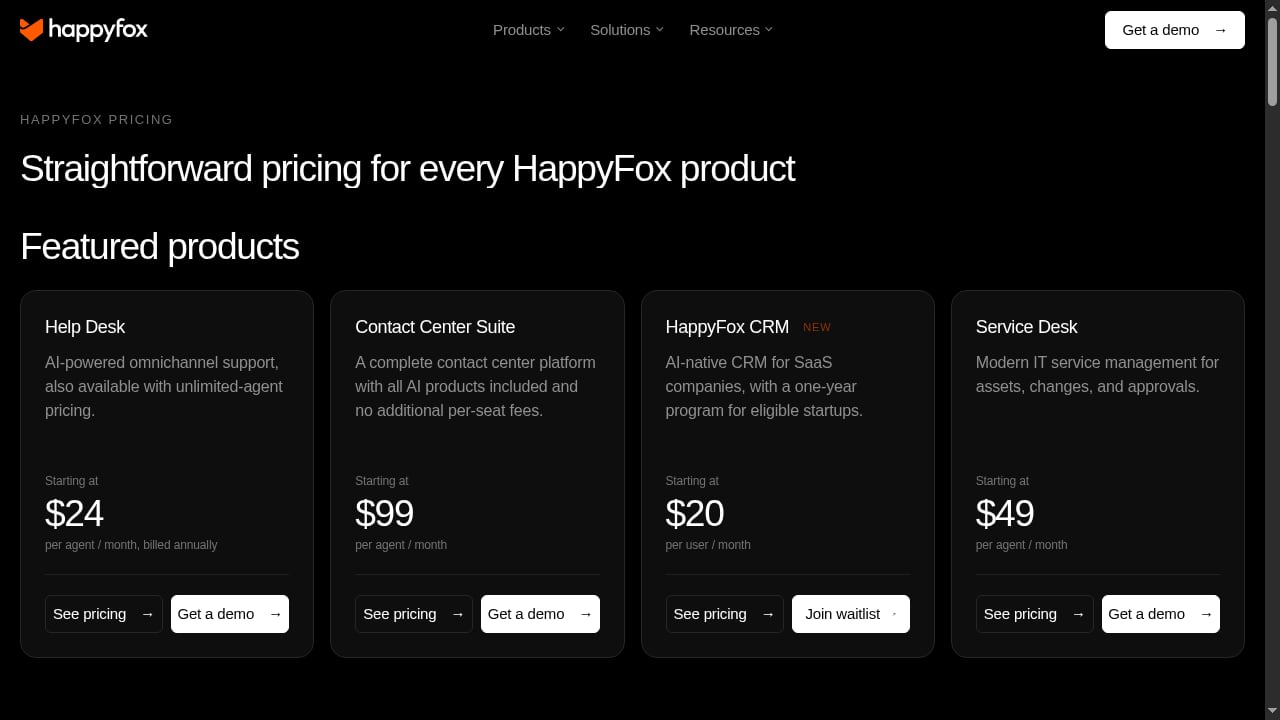
HappyFox uses per-agent subscription pricing with monthly and annual billing, plus volume discounts and add-ons. Based on published review data, the Help Desk tiers look roughly like this:
- Basic: around $29 per agent per month, capped at five agents, with unlimited tickets, knowledge base, omnichannel ticketing, SLA management, and SSO.
- Teams: around $69 per agent per month, removing the agent cap and adding custom domain, custom email, and custom roles and permissions.
- Pro: around $119 per agent per month, adding 24/7 email support, asset management, IP-based agent restrictions, load-balanced assignment, agent collision detection, scheduled tickets, and task management.
Longer commitments reduce the per-agent rate significantly — for example, a two-year prepay can bring the Basic tier to around $21 per agent per month and the Teams tier to around $39. HappyFox also offers unlimited-agent plans starting around $1,600 per month with a two-year commitment, though those plans limit ticket volume and custom fields, so they are not a universal cost saver.
Two cost signals deserve emphasis. First, HappyFox is not the cheapest per-seat option; competitors like Zoho Desk start much lower, while Freshdesk Omni sits at a similar entry price. Second, AI, chatbot, and live chat are add-ons even on the top Help Desk tier, so your real cost per agent can be materially higher than the list price. HappyFox does offer free white-glove migration with annual Help Desk subscriptions and a startup program that includes free CRM for a year, which can offset initial costs.
Setup and onboarding experience
HappyFox requires you to schedule a demo before you can try it, which is a sales-led motion rather than a self-serve signup. Once you are in, setup is straightforward: enter basic business details, invite agents by pasting email addresses, and start configuring categories and forms. One quirk noted by reviewers is that when you import multiple agents at once, you can assign only one role per batch, so you need separate imports for agents and managers.
The dashboard surfaces the most important tasks — adding agents, setting up categories, pending tickets, and your assigned tickets — along with a link to HappyFox University tutorials. You can book a session with a HappyFox professional during trial setup if you want help. Support is available via 24/7 live chat and ticketing, with 24/7 email support on the Pro tier.
A realistic onboarding sequence looks like this:
- Map your support categories to email addresses and teams.
- Build custom fields for your most common intake forms.
- Configure Smart Rules for assignment, escalation, and reminders.
- Seed the knowledge base with your top 20 recurring questions.
- Set SLAs and reporting dashboards before go-live.
- Train agents on the ticket view, private notes, and canned responses.
If you are comparing setup effort across platforms, our Top 10 AI Customer Support Automation Platforms 2026 breaks down automation depth and ease of setup side by side.
Strengths and limitations
Strengths
- Clean, intuitive interface that reviewers repeatedly praise for ease of use.
- Strong ticket organization through categories, custom fields, and Smart Rules.
- Branded knowledge base with self-service and AI Copilot integration.
- Broad product suite covering help desk, IT service management, live chat, chatbot, CRM, and business intelligence.
- Solid administration and security features, including audit logs, 2FA, SSO, and role-based permissions.
- Free white-glove migration on annual Help Desk plans.
Limitations
- AI, chatbot, and live chat are add-ons, which can push total cost well above the headline per-agent rate.
- Per-agent pricing is higher than some competitors at the entry level.
- No self-serve trial; you must book a demo first.
- Bulk agent import assigns only one role per batch.
- Social media support is narrower than some competitors, and the interface icons may not be immediately intuitive to new users.
- For pure IT service management, a dedicated Service Desk product may be a better fit than stretching the Help Desk tier.
How HappyFox compares to alternatives
First viewport screenshot of www.happyfox.com.
HappyFox's closest competitors are Freshdesk, Zoho Desk, and, for IT use cases, Freshservice and HaloITSM. Freshdesk Omni is often cited as more intuitive with broader social media support, and it holds an Editors' Choice distinction in independent reviews. Zoho Desk wins on entry-level price. HappyFox's advantage is a well-structured ticketing core with a knowledge base that is genuinely usable, plus a suite that can grow into IT and internal support without switching vendors.
If your priority is an AI knowledge base rather than a full help desk, a lighter tool may be a better fit. Our comparison of HelpLook vs SAAS First: AI Knowledge Base or Help Desk? is useful for teams deciding whether they need a knowledge-first tool or a ticketing-first platform. For a broader view of knowledge base options, see Top 10 AI Documentation & Knowledge Base Platforms 2026.
Decision criteria: should you choose HappyFox?

HappyFox product interface.
Choose HappyFox if:
- You want a configurable ticketing system with strong categories, custom fields, and automation rules.
- You need a branded self-service knowledge base alongside ticketing.
- You plan to use the same vendor for customer support and internal IT or HR support.
- You value administration controls such as audit logs, SSO, 2FA, and role-based permissions.
- You are willing to commit annually or multi-year to get better per-agent pricing and free migration.
Look elsewhere if:
- You need the lowest possible per-agent cost at the entry level.
- AI, chatbot, and live chat are must-haves and your budget is tight — the add-on costs will matter.
- You want a fully self-serve trial without a sales conversation.
- Your support is primarily social media based and you need the broadest channel coverage.
Related reading
- How to Use HelpLook with eesel AI: Setup & Workflow - Learn how to connect HelpLook's AI knowledge base with eesel AI to automate ticket replies, improve accuracy, and scale support without adding headcount.
- HelpLook vs Chatbase vs Document360: 2026 Comparison - Compare HelpLook, Chatbase, and Document360 for AI knowledge bases, chatbots, and help centers. See strengths, tradeoffs, and which fits your team.
FAQ
Is HappyFox good for small businesses? Yes, particularly for teams of up to five agents on the Basic plan, which includes unlimited tickets, knowledge base, omnichannel ticketing, SLA management, and SSO. Larger teams should compare the Teams and Pro tiers against per-agent pricing from competitors.
Does HappyFox include AI features in its base price? Not entirely. AI Copilot, chatbot, and live chat are add-ons, and AI capabilities such as ticket summarization, AI agents, AI Resolve, AI Insights, and quality assurance are part of the broader HappyFox AI offering. Budget for them separately.
How much does HappyFox cost? Published review data puts Help Desk at roughly $29 per agent per month for Basic, $69 for Teams, and $119 for Pro, with discounts for two-year prepayment. Unlimited-agent plans start around $1,600 per month with a two-year commitment.
Can I try HappyFox before buying? You need to schedule a demo with a HappyFox representative to try it out. During trial setup, you can book time with a HappyFox professional for help.
Is HappyFox suitable for IT service management? Yes, but consider HappyFox Service Desk rather than the top Help Desk tier. Service Desk is designed for IT use cases, while Help Desk is primarily customer-facing. Asset management and task management are available on higher tiers.
Does HappyFox offer free migration? Yes, free white-glove migration is included with annual Help Desk subscriptions.
Conclusion
HappyFox is a well-built help desk that earns its reputation for organized ticket management and an approachable interface. Its knowledge base, Smart Rules automation, and administration controls make it a credible choice for customer support, IT, and internal support teams. The caveats are real: per-agent pricing is mid-to-high, AI and chat are add-ons, and there is no self-serve trial. If you go in with a clear total-cost calculation and a defined onboarding plan, HappyFox is a dependable platform that can scale from a small support team to a multi-department service organization.
For a broader market view before you decide, see our Top 10 AI Customer Support Automation Platforms 2026 and the Chatbase Review 2026 if you are weighing AI-first alternatives.
Sources: PCMag HappyFox review, Gartner Peer Insights HappyFox, G2 HappyFox Help Desk reviews.